
TL;DR
Smart home device bundles group connected products such as lights, plugs, sensors, cameras, or a hub into one package, sometimes for less than buying them individually. Before you buy, check ecosystem compatibility, hub requirements, subscriptions, privacy, and whether the included devices solve a specific household problem. A smaller bundle that works reliably is usually a better buy than a larger box full of gear you will not use.
A box of six smart devices can look like a shortcut to a smarter home. Then you open it and discover you already own the hub, the camera needs a monthly plan, and one sensor refuses to appear in the app you use every day.

Get the latest gadgets delivered free with Prime
- Fast, free delivery on millions of items
- Prime Video, Amazon Music and more included
- Member-only deals all year
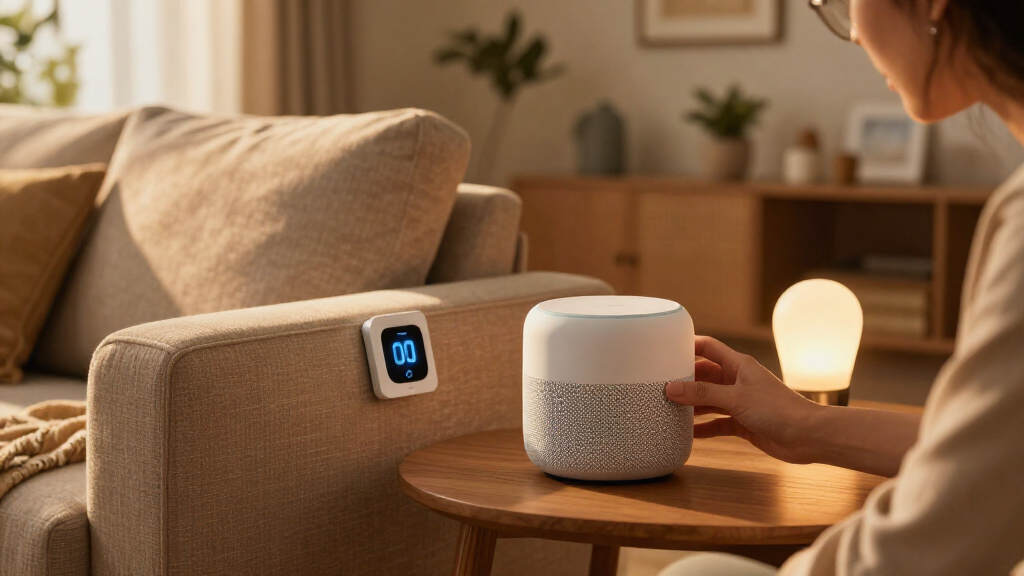
Smart home device bundles can make setup simpler and lower the combined price, but only when the products match your home and your habits. A bundle groups two or more connected devices—often a hub, speaker, lights, plugs, sensors, cameras, or thermostat—into one package. The box is convenient; the fine print decides whether it is a good deal.
This guide shows you how to check compatibility, compare the real cost, and choose a bundle around a specific goal. You will also learn what Matter, Thread, subscriptions, and privacy policies mean for the devices you bring home.
Choose a bundle around one clear household goal, not the number of products in the box.
Check the exact device model, app compatibility, and hub or Thread border router requirements.
Compare the package price with individual device costs, required equipment, and recurring subscriptions.
Check wireless coverage and installation needs at the devices’ intended locations.
Review camera data practices, security updates, multifactor authentication, and offline features before purchase.
Choose a bundle that fixes one everyday annoyance
Smart home device bundles are packages of connected products meant to work together, often at a lower combined price than buying each item separately. Their value, though, depends less on the number of devices than on whether they remove a recurring friction point. A bundle that makes a hallway safer after dark can improve daily life; one with several features you rarely use adds setup and maintenance without a comparable benefit.
Think about a renter who comes home with grocery bags after sunset. A starter lighting bundle with a smart plug or motion sensor may switch on a lamp before they reach the sofa. That small, repeatable win can feel more useful than a large package containing a camera, thermostat, and sensors they have no plan to install. The smaller set is also easier to test: if the sensor misses motion or the lamp responds slowly, there are fewer components to troubleshoot.
Most packages fall into a few practical groups. A lighting bundle may include bulbs and a bridge; a security set could pair door and motion sensors with a siren; a climate package might combine a thermostat and room sensors. Some bundles group two or more connected products, often a hub or a thermostat, into a package, so read the full contents rather than relying on the picture on the box. Included devices may be designed to complement each other, but that does not mean every item is necessary for your goal.
Start with a sentence about your goal: “I want the porch light to turn on when someone approaches,” or “I want the heat to drop when we leave.” Then identify the minimum devices and features needed to make that happen. If you cannot name the problem a device solves, leave it out for now. You can add more after the first devices prove reliable—and avoid paying upfront for complexity you may never use.
Products Worth Considering
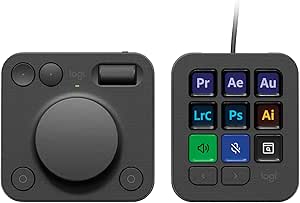
Logitech MX Creative Console with 9 Customizable Keys, Graphite

Bose SoundTouch 30 Wireless Speaker, Black

Anker SOLIX C300 Portable Power Station, 288Wh
As an affiliate, we earn on qualifying purchases.
Check compatibility before you pay for the box
Smart home device bundles work best when every device supports your chosen ecosystem and the features you actually plan to use. Check the exact model against Apple Home, Amazon Alexa, or Google Home, and confirm whether it needs a hub, bridge, or Thread border router before you buy. Compatibility is not just about whether a device appears in an app: it determines whether you can build the routine that makes the device useful and whether you will need to manage it in several apps.
The wireless connection matters. Wi-Fi devices usually connect directly to your home network; Zigbee and Z-Wave devices generally need a compatible hub; and Thread devices need a suitable Thread border router to reach the network. That router may be built into another device you already own, but do not assume it is. A bundle that includes a hub can be helpful—or an unnecessary duplicate sitting beside your router. A hub can also be the bridge that lets low-power accessories communicate reliably, so buying a bundle without one may mean extra cost or a system that cannot work as advertised.
Matter is a smart-home standard designed to improve compatibility across brands and platforms. Support can make it easier to add products from different makers, but it does not mean every feature behaves identically in every app. For example, a Matter-supported bulb might offer basic switching across platforms while a maker’s app keeps advanced color scenes or scheduling tools. This creates a practical tradeoff: using one preferred platform may make everyday controls simpler, while using the manufacturer’s app may be necessary for more specialized settings.
Before checkout, look up the model number and confirm the supported features in your preferred app. Imagine adding a motion sensor that appears in Alexa but cannot trigger the lighting routine you wanted. The brand name alone cannot prevent that mismatch; the precise model and its documented integrations can. If a feature is essential, verify it in the platform’s compatibility details rather than assuming that general support includes it.
Compare the full price, not just the discount sticker
A smart home bundle is a real bargain only when its package price beats the cost of the devices you need, after you add required equipment and ongoing fees. Compare current individual prices, then count any hub, bridge, batteries, installation, or subscription costs that the headline price leaves out. This shifts the comparison from “How much am I saving?” to “What will it cost to get the result I want?”—a more useful question when a bundle includes items you would not otherwise buy.
Use this simple comparison before you buy:
| Cost to check | Question to ask | Example |
|---|---|---|
| Bundle price | What exactly is included? | Three bulbs and a bridge |
| Separate device prices | Would buying only two items cost less? | Two bulbs may meet your need |
| Extra equipment | Do you need a hub or router? | A Zigbee hub may be required |
| Recurring fees | Are key features subscription-only? | Video history may need a plan |
For instance, a security package might look cheaper than buying its sensors separately, but cloud video storage or professional monitoring could add a recurring fee. If the bundle includes a free trial, check when it ends and what stops working afterward. A feature that becomes unavailable may change how useful the entire system is, while a subscription that continues may cost more over time than the initial discount saved. The right comparison is the cost of using the functions you want, not the number printed in a promotional badge.
Also ask whether every item will earn its shelf space. If a four-bulb set saves a little but your apartment needs only two bulbs, unused devices are not savings. They tie up money and may sit unused before you need them—or become an excuse to install devices without a clear purpose. A modest discount on equipment you will install is better than a dramatic discount on extras you will leave in a drawer.
Pick the right wireless setup for your rooms
A bundle can only be dependable if its wireless signals reach the places where you will use the devices. Wi-Fi coverage, walls, floors, metal surfaces, and device placement all affect performance, so match the bundle’s network needs to your actual home rather than the floor plan in a product listing. A device can pair successfully near the router during setup and still be unreliable in the room where it needs to work.
Picture a motion sensor in a basement hallway and a hub on the second floor. Thick walls or a distant corner may interrupt communication, even though both devices pair successfully during setup. The result could be a delayed light or a missed alert—the exact failure that undermines trust in the routine. If your Wi-Fi already struggles to reach a back bedroom, adding several Wi-Fi cameras may make the weak spot more noticeable, especially if they send video over the same network.
Thread uses a low-power mesh network, and Zigbee devices can also relay signals in many setups, but the benefit depends on compatible equipment and placement. A Thread device still needs a suitable border router; a Zigbee device usually needs its matching hub. Mesh networking may extend reach as you add compatible devices, but it is not an automatic fix for every dead zone: the network needs participating devices in useful locations, and a powered bulb that can relay signals may behave differently from a battery-powered sensor that cannot.
Before choosing, walk the home and name each device’s intended location. Check whether a camera is rated for outdoor use, whether a sensor needs a battery, and whether a hardwired thermostat fits your existing wiring. For a large home, you may need better Wi-Fi coverage or additional compatible network equipment; for a small rental, a few wireless lights and plugs may be enough. Planning placement first helps you avoid buying equipment that works only in the easiest-to-reach room or paying for network upgrades your actual setup does not need.
Read privacy and subscription terms before adding cameras
Smart home device bundles can collect information about when you are home, which rooms you use, and what a camera or microphone captures. Before buying, check what data the company collects, where it stores it, who can access it, and how long the product will receive security updates. These details matter because connected devices can reveal routines even when you are not actively using them, and a product’s privacy and security practices can affect your household for as long as it remains connected.
A camera bundle illustrates the tradeoff. You may get live viewing and motion alerts without a paid plan, while recorded clips, longer video history, or advanced alerts may require a subscription. A trial can make the package feel complete on day one, so check what features remain after the trial ends and include that fee in your cost comparison. If recording is the main reason you want the camera, losing access to stored clips without a plan may make a seemingly affordable device a poor fit.
Place cameras thoughtfully: point them toward the doorway or driveway, not a neighbor’s window or a private indoor space. Use a strong, unique account password and turn on multifactor authentication when available. These steps help protect access to the account, though they cannot replace good product security or a manufacturer that keeps issuing updates. Think of account safeguards and manufacturer support as complementary: one reduces the chance of unauthorized access to your account, while the other helps address vulnerabilities in the device and its software.
Also consider local control. Some devices can perform selected tasks within your home without relying entirely on cloud services; others depend on an internet connection for core features. That difference matters when an outage hits during a storm. Check the product’s support policy and what still works offline, rather than treating “smart” as a promise of permanent service. A cloud-dependent device may offer convenient remote access and video history, but local functions can be more resilient during an outage; decide which tradeoff fits the way you plan to use it.
Set up a small bundle in the right order
To set up a smart home device bundle smoothly, confirm the network and app first, then add the hub and devices one at a time. This order makes it easier to spot a pairing issue before it turns into a pile of blinking lights and confusing error messages. It also gives you a chance to verify that the essential routine works before investing time in optional features.
- Confirm the goal and contents. Check every device, power adapter, battery, and mounting part against the package list. Decide where each item will go. This prevents a missing accessory or a poor placement choice from becoming a problem after installation.
- Check ecosystem and network needs. Confirm your app, Wi-Fi band if specified, hub, and Thread border router requirements before opening every box. Knowing what the system depends on helps distinguish a compatibility issue from a weak signal later.
- Update the hub or main controller. Connect it where it has a strong signal and install available software updates before pairing accessories. An updated controller is less likely to introduce avoidable setup problems, and its location can affect the reliability of devices that communicate through it.
- Add devices one at a time. Give each product a clear room name, such as “Hallway motion sensor,” so future routines make sense. Testing each addition separately makes it easier to identify which device needs attention.
- Test the routine and the fallback. Try the light or alert in normal use, then check what still works if the internet drops. A routine that works only under ideal conditions may not be dependable when you need it most.
For example, if a door sensor should turn on the entry light, first test the sensor in its app, then build the automation, then walk through the door as you would at night. If the routine fails, you will know which link to check instead of guessing whether the sensor, hub, app, or lamp caused the problem. Testing the real sequence also reveals practical issues—a light that turns on too late or an alert that arrives only after you have left the room—that a successful pairing screen cannot show.
Keep the first setup small. Once the routine works for a week, expand the system if you still see a real need. That patient approach is less exciting than opening every box at once, but it saves time and makes troubleshooting far easier. It also gives you a chance to learn how the devices behave in your home before adding more equipment that may depend on the same network or app.
Frequently Asked Questions
What is included in a smart home bundle?
Contents vary: a package may include bulbs, plugs, sensors, a camera, a hub, or accessories such as batteries and mounting hardware. Check the exact product list and confirm whether a required bridge or hub is included.
Are smart home bundles cheaper than buying devices separately?
Sometimes, but not always. Compare the bundle with the current price of the specific devices you need, then add any required hub, installation, batteries, or subscription fees.
Will a bundle work with Alexa, Google Home, or Apple Home?
That depends on the exact model and which features you want to use. Check the manufacturer’s compatibility information for your preferred platform; brand-level compatibility does not guarantee every automation or feature works in every app.
Does Matter compatibility mean all devices work the same way?
No. Matter is designed to improve communication across smart-home platforms, but supported features can differ by device, app, and ecosystem. Confirm that the specific controls and automations you want are available.
Do smart home bundles always need a hub?
No. Some devices connect directly to Wi-Fi, while Zigbee and Z-Wave devices generally need a compatible hub. Thread devices require a suitable Thread border router, which may already be built into another device in your home.
Can I mix brands in one smart home?
Often, yes, but the experience depends on each product’s compatibility and the platform you use to manage it. Check model-specific support and test a small setup before buying a large set of mixed-brand devices.
Do security camera bundles require a subscription?
Some basic functions may work without a plan, while cloud recording, extended video history, professional monitoring, or advanced alerts may cost extra. Check what remains available after any included trial ends.
Will my smart home bundle work if the internet goes down?
It depends on the devices and how their features work. Local controls may continue to function, while remote access or cloud-dependent features may stop; check the product documentation for its offline behavior.
Conclusion
Buy the smallest smart home bundle that solves a problem you can name, works with the devices you already own, and stays affordable after subscriptions and extra hardware. Check the model numbers, network requirements, and included features before you trust the discount sticker.
A good setup should fade into the background: a hallway light clicks on, the thermostat eases back, and your home feels a little easier to live in. Start with one useful routine, then let your experience—not the size of the box—guide what comes next.