Among these mechanical gaming keyboards, I rank the ASUS ROG Strix Scope II as the best overall for buyers seeking a gaming-first wired board, while the AULA F75 Pro stands out for wireless flexibility and hot-swappable switches. The AULA WIN68 HE and WIN60 HE are the picks for compact layouts and Hall effect controls, while the Redragon K671 offers a simpler entry point with hot-swappable red switches. The main tradeoffs are compactness versus dedicated keys, wired simplicity versus wireless freedom, and standard mechanical switches versus Hall effect designs. Extra displays, macro keys, and RGB can be useful, but they should not outweigh layout comfort or switch preference. Read on for the full breakdown, buying advice, and recommendations by gaming setup.

Get the latest gadgets delivered free with Prime
- Fast, free delivery on millions of items
- Prime Video, Amazon Music and more included
- Member-only deals all year
Complete the kit



Key Takeaways
- The ASUS ROG Strix Scope II is the best overall fit for a wired gaming setup, while the AULA F75 Pro is a stronger match if wireless use and switch swapping matter more.
- The AULA WIN68 HE and WIN60 HE prioritize compact gaming with Hall effect magnetic switches; their smaller layouts mean more reliance on key combinations and a separate mouse or number pad.
- The lineup divides between practical controls and display-led extras: the Redragon K580 adds macro keys and a media wheel, while the Womier SK80 and SteelSeries Apex 5 include display features.
- Hot-swappable switches appear on the AULA F75 Pro and Redragon K671, giving buyers more scope to change the typing feel than on boards with fixed switch configurations.
- Layout is a more meaningful separator than lighting alone: full-size and 98-key options retain more keys, while 75%, 68-key, and 60% boards save desk space at the cost of direct access.
| Logitech G413 SE Full-Size Mechanical Gaming Keyboard |  | Best for a Straightforward Full-Size Setup | Layout: Full-size QWERTY | Number of keys: 108 | Switch type: Tactile mechanical | VIEW LATEST PRICE | See Our Full Breakdown |
| AULA WIN68 HE 68-Key Compact Gaming Keyboard |  | Best Compact Pick with Arrow Keys | Key count: 68 | Layout: Compact QWERTY with arrow keys | Switch type: Hall Effect magnetic linear | VIEW LATEST PRICE | See Our Full Breakdown |
| Aula WIN60 HE 60% Mechanical Gaming Keyboard with Hall Effect Magnetic Switches | 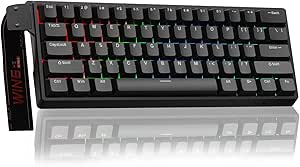 | Best for Competitive FPS Players | Form factor: 60% compact | Key count: 61 | Switch type: Hall Effect magnetic, Graywood V3 | VIEW LATEST PRICE | See Our Full Breakdown |
| Redragon K580 Wired RGB Mechanical Gaming Keyboard with Macro Keys and Media Wheel |  | Best for Clicky Switch Customization | Layout: QWERTY, 104 keys | Switches: Outemu Blue, clicky and hot-swappable | Connectivity: Wired USB-C | VIEW LATEST PRICE | See Our Full Breakdown |
| Razer BlackWidow V4 X Mechanical Gaming Keyboard with Yellow Switches |  | Best for Quiet, Fast Full-Size Gaming | Layout: QWERTY, 104 keys | Switch type: Linear Yellow | Actuation point: 1.2 mm | VIEW LATEST PRICE | See Our Full Breakdown |
| Womier SK80 75% Mechanical Gaming Keyboard with Multimedia Display |  | Best for a Customizable Desk Setup | Layout: 75% QWERTY, 82 keys | Switches: Linear, hot-swappable 3-pin and 5-pin | Mount: Gasket mount with EVA filling | VIEW LATEST PRICE | See Our Full Breakdown |
| Logitech G316 X 98 Mechanical Gaming Keyboard, Linear Switches, Black |  | Best for a Compact Layout with a Numpad | Layout: 98% QWERTY, 96 buttons | Switches: Linear, hot-swappable mechanical | Connectivity: Wired USB-A and USB-C | VIEW LATEST PRICE | See Our Full Breakdown |
| AULA F75 Pro 75% Wireless Hot-Swappable Mechanical Keyboard |  | Best for Wireless Multi-Device Gaming | Layout: 75%, 81 keys, QWERTZ | Connectivity: Bluetooth 5.0, 2.4 GHz wireless, and USB-C | Multi-device support: Up to 5 devices | VIEW LATEST PRICE | See Our Full Breakdown |
| Redragon K671 Wired Mechanical Gaming Keyboard with Hot-Swappable Red Switches |  | Best Straightforward Full-Size Pick | Layout: Full-size QWERTY, 104 keys | Switches: Linear red, hot-swappable | Connectivity: Wired | VIEW LATEST PRICE | See Our Full Breakdown |
| SteelSeries Apex 5 Hybrid Mechanical Gaming Keyboard with OLED Display and RGB Lighting |  | Best for Tactile, Clicky Feedback | Layout: Full-size AZERTY, 104 keys | Switches: Hybrid blue, tactile and clicky | Switch lifespan: Rated for 20 million keypresses | VIEW LATEST PRICE | See Our Full Breakdown |
| ASUS ROG Strix Scope II X Wired Mechanical Gaming Keyboard |  | Best Full-Size for Switch Customization | Layout: 100% full-size, 104 keys | Switches: ROG NX Snow V2 linear, pre-lubed and hot-swappable | Connectivity: Wired USB-C to USB-A | VIEW LATEST PRICE | See Our Full Breakdown |
| mechanical gaming keyboard | Layout | Connectivity | Backlighting | Keycaps |
|---|---|---|---|---|
| Logitech G413 SE Full-Size Mec | Full-size QWERTY | Wired USB 2.0 | Single-color white LED | PBT |
| AULA WIN68 HE 68-Key Compact G | Compact QWERTY with arrow keys | Wired USB-C | RGB, 16.8 million colors | — |
| Aula WIN60 HE 60% Mechanical G | — | Wired USB-C | RGB, 16.8 million colors | — |
| Redragon K580 Wired RGB Mechan | QWERTY, 104 keys | Wired USB-C | RGB | Double-shot |
| Razer BlackWidow V4 X Mechanic | QWERTY, 104 keys | Wired | Per-key RGB | Doubleshot ABS |
| Womier SK80 75% Mechanical Gam | 75% QWERTY, 82 keys | Detachable USB-C, wired | RGB, 19 effects and 9 colors | Cherry profile, Kanagawa theme |
| Logitech G316 X 98 Mechanical | 98% QWERTY, 96 buttons | Wired USB-A and USB-C | — | Double-shot PBT |
| AULA F75 Pro 75% Wireless Hot- | 75%, 81 keys, QWERTZ | Bluetooth 5.0, 2.4 GHz wireless, and USB-C | RGB with 16 preset effects | Side-printed PBT |
| Redragon K671 Wired Mechanical | Full-size QWERTY, 104 keys | Wired | 11 modes with adjustable effects, brightness, and speed | — |
| SteelSeries Apex 5 Hybrid Mech | Full-size AZERTY, 104 keys | — | Per-key RGB | — |
| ASUS ROG Strix Scope II X Wire | 100% full-size, 104 keys | Wired USB-C to USB-A | RGB | PBT doubleshot |
More Details on Our Top Picks
Logitech G413 SE Full-Size Mechanical Gaming Keyboard
The Logitech G413 SE suits players who want a familiar full-size layout without relying on elaborate software or lighting effects. Its tactile switches give keystrokes a noticeable bump, while PBT keycaps and a brushed aluminum-magnesium top case add a more durable feel than the plastic construction of the AULA WIN68 HE. The 108-key layout keeps the number pad and function row available for games, work, and shortcuts, but it takes up more desk space than the compact AULA options. Its single-color white backlighting is practical rather than customizable, and 6-key rollover is more limited than the high polling and adjustable actuation offered by Hall Effect models. I’d choose it for a dependable, conventional setup, not for competitive players seeking extensive input tuning.
Pros:- PBT keycaps resist wear better than many standard ABS keycaps.
- Brushed aluminum-magnesium top case provides a sturdy frame.
- Tactile mechanical switches offer a noticeable keystroke bump.
- Full-size layout includes a number pad and 12 function-key media controls.
Cons:- Full-size footprint uses more desk space than the AULA WIN68 HE or WIN60 HE.
- White-only backlighting lacks the RGB customization found on the Redragon K580 and Razer BlackWidow V4 X.
- 6-key rollover offers less input flexibility than the Hall Effect keyboards in this roundup.
Best for: PC players who want a full-size wired keyboard with tactile switches, a number pad, and durable keycaps for both gaming and everyday typing.
Not ideal for: Competitive players who want adjustable actuation or rapid-trigger features, and desk-space-conscious buyers who would rather have a compact layout.
- Layout:Full-size QWERTY
- Number of keys:108
- Switch type:Tactile mechanical
- Keycaps:PBT
- Connectivity:Wired USB 2.0
- Backlighting:Single-color white LED
- Anti-ghosting:6-key rollover
- Top case:Brushed aluminum-magnesium alloy
Our verdict“Choose the G413 SE if you want a durable, conventional full-size gaming keyboard and do not need RGB or adjustable switch behavior.”
AULA WIN68 HE 68-Key Compact Gaming Keyboard
The AULA WIN68 HE makes a strong case for a compact gaming keyboard when you still want dedicated arrow keys. Its Hall Effect magnetic switches allow adjustable actuation and per-key sensitivity, giving players more control over when inputs register than the fixed tactile switches on the Logitech G413 SE. The 68-key layout frees up desk space, while detachable USB-C makes cable replacement or packing easier. Compared with the even smaller AULA WIN60 HE, the WIN68 keeps arrow keys but needs more room and still places many commands behind Fn combinations. The Windows-only web driver is a real constraint: the keyboard can connect over USB-C, but its configuration tools do not support macOS. I’d pick it for compact, tunable play on Windows, not for Mac users or buyers who need a number pad.
Pros:- Adjustable actuation and per-key sensitivity support customized input behavior.
- Compact 68-key layout retains dedicated arrow keys.
- Detachable USB-C cable simplifies replacement and transport.
- RGB backlighting offers adjustable colors and effects.
Cons:- The configuration driver does not support macOS.
- Many secondary commands require Fn and key combinations.
- Plastic enclosure feels less substantial than the aluminum-topped Logitech G413 SE.
Best for: Windows-based FPS and action-game players who want adjustable magnetic switches, a smaller footprint, and dedicated arrow keys.
Not ideal for: Mac users who need software-based remapping or sensitivity adjustments, and buyers who rely on a number pad or dedicated navigation keys.
- Key count:68
- Layout:Compact QWERTY with arrow keys
- Switch type:Hall Effect magnetic linear
- Actuation range:0.02–3.44 mm
- Polling rate:8000 Hz
- Connectivity:Wired USB-C
- Backlighting:RGB, 16.8 million colors
- Driver compatibility:Windows; driver does not support macOS
Our verdict“Choose the WIN68 HE if you want adjustable Hall Effect switches in a compact Windows setup without giving up dedicated arrow keys.”
Aula WIN60 HE 60% Mechanical Gaming Keyboard with Hall Effect Magnetic Switches
For players who put compactness and rapid input adjustment ahead of a full set of keys, the AULA WIN60 HE is the most focused choice here. Its Hall Effect switches and Rapid Trigger support fine-grained actuation changes, while the 8000 Hz polling rate is aimed at fast-paced play. Those features distinguish it from the AULA WIN68 HE, which keeps arrow keys and a slightly larger layout, and from the Logitech G413 SE, whose tactile switches have fixed behavior. The tradeoff is a true 61-key, 60% layout: there is no dedicated arrow-key cluster, and many everyday commands require layers or remapping. The web driver avoids bulky software installation, but compatibility is limited to Windows 10/11, and the wired-only connection offers no placement flexibility. This is a specialist gaming pick, not the easiest one-keyboard option for mixed work and play.
Pros:- Hall Effect switches support adjustable actuation and Rapid Trigger behavior.
- 8000 Hz polling rate is designed for rapid input reporting.
- 60% layout leaves more desk space for mouse movement.
- Web-based driver supports key remapping, macros, and RGB adjustments without bulky installed software.
Cons:- The 61-key layout omits dedicated arrow and navigation key clusters.
- Compatibility is limited to Windows 10/11, with no PlayStation or Xbox support.
- Wired USB-C connection limits placement flexibility compared with wireless options in the wider roundup.
Best for: Windows PC players focused on competitive FPS games who want a small keyboard with adjustable magnetic actuation and Rapid Trigger features.
Not ideal for: Mac or console players, and anyone who regularly needs dedicated arrow keys, navigation keys, or a wireless connection.
- Form factor:60% compact
- Key count:61
- Switch type:Hall Effect magnetic, Graywood V3
- Polling rate:8000 Hz
- Rapid Trigger step:0.02 mm
- Connectivity:Wired USB-C
- Backlighting:RGB, 16.8 million colors
- Compatibility:Windows 10/11
Our verdict“Pick the WIN60 HE for Windows-based competitive gaming if Rapid Trigger matters more to you than dedicated keys or broad compatibility.”
Redragon K580 Wired RGB Mechanical Gaming Keyboard with Macro Keys and Media Wheel
The Redragon K580 is the lineup’s clearest choice for players who want a full-size board with dedicated controls and switch-swapping potential. Its hot-swappable Outemu Blue switches let owners change switches without soldering, a flexibility the Logitech G413 SE and Razer BlackWidow V4 X do not offer in the supplied details. Five programmable macro keys, a volume roller, and separate media controls also reduce reliance on key combinations. The catch is sound: clicky Blue switches produce audible keystrokes, making this a poor fit for shared rooms or quiet microphones. Its RGB and deeper macro customization depend on companion software, unlike the simpler setup of the G413 SE. Double-shot keycaps and an aluminum plate add durability, but the full-size layout still occupies more space than the compact AULA boards.
Pros:- Hot-swappable switches allow changes without soldering.
- Five programmable macro keys provide dedicated command access.
- Dedicated media controls and a volume roller make audio adjustments direct.
- Double-shot keycaps and an aluminum plate support a durable build.
Cons:- Clicky Blue switches are loud compared with the linear Yellow switches in the Razer BlackWidow V4 X.
- Advanced RGB effects and deeper macro profiles require companion software.
- Full-size layout takes more desk space than the AULA WIN68 HE and WIN60 HE.
Best for: Players who want a full-size keyboard with audible clicky switches, dedicated macro and media controls, and the option to swap switches without soldering.
Not ideal for: People gaming or typing near roommates, stream microphones, or quiet workspaces, and buyers who want a compact layout or minimal software setup.
- Layout:QWERTY, 104 keys
- Switches:Outemu Blue, clicky and hot-swappable
- Connectivity:Wired USB-C
- Backlighting:RGB
- Macro keys:Five programmable keys
- Media controls:Dedicated controls and volume roller
- Keycaps:Double-shot
- Plate:Aluminum
Our verdict“Choose the K580 if you want a full-size, clicky board with built-in macros and switch-swapping flexibility, and can live with the noise.”
Razer BlackWidow V4 X Mechanical Gaming Keyboard with Yellow Switches
The Razer BlackWidow V4 X pairs a full-size layout with linear switches tuned for quick, relatively quiet keystrokes. Its 1.2 mm actuation point and 45 g force suit players who prefer a light, direct press over the tactile bump of the Logitech G413 SE or the audible clicks of the Redragon K580. Six programmable macro keys and dedicated media controls keep frequent actions close at hand, while per-key Chroma RGB offers more lighting control than the G413 SE’s white LEDs. Sound-dampening features, foam, and lubricated stabilizers help reduce noise, though they do not make the keyboard silent. The tradeoffs are its wired-only design, lack of water resistance, and ABS enclosure and keycaps. Compared with the K580, it gives up hot-swappable switches for a quieter, more streamlined gaming setup.
Pros:- Linear Yellow switches have a 1.2 mm actuation point and 45 g actuation force.
- Sound-dampening features, foam, and lubricated stabilizers help reduce typing noise.
- Six programmable macro keys and dedicated media controls provide direct access to commands.
- Per-key Chroma RGB allows individual lighting customization.
Cons:- Wired connection limits placement flexibility compared with wireless keyboards in the wider roundup.
- The keyboard is not water resistant.
- ABS enclosure and doubleshot ABS keycaps are less premium materials than the Logitech G413 SE’s aluminum-magnesium top case and PBT caps.
Best for: Full-size PC gamers who want light linear switches, programmable macros, per-key RGB, and noise-reducing construction.
Not ideal for: Buyers who need wireless placement, water resistance, or hot-swappable switches, or who prefer tactile or clicky feedback.
- Layout:QWERTY, 104 keys
- Switch type:Linear Yellow
- Actuation point:1.2 mm
- Actuation force:45 g
- Connectivity:Wired
- Macro keys:Six programmable keys
- Backlighting:Per-key RGB
- Keycaps:Doubleshot ABS
Our verdict“Choose the BlackWidow V4 X if you want a full-size gaming board with light linear switches, macros, and quieter operation rather than switch-swapping flexibility.”
Womier SK80 75% Mechanical Gaming Keyboard with Multimedia Display
The Womier SK80 pairs a space-saving 75% layout with a small color display, making it a strong fit for players who want desk personality without giving up arrow keys. Its gasket mount, EVA filling, and pre-lubed linear switches are aimed at a softer, more muted feel than the straightforward wired Redragon K671. Hot-swap support also lets owners change compatible 3-pin or 5-pin switches without replacing the keyboard. The tradeoff is that this is a wired-only board, while the AULA F75 Pro offers wireless connections and multi-device switching. Full RGB and macro customization also depends on installing software, and the SK80 has no stated water resistance. Choose it for its display and typing feel, not for wireless flexibility or spill protection.
Pros:- 75% layout retains arrow keys while using less desk space than a full-size board.
- Color display supports customizable GIFs and system-status information.
- Gasket mount and EVA filling are designed for a softer, quieter feel.
- Hot-swappable PCB accepts compatible 3-pin and 5-pin switches.
Cons:- Wired USB-C connection limits placement flexibility compared with the AULA F75 Pro.
- Full RGB and macro customization requires software installation.
- No water-resistance rating is specified.
Best for: Gamers who want a compact wired board with a customizable screen, a softer typing feel, and room to swap switches later.
Not ideal for: Players who need wireless use, frequent device switching, or a keyboard with stated water resistance.
- Layout:75% QWERTY, 82 keys
- Switches:Linear, hot-swappable 3-pin and 5-pin
- Mount:Gasket mount with EVA filling
- Connectivity:Detachable USB-C, wired
- Backlighting:RGB, 19 effects and 9 colors
- Display:Customizable color multimedia screen, angled at 11°
- Keycaps:Cherry profile, Kanagawa theme
- Compatibility:Windows 10 and later; Mac
Our verdict“Choose the SK80 if a customizable screen and cushioned wired typing feel matter more than wireless use.”
Logitech G316 X 98 Mechanical Gaming Keyboard, Linear Switches, Black
The Logitech G316 X 98 is the practical pick for players who use a numpad but want a more compact footprint than a conventional full-size board. Its 98% layout keeps number-entry keys close to the main cluster, while the 8 kHz report rate and wired connection suit a fixed gaming setup. A display and dial put media, volume, brightness, and report-rate controls within reach, and hot-swappable linear switches leave room for later changes. Compared with the 75% Womier SK80, this Logitech gives up some compactness but retains the numpad; unlike the Redragon K671, it adds gasket mounting, sound-dampening layers, and double-shot PBT caps. Its wired-only connection and nonstandard 96-button arrangement may take adjustment.
Pros:- 98% layout retains a numpad in a more compact footprint than a standard full-size board.
- 8 kHz report rate and wired connection suit a stationary gaming setup.
- Hot-swappable linear switches and double-shot PBT keycaps support customization and durability.
- Onboard display and dial provide quick access to media and keyboard settings.
Cons:- Wired-only use offers less placement flexibility than the AULA F75 Pro.
- The 96-button layout differs from a standard full-size arrangement.
- The compact layout still takes more desk space than 75% options such as the Womier SK80.
Best for: PC gamers who use a numpad for work or play, want onboard controls, and keep their keyboard connected to one setup.
Not ideal for: Wireless-first players or buyers who want a familiar full-size key arrangement without adapting to a 96-button layout.
- Layout:98% QWERTY, 96 buttons
- Switches:Linear, hot-swappable mechanical
- Connectivity:Wired USB-A and USB-C
- Report rate:8 kHz
- Keycaps:Double-shot PBT
- Mounting:Gasket-mounted with sound-dampening layers
- Controls:Dot-matrix LED display and dial
- Dimensions:15.12 × 5.51 × 1.57 in
Our verdict“Pick the G316 X 98 if you need a numpad and onboard controls but want a tighter footprint than a traditional full-size keyboard.”
AULA F75 Pro 75% Wireless Hot-Swappable Mechanical Keyboard
For a gaming desk shared with a laptop, tablet, or phone, the AULA F75 Pro offers the broadest connection options in this group: Bluetooth, 2.4 GHz wireless, and USB-C, with support for up to five devices. Its 75% layout keeps arrow keys while leaving more room for mouse movement, and the knob gives quick access to common adjustments. The rechargeable 4000 mAh battery and hot-swappable linear switches add flexibility that the wired Womier SK80 and Redragon K671 do not provide. The main catch is the listed QWERTZ layout, which may be an awkward fit for buyers accustomed to QWERTY. Music-reactive lighting also needs the driver. Choose this board for connection versatility, not if your preferred key layout is a must-have.
Pros:- Bluetooth, 2.4 GHz, and USB-C connections support flexible setups.
- Can pair with up to five devices for switching between a gaming PC and other hardware.
- 75% layout retains arrow keys while saving desk space.
- Hot-swappable switches, PBT keycaps, and a multifunction knob support personalization.
Cons:- QWERTZ layout may not suit buyers accustomed to QWERTY.
- Music-reactive lighting effects require the driver.
- Wireless use depends on the rechargeable battery.
Best for: Gamers who switch between a PC and other devices and want a compact layout with wireless and wired connection options.
Not ideal for: QWERTY users who do not want to adapt to QWERTZ, or buyers who prefer lighting features without driver software.
- Layout:75%, 81 keys, QWERTZ
- Connectivity:Bluetooth 5.0, 2.4 GHz wireless, and USB-C
- Multi-device support:Up to 5 devices
- Switches:Linear LEOBOG Reaper; hot-swappable 3-pin and 5-pin
- Keycaps:Side-printed PBT
- Backlighting:RGB with 16 preset effects
- Battery:Rechargeable, 4000 mAh
- Additional features:Multifunction knob, programmable keys, N-key rollover, Windows key lock
Our verdict“Choose the F75 Pro if you need a compact keyboard that can move between several devices and connection modes.”
Redragon K671 Wired Mechanical Gaming Keyboard with Hot-Swappable Red Switches
The Redragon K671 keeps the familiar full-size formula: 104 QWERTY keys, linear red switches, and dedicated multimedia shortcuts. Full-key anti-ghosting supports simultaneous inputs, while software remapping and macros give players some control over their setup. Four spare switches and replacement keycaps are useful extras for maintenance or experimentation. Compared with the more elaborate Logitech G316 X 98, the K671 uses a conventional full-size layout but lacks its display, dial, and stated sound-dampening layers. It also has fewer customization options for appearance: the backlight effects can be adjusted, but the backlight color itself cannot be changed. Wired-only connectivity and an ABS enclosure make it a more basic choice than the wireless AULA F75 Pro.
Pros:- Full-size 104-key QWERTY layout includes a dedicated number pad.
- Full-key anti-ghosting supports simultaneous key presses.
- Hot-swappable red switches and included spares allow basic switch replacement.
- Software supports key remapping and macro creation.
Cons:- Wired connection limits placement flexibility compared with the AULA F75 Pro.
- Backlight color cannot be changed.
- ABS enclosure is less feature-rich than the Logitech G316 X 98’s gasket-mounted, dampened design.
Best for: Gamers who want a familiar full-size QWERTY board with linear switches, macro support, and included replacement parts.
Not ideal for: Players who need wireless connectivity, customizable backlight colors, or the more layered controls and construction features of the Logitech G316 X 98.
- Layout:Full-size QWERTY, 104 keys
- Switches:Linear red, hot-swappable
- Connectivity:Wired
- Key rollover:Full-key anti-ghosting
- Backlighting:11 modes with adjustable effects, brightness, and speed
- Shortcuts:12 multimedia shortcuts
- Enclosure:ABS
- Included accessories:Four spare switches and two replacement keycaps
Our verdict“The K671 suits buyers who want a conventional full-size gaming keyboard with hot-swap switches and macro support, without extra display or wireless features.”
SteelSeries Apex 5 Hybrid Mechanical Gaming Keyboard with OLED Display and RGB Lighting
The SteelSeries Apex 5 stands apart from the linear-focused Womier SK80, AULA F75 Pro, and Redragon K671 with its tactile, clicky hybrid blue switches. That feedback can make key presses feel more distinct, but the audible clicks are a poor match for shared rooms or quiet streaming setups. The OLED display and per-key RGB add personalized status and lighting controls, while the aluminum frame and magnetic wrist rest give it a more substantial, supported setup than the simpler K671. Its full-size 104-key layout keeps the number pad, but the listed AZERTY arrangement is a deciding factor for many buyers. IP32 water resistance offers limited protection, not waterproofing, and the keyboard remains wired.
Pros:- Tactile, clicky hybrid switches provide more pronounced feedback than the linear boards in this roundup.
- Customizable OLED display can show GIFs and game information.
- Per-key RGB allows individual lighting customization.
- Aluminum frame and magnetic wrist rest add structure and support.
Cons:- AZERTY layout may not suit QWERTY users.
- Clicky switches can be disruptive in shared or quiet spaces.
- IP32 protection is limited, and the keyboard is wired.
Best for: Players who prefer tactile, audible key feedback, want a full-size board, and use an AZERTY layout.
Not ideal for: QWERTY buyers, people sharing quiet spaces, or anyone expecting wireless use or full waterproofing.
- Layout:Full-size AZERTY, 104 keys
- Switches:Hybrid blue, tactile and clicky
- Switch lifespan:Rated for 20 million keypresses
- Display:Customizable OLED smart display
- Backlighting:Per-key RGB
- Frame:Aluminum alloy
- Water resistance:IP32
- Wrist rest and connectivity:Magnetic wrist rest; USB wired
Our verdict“Choose the Apex 5 if you want a full-size AZERTY board with clicky feedback, an OLED display, and a wrist rest.”
ASUS ROG Strix Scope II X Wired Mechanical Gaming Keyboard
The ROG Strix Scope II X suits players who want a full-size gaming board they can tune rather than replace when their switch preferences change. Its hot-swappable, pre-lubed linear switches make experimenting easier, while PBT doubleshot keycaps and an aluminum top plate bring more durable construction than a basic wired option such as the Logitech G413 SE. Sound-dampening foam and pads also help curb case noise, and the detachable wrist rest supports longer desk sessions.
The tradeoff is its footprint: at 104 keys, it takes more room than compact choices such as the AULA WIN68 HE. It is wired only, too, and its USB-C-to-USB-A cable may call for an adapter with some newer devices. I’d choose it for switch flexibility and a complete full-size setup, not for a tidy desk or wireless convenience.
Pros:- Hot-swappable, pre-lubed linear switches allow switch changes and offer a smooth keystroke feel
- PBT doubleshot keycaps are built to resist wear and shine
- Sound-dampening foam and pads help reduce pinging and echo
- Detachable wrist rest and three tilt angles support different desk setups
Cons:- Full-size 104-key layout occupies more desk space than compact alternatives
- Wired-only connection limits placement flexibility
- USB-C-to-USB-A cable may require an adapter for devices with only USB-C ports
Best for: PC gamers who want a full-size layout, smooth linear switches, and the option to swap switches later without changing keyboards
Not ideal for: Desk-space-conscious players or anyone who needs wireless use or a direct USB-C-to-USB-C connection
- Layout:100% full-size, 104 keys
- Switches:ROG NX Snow V2 linear, pre-lubed and hot-swappable
- Connectivity:Wired USB-C to USB-A
- Keycaps:PBT doubleshot
- Backlighting:RGB
- Plate:Aluminum
- Dimensions:17.2 × 5.1 × 1.5 inches
- Included accessories:Detachable wrist rest, keycap and switch puller, themed spacebar, USB cable
Our verdict“Choose the ROG Strix Scope II X if you want a durable, customizable full-size wired board and have the desk space to accommodate it.”
How We Picked
I ranked these boards by how well their stated features address real gaming and daily-use needs: layout access, switch design, wired or wireless connection, customization, onboard controls, and build-focused details. I gave extra weight to features that change how a board fits a setup, such as Hall effect switches, hot-swappable sockets, dedicated macro keys, and compact layouts, rather than treating RGB or an added display as automatic advantages.
The order reflects the balance of those factors, not a claim that one layout or switch type suits everyone. The ASUS ROG Strix Scope II leads as the wired gaming-focused all-rounder; the AULA F75 Pro follows for buyers who value wireless flexibility and switch changes. Compact Hall effect models rank well for players who favor desk space and magnetic-switch features, while boards with specialized layouts, hybrid switches, or extra controls suit narrower needs. I also weighed tradeoffs: a smaller footprint can remove convenient keys, and a feature-rich board can be a poor match if its layout or connection does not suit the buyer.
Factors to Consider When Choosing Mechanical Gaming Keyboards
I would start with the way you use your desk, then compare switch behavior and connectivity. A keyboard that fits your games and daily routines is a better choice than one with the longest list of extras.
Choose a layout by the keys you use
Full-size boards preserve a number pad and provide direct access to more keys, which can help with data entry, shortcuts, or games that use many bindings. A 98-key layout keeps many of those functions in a narrower footprint, while 75%, 68-key, and 60% designs reclaim desk space. The tradeoff is that some navigation, function, or number-pad actions may require key combinations or are absent. Before choosing compact, check whether your regular games need dedicated function keys, arrow keys, or a number pad. A small board can also leave more room for mouse movement, which matters to players using low sensitivity. Do not assume that a compact board is automatically easier to use: the right fit depends on which keys you reach for without thinking.
Match switch type to the feel and response you want
Mechanical boards can differ substantially in actuation feel, sound, and travel, even when their layouts look alike. Linear switches move without a tactile bump, while other switch designs may provide more noticeable feedback; neither style is universally better for gaming. Hall effect magnetic switches use magnetic sensing, and their appeal is tied to adjustable or specialized actuation behavior where supported, not simply to being mechanical. Check the specific product’s switch details and software support rather than relying on a label alone. If you are unsure, prioritize a return policy or a way to try the switch feel before committing. A switch that feels comfortable for long sessions may matter more than a feature that only affects a narrow set of games.
Decide whether wired or wireless suits your setup
A wired keyboard avoids battery charging and keeps the connection straightforward, making it a sensible choice for a fixed gaming desk. Wireless models reduce cable clutter and are easier to move between a gaming station and another workspace, but buyers should verify which connection modes are supported and how charging works. Do not infer wireless capability from a model’s gaming label; check the exact version and its listed connection options. If you play competitively, consider whether you prefer a cable-free desk or the simplicity of a direct wired connection. A wireless board may also need more attention to charging and connection settings. Choose based on how the keyboard will be used day to day, not on the assumption that one connection type is always faster or better.
Treat hot-swapping as flexibility, not a performance upgrade
Hot-swappable sockets let users change compatible switches without soldering, which can make it easier to adjust the feel or replace a switch later. They do not automatically make a keyboard faster, quieter, or more durable. Check which switch types the board accepts, since socket compatibility can limit your choices. Buyers who already know their preferred switch may gain more from a board with the right layout and controls than from the ability to swap switches. If you are new to keyboards, swapping can be a useful path to experimentation, but it brings extra parts and decisions. Also check whether keycaps and stabilizers meet your needs; switch swapping alone does not customize every aspect of typing feel.
Prioritize useful controls over decorative extras
Macro keys and media controls can reduce the need to use key combinations, particularly for players who bind complex actions or adjust audio often. An OLED or multimedia display may offer glanceable information, but its value depends on what it shows and whether you will use it while gaming. RGB is primarily a lighting preference, so it should not outweigh layout comfort or switch feel. Ask whether each extra solves a recurring problem at your desk or simply adds another feature to configure. Extra controls can also take up space or add complexity to software setup. When choosing between two boards, favor the feature you will use repeatedly over the one that looks most distinctive in a product listing.
Frequently Asked Questions
Should I choose a Hall effect keyboard or a standard mechanical keyboard for gaming?
Choose a Hall effect model if magnetic-switch features and a compact gaming layout suit your preferences, and confirm which actuation settings the exact model supports. A standard mechanical board may be a better fit if you want a more familiar switch selection or need a layout with more dedicated keys. Hall effect is not a guarantee of better results in every game, and the benefits depend on implementation and software. In this lineup, the AULA WIN68 HE and WIN60 HE are the compact magnetic-switch options, while the other boards use different mechanical or hybrid approaches. Compare supported features and key access before focusing on the switch technology alone.
Is a 60% or 68-key keyboard practical as my only keyboard?
It can be, if you are comfortable using function layers and do not depend on a number pad or many dedicated navigation keys. A 68-key layout retains more direct access than a 60% board, but it still trades some keys for a smaller footprint. That space can benefit gaming setups where mouse movement is a priority. For work that involves frequent number entry, spreadsheets, or many shortcuts, a 98-key or full-size board may be less disruptive. Try listing the keys you use every day before choosing the smaller format.
Does hot-swappable mean I can install any mechanical switch?
No. Hot-swappable boards support compatible switches, but socket type and physical design can restrict which replacements fit. Check the manufacturer’s compatibility information before buying switches, especially if you have a particular switch family in mind. The feature is useful for changing feel or replacing a faulty switch without soldering, but it does not guarantee a broad selection. It also does not change the board’s layout or add features such as dedicated media controls. Treat it as a customization option, not as a promise of universal compatibility.
When is a full-size keyboard worth the extra desk space?
A full-size layout makes sense if you regularly use the number pad, prefer dedicated navigation keys, or want more keys available without layers. It can also suit a shared desk where the keyboard handles both gaming and general work. If you mainly play games and need room for wide mouse movement, a 75%, 68-key, or 60% model may fit better. A 98-key layout is a middle ground for buyers who want many number-pad functions in a narrower footprint. Let your regular tasks, rather than the idea that one layout is standard, guide the choice.
Which features should I prioritize if this is my first gaming keyboard?
Start with a familiar layout, a switch feel you can tolerate for long sessions, and a connection type that fits your desk. Dedicated keys and simple controls may be easier to use than a compact layout with layers or a board packed with customization options. If you are uncertain about switch feel, a hot-swappable model can leave room to experiment, but it is not required for a good first keyboard. Compare the Redragon K671 for a wired board with hot-swappable red switches and the Logitech G413 SE for a straightforward full-size option. Pick based on the keys and controls you will use, not on lighting or display features alone.
Conclusion
I recommend the ASUS ROG Strix Scope II as the best overall choice for buyers who want a wired, gaming-focused keyboard, and the AULA F75 Pro as the best value-oriented feature set for those seeking wireless use and hot-swappable switches. For a first board, the Logitech G413 SE is a straightforward full-size option; for a premium-leaning setup with extra gaming features, consider the Razer BlackWidow V4 X or SteelSeries Apex 5, depending on whether you prefer its switch and control approach or an OLED display. Players who want compact magnetic-switch designs should compare the AULA WIN68 HE and WIN60 HE, while buyers who need macro controls should look at the Redragon K580. Choose by layout and daily use first: those choices will shape your experience more than a display or lighting feature you rarely touch.