Portable thermal label printers range from compact models for small product labels to wider wireless printers built for shipping. I rank the MUNBYN Bluetooth Thermal Label Printer as the best overall pick for buyers who want a versatile place to start; the Phomemo M110 stands out for compact, smaller-format tasks, while the JADENS 4×6 is a direct fit for shipping labels. The main tradeoff is portability versus label size: a smaller printer is easier to carry, but it may not suit standard shipping workflows. App and device compatibility also matter, since wireless printing can depend on your phone or computer setup. Read on for the full breakdown and guidance on choosing a printer that matches your labels and routine.

Get the latest gadgets delivered free with Prime
- Fast, free delivery on millions of items
- Prime Video, Amazon Music and more included
- Member-only deals all year
Complete the kit


Key Takeaways
- Label format separates the field: the Phomemo M110 is a compact pick for smaller labels, while the JADENS and other 4×6 models better match parcel shipping.
- Portability does not mean one-size-fits-all: compact models suit product, barcode, or organization labels, but wider printers take up more room in a bag or workspace.
- Several listings target the same shipping job: NULLTONEX, Rongta RP425, Labeer, KNAON, Nelko, and Phomemo 241BT all require a closer check of device support and workflow fit before choosing between them.
- Bluetooth is only part of the buying decision: printer app support, operating-system compatibility, and label-template handling can matter as much as wireless connectivity.
- Supplied labels do not define long-term value: the Phomemo 241BT includes 20 labels, but buyers should also check ongoing label availability, supported sizes, and refill convenience.
| MUNBYN Bluetooth Thermal Label Printer |  | Best for Broad Label Compatibility | Model: RW403B | Printer type: Thermal | Print output: Monochrome | VIEW LATEST PRICE | See Our Full Breakdown |
| JADENS Bluetooth Thermal Shipping Label Printer, 4×6 | 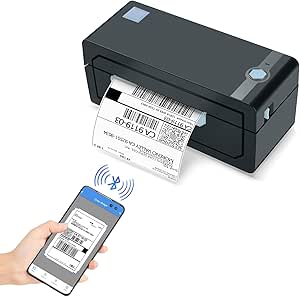 | Best for Flexible Shipping Media | Model: JD268BT | Print resolution: 203 × 203 DPI | Maximum media size: 4 × 6 inches | VIEW LATEST PRICE | See Our Full Breakdown |
| Phomemo M110 Portable Bluetooth Thermal Label Printer |  | Best Compact Organizer | Printer type: Thermal | Connectivity: Bluetooth 4.0 | Bluetooth range: Up to 33 ft | VIEW LATEST PRICE | See Our Full Breakdown |
| NULLTONEX 4×6 Bluetooth Thermal Shipping Label Printer |  | Best for Fast Shipping Runs | Printer type: Direct thermal | Resolution: 203 DPI | Print speed: Up to 150 mm/s (72 labels per minute) | VIEW LATEST PRICE | See Our Full Breakdown |
| Rongta RP425 Bluetooth Thermal Shipping Label Printer |  | Best for Automatic Label Feeding | Model: RP425 | Printer type: Thermal | Connectivity: Bluetooth | VIEW LATEST PRICE | See Our Full Breakdown |
| Labeer Bluetooth Thermal Shipping Label Printer, 4×6 |  | Best for Flexible Label Sizes | Printer type: Direct thermal | Resolution: 203 × 203 DPI | Supported label widths: 1.57–4.41 inches | VIEW LATEST PRICE | See Our Full Breakdown |
| KNAON Bluetooth Thermal Shipping Label Printer |  | Best for App-Based Label Design | Printer type: Thermal, monochrome | Resolution: 200 × 200 | Maximum paper width: 4.2 inches | VIEW LATEST PRICE | See Our Full Breakdown |
| Rongta RP425 Wireless Thermal Label Printer |  | Best for a Simple Phone-and-USB Setup | Model: RP425-WH | Printer type: Thermal, monochrome | Resolution: 203 × 203 dpi | VIEW LATEST PRICE | See Our Full Breakdown |
| Nelko Bluetooth Thermal Shipping Label Printer | 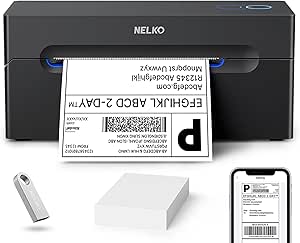 | Best for Fast Shipping Batches | Printer type: Thermal, monochrome | Resolution: 203 × 203 DPI | Print speed: Up to 72 4 × 6 labels per minute | VIEW LATEST PRICE | See Our Full Breakdown |
| Phomemo 241BT Bluetooth Thermal Label Printer with 20 Labels |  | Best for Broad Device Compatibility | Printer type: Thermal, monochrome | Resolution: 203 × 203 DPI | Supported label width: 1–4.6 inches | VIEW LATEST PRICE | See Our Full Breakdown |
| Rongta F11A Portable Wireless Thermal Printer |  | Best for Portable Document Printing | Printer type: Monochrome thermal | Connectivity: Bluetooth via RONGTA app; USB | Compatibility: Android, iOS, Windows 7–11, macOS | VIEW LATEST PRICE | See Our Full Breakdown |
| portable thermal label printer | Connectivity | Printer type | Dimensions | Weight |
|---|---|---|---|---|
| MUNBYN Bluetooth Thermal Label | Bluetooth, USB | Thermal | 4.9 × 9.67 × 6.49 inches | — |
| JADENS Bluetooth Thermal Shipp | Bluetooth, USB 2.0 | — | 5.91 × 9.06 × 5.91 inches | — |
| Phomemo M110 Portable Bluetoot | Bluetooth 4.0 | Thermal | 4.48 × 2.44 × 3.43 inches | 222.8 g |
| NULLTONEX 4×6 Bluetooth Therma | Bluetooth, USB | Direct thermal | 8.08 × 4.73 × 6.9 inches | 1.2 pounds |
| Rongta RP425 Bluetooth Thermal | Bluetooth | Thermal | — | 0.65 kg |
| Labeer Bluetooth Thermal Shipp | Bluetooth, USB | Direct thermal | 7.2 × 2.64 × 3.15 inches | 450 g |
| KNAON Bluetooth Thermal Shippi | Bluetooth, USB | Thermal, monochrome | — | — |
| Rongta RP425 Wireless Thermal | Bluetooth, USB | Thermal, monochrome | 4 × 1 × 2 inches (D × W × H) | — |
| Nelko Bluetooth Thermal Shippi | Bluetooth via NELKO app, USB | Thermal, monochrome | — | 1.4 kg |
| Phomemo 241BT Bluetooth Therma | Bluetooth, USB | Thermal, monochrome | — | 720 g |
| Rongta F11A Portable Wireless | Bluetooth via RONGTA app; USB | Monochrome thermal | — | — |
More Details on Our Top Picks
MUNBYN Bluetooth Thermal Label Printer
The MUNBYN RW403B is the most flexible choice here for shoppers who want one portable printer for shipping and everyday labeling. Its 1.57–4.25-inch label range covers more varied tasks than the Phomemo M110, which is limited to narrow labels and is not designed for shipping. Bluetooth and USB connections also let buyers switch between phones, tablets, and computers. The tradeoff is that this is still a monochrome thermal printer, and its 4.25-inch maximum width falls short of a full 4.3-inch range such as the NULLTONEX offers. I’d choose it for mixed household or small-business use, while buyers focused solely on 4×6 shipping labels may prefer a more shipping-centered setup.
Pros:- Supports label widths from 1.57 to 4.25 inches for varied tasks
- Bluetooth and USB connections support mobile and computer workflows
- Works with Android, iOS, Windows, Mac, and Chromebook
- Ink-free printing and a compact body
Cons:- Monochrome output cannot produce color-coded labels
- Maximum width is narrower than the NULLTONEX’s stated 4.3 inches
Best for: Home-based sellers and organizers who want one printer for shipping labels plus smaller inventory or storage labels
Not ideal for: Buyers who need color output or label widths beyond 4.25 inches
- Model:RW403B
- Printer type:Thermal
- Print output:Monochrome
- Supported label width:1.57–4.25 inches
- Connectivity:Bluetooth, USB
- Compatible operating systems:Android, iOS, Windows, Mac, Chromebook
- Dimensions:4.9 × 9.67 × 6.49 inches
- Noise level:60 dB
- Warranty:2 years
Our verdict“Choose the MUNBYN if you need a compact printer for both shipping and general-purpose labels across several device types.”
JADENS Bluetooth Thermal Shipping Label Printer, 4×6
The JADENS JD268BT is a practical pick for sellers who alternate between label rolls and fanfold stock. That media flexibility gives it a clearer shipping role than the Phomemo M110, which handles smaller organization labels rather than shipping labels. Its 203 DPI output and support for labels up to 4 × 6 inches fit common parcel workflows, while USB and Bluetooth cover desktop setups. The main catch is that mobile printing depends on the Jadens Printer app, so it is less straightforward for phone-first sellers than a printer with a simpler mobile workflow. Changing label types also calls for recalibration. I’d put it ahead of a general-purpose compact model when media choice matters more than app simplicity.
Pros:- Accepts both fanfold and roll media
- Supports standard labels up to 4 × 6 inches
- USB and Bluetooth connectivity for computer workflows
- 203 DPI monochrome thermal printing needs no ink or toner
Cons:- Mobile printing requires the Jadens Printer app
- Label size changes require recalibration
- One-year limited warranty is shorter than the MUNBYN’s stated coverage
Best for: Small online sellers who use both fanfold and roll labels and print standard parcel labels from a computer
Not ideal for: Phone-first sellers who want to print without a dedicated app or frequently switch labels without recalibration
- Model:JD268BT
- Print resolution:203 × 203 DPI
- Maximum media size:4 × 6 inches
- Label width:1.57–4.1 inches
- Media types:Fanfold and roll
- Connectivity:Bluetooth, USB 2.0
- Compatible systems:Windows 7 or later, Mac OS 10.9 or later; Android and iOS via app
- Dimensions:5.91 × 9.06 × 5.91 inches
- Warranty:One-year limited warranty
Our verdict“Pick the JADENS if your shipping workflow uses multiple media formats and you are comfortable managing app-based mobile printing.”
Phomemo M110 Portable Bluetooth Thermal Label Printer
At 222.8 g and with support for labels only 20–50 mm wide, the Phomemo M110 serves a different job from the shipping-focused JADENS and NULLTONEX printers. Its compact format suits school supplies, pantry containers, small inventory tags, and other labels that need to fit tight spaces. The app adds useful tools—editable templates, Excel batch printing, and OCR—so it can speed up repetitive labeling without a desktop setup. That convenience comes with limits: it does not support shipping labels or color, and some templates, icons, and fonts require paid membership. I’d choose it for portable organization work, not as a substitute for a full-width parcel-label printer.
Pros:- Lightweight 222.8 g design is easy to carry
- Bluetooth 4.0 supports mobile printing within a stated range of up to 33 ft
- App includes editable templates, Excel batch printing, and OCR
- 20–50 mm label width suits compact tags and organization labels
Cons:- Not designed to print shipping labels
- Monochrome output offers no color-coding option
- Some templates, icons, and fonts require paid membership
Best for: Students, home organizers, and small shops that need a lightweight printer for narrow inventory and storage labels
Not ideal for: Online sellers who need 4×6 shipping labels or buyers who want all app templates and design assets included
- Printer type:Thermal
- Connectivity:Bluetooth 4.0
- Bluetooth range:Up to 33 ft
- Label width:20–50 mm (0.78–2 inches)
- Print resolution:203 dpi
- Output:Monochrome
- Weight:222.8 g
- Dimensions:4.48 × 2.44 × 3.43 inches
- Included accessories:Test thermal label roll, USB-C cable, user manual
Our verdict“Choose the Phomemo M110 for portable, narrow-format organization labels, but skip it if parcel shipping is the main task.”
NULLTONEX 4×6 Bluetooth Thermal Shipping Label Printer
The NULLTONEX pairs a stated print speed of up to 150 mm/s with support for common shipping platforms, making it a focused option for sellers printing batches of parcel labels. Its 1.57–4.3-inch width range is slightly broader than the JADENS JD268BT’s 1.57–4.1-inch range, and the included 25 thermal labels let a buyer start with a small supply on hand. USB offers a wired alternative to Bluetooth, while the app’s offline template storage may help when a saved design is needed without an active connection. The tradeoff is app dependence for Bluetooth label creation and printing; the Phomemo M110 is more suited to compact general labeling, but neither replaces the NULLTONEX for full-size shipping tasks.
Pros:- Print speed is stated at up to 150 mm/s
- Supports label widths from 1.57 to 4.3 inches
- Compatible with major shipping platforms including Amazon, Shopify, USPS, and UPS
- Includes USB cable, power cord, and 25 thermal labels
Cons:- Bluetooth label creation and printing require the FlashLabel Pro app
- Monochrome output cannot support color-coded label designs
- The 1.2-pound weight is less suited to carrying around than the Phomemo M110
Best for: Small e-commerce sellers who print batches of shipping labels and want Bluetooth or USB connection options
Not ideal for: Buyers who avoid companion apps for wireless printing or need color labels
- Printer type:Direct thermal
- Resolution:203 DPI
- Print speed:Up to 150 mm/s (72 labels per minute)
- Supported label width:1.57–4.3 inches
- Connectivity:Bluetooth, USB
- Compatible platforms:Amazon, Shopify, Etsy, USPS, UPS, FedEx, DHL
- Dimensions:8.08 × 4.73 × 6.9 inches
- Weight:1.2 pounds
- Included accessories:Power cord, USB cable, 25 sheets of 4 × 6-inch thermal labels
Our verdict“Choose the NULLTONEX for app-based, high-throughput shipping at a portable scale, especially if the included starter labels are useful.”
Rongta RP425 Bluetooth Thermal Shipping Label Printer
The Rongta RP425 is a good fit for buyers who want label handling to be as simple as possible: it automatically identifies and feeds direct thermal labels across a broad 0.98–4.37-inch width range. That gives it more width flexibility than the JADENS JD268BT, while its 150 mm/s speed matches the NULLTONEX’s stated maximum. It also spans desktop and mobile systems, including Chrome OS, Android, and iOS, though Bluetooth printing from phones requires the RONGTA app. One concern is that the supplied product information gives conflicting dimensions, making it harder to judge how it will fit a tight workspace or travel bag. I’d favor it for varied label sizes, but choose a model with clearer sizing details if portability dimensions are a deciding factor.
Pros:- Automatically identifies and feeds direct thermal labels
- Broad 0.98–4.37-inch label width range
- Compatible with Windows, macOS, Chrome OS, Android, and iOS
- Prints at up to 150 mm/s with 203 dpi resolution
Cons:- Bluetooth printing from iOS and Android requires the RONGTA app
- Product information lists conflicting dimensions
- Monochrome thermal printing does not produce color labels
Best for: Small-business shippers who use several label widths and want automatic label identification across mobile and desktop systems
Not ideal for: Buyers who need dependable size information before planning a compact workstation or carrying setup
- Model:RP425
- Printer type:Thermal
- Connectivity:Bluetooth
- Compatible systems:Windows 7 or newer, macOS 10.11 or newer, Chrome OS, Android, iOS
- Supported label width:0.98–4.37 inches
- Print resolution:203 dpi
- Print speed:Up to 150 mm/s
- Weight:0.65 kg
- Listed dimensions:10.2 × 7.4 × 5.3 inches; also listed as 3 × 7 × 2 inches
Our verdict“Choose the RP425 if automatic feeding and support for varied label widths matter more than having consistent published dimensions.”
Labeer Bluetooth Thermal Shipping Label Printer, 4×6
The Labeer is a strong fit for sellers who switch between shipping labels and smaller address, barcode, or inventory labels. Its 1.57–4.41-inch width range and support for both roll and fanfold media give it more format flexibility than the Rongta RP425, which tops out at 4 × 6-inch media. At 450 g, it is also relatively easy to move between a packing station and a storage shelf. Automatic gap calibration and jam detection can cut down on misaligned prints and interruptions during routine batches. The tradeoff is that wireless use depends on the FlashLabel Pro app, while macOS, ChromeOS, and Linux require USB. Choose it for adaptable label handling, not for app-free mobile printing.
Pros:- Supports label widths from 1.57 to 4.41 inches, including common shipping and smaller label formats.
- Accepts both roll and fanfold thermal labels.
- Connects wirelessly to phones and Windows PCs, as well as by USB.
- Automatic gap calibration, paper-out detection, and jam detection help manage printing interruptions.
Cons:- Phone printing requires the FlashLabel Pro app.
- macOS, ChromeOS, and Linux printing is USB-only.
- Monochrome output cannot produce color-coded labels.
Best for: Small sellers who print 4 × 6 shipping labels alongside narrower barcode, address, or inventory labels and want both roll and fanfold media support.
Not ideal for: Mac, ChromeOS, or Linux users who need wireless printing, since those systems connect by USB, and phone users who prefer not to print through a dedicated app.
- Printer type:Direct thermal
- Resolution:203 × 203 DPI
- Supported label widths:1.57–4.41 inches
- Connectivity:Bluetooth, USB
- Compatible operating systems:Windows, macOS, ChromeOS, Linux, iOS, Android
- Supported media:Roll and fanfold thermal labels
- Dimensions:7.2 × 2.64 × 3.15 inches
- Weight:450 g
Our verdict“Choose the Labeer if you need a lightweight 4 × 6 printer that can also handle several narrower label formats.”
KNAON Bluetooth Thermal Shipping Label Printer
KNAON’s clearest distinction is its app toolkit: the FlashLabel Pro app includes templates, icons, and fonts for creating labels beyond standard shipping formats. That makes it more appealing for home businesses producing product, storage, or address labels than the Rongta RP425, whose supplied details focus on straightforward shipping-label printing. The printer supports Bluetooth from phones and USB from a broad range of computers, with media up to 4.2 inches wide. However, importing shipping-platform PDFs into the app adds steps, so frequent marketplace shippers may find a more direct workflow preferable. The listed dimensions also conflict between the description and product details, making its actual footprint harder to judge. Pick it for design flexibility, not the simplest shipping routine.
Pros:- FlashLabel Pro offers templates, icons, and fonts for creating custom labels.
- Bluetooth and USB connections cover phones, tablets, and several desktop operating systems.
- Supports label widths from 1.5 to 4.2 inches.
- The stated print speed is up to 180 mm/s.
Cons:- Bluetooth printing requires the FlashLabel Pro app.
- Shipping-platform labels must be saved as PDFs and imported into the app.
- The supplied dimensions differ between the description and product details.
Best for: Home-business owners and organizers who want app-based templates and design assets for custom labels as well as occasional shipping labels.
Not ideal for: High-volume marketplace shippers who want to send platform PDFs directly to a printer, or buyers who need clear, consistent information about the printer’s dimensions.
- Printer type:Thermal, monochrome
- Resolution:200 × 200
- Maximum paper width:4.2 inches
- Print speed:Up to 180 mm/s
- Connectivity:Bluetooth, USB
- Compatible systems:iOS, Android, Windows 7 or later, macOS, ChromeOS, Linux
- App resources:3,000+ templates, 5,000+ icons, 100+ fonts
- Included:10 test printing papers
Our verdict“Pick KNAON if app-based label design matters more to you than a direct, low-step shipping-label workflow.”
Rongta RP425 Wireless Thermal Label Printer
The RP425 suits buyers who want a basic wireless-or-wired path to monochrome shipping labels without a long list of format claims. It prints up to 4 × 6 inches, connects to phones by Bluetooth through the RONGTA app, and uses USB with computers. Compared with the Labeer, it offers less documented flexibility for smaller label widths and media formats; in return, its stated setup is straightforward for standard shipping work. Its listed dimensions are unusually small for a printer that handles 4 × 6 media, so I would verify the physical footprint before assigning it a permanent spot. The supplied data also gives a pages-per-minute figure rather than a label-per-minute speed, which makes production-rate comparisons difficult. This is a simpler choice, but not the strongest pick for varied label jobs.
Pros:- Supports Bluetooth phone printing and USB computer connections.
- Prints monochrome labels up to 4 × 6 inches.
- Compatible with Windows, macOS, Android, and iOS.
- A one-year warranty is specified.
Cons:- Monochrome printing does not support color labels.
- The supplied 15-pages-per-minute figure does not clarify label throughput.
- The listed 4 × 1 × 2-inch dimensions warrant verification for a 4 × 6-capable printer.
Best for: Occasional shippers who want Bluetooth phone printing through the RONGTA app and USB connectivity for a computer, mainly for labels up to 4 × 6 inches.
Not ideal for: Sellers printing several label formats or planning a high-volume workflow, since the supplied specs give limited media detail and no clear label-per-minute rate.
- Model:RP425-WH
- Printer type:Thermal, monochrome
- Resolution:203 × 203 dpi
- Maximum media size:4 × 6 inches
- Connectivity:Bluetooth, USB
- Compatible devices:Laptops, PCs, smartphones, tablets
- Dimensions:4 × 1 × 2 inches (D × W × H)
- Warranty:1 year
Our verdict“Choose the RP425 for straightforward phone-or-computer printing of standard shipping labels, not for documented speed or varied media needs.”
Nelko Bluetooth Thermal Shipping Label Printer
For sellers who care more about moving through a stack of parcels than designing custom labels, Nelko’s stated speed of up to 72 4 × 6 labels per minute is its main draw. It accepts fanfold and roll labels and prints over Bluetooth through the NELKO app or by USB, giving it a practical mix for a home packing station. Against the KNAON, Nelko is the more shipping-focused option: KNAON emphasizes app-based templates, while Nelko supplies a clear 4 × 6 batch-speed claim. The tradeoff is that Mac printing is USB-only and mobile Bluetooth depends on Nelko’s app. At 1.4 kg, it is also less suited to frequent carrying than lighter choices such as the Labeer.
Pros:- Stated throughput reaches up to 72 4 × 6 labels per minute.
- Supports both fanfold and roll labels.
- Offers Bluetooth and USB connectivity.
- Works with iOS, Android, Windows, Mac OS, and Chrome OS.
Cons:- Bluetooth printing requires the NELKO app.
- Mac OS printing is USB-only.
- At 1.4 kg, it is less convenient to carry than the 450 g Labeer.
Best for: Online sellers who print frequent batches of 4 × 6 shipping labels at a mostly fixed packing station and want roll or fanfold media options.
Not ideal for: Mac users who require wireless printing, or people who plan to carry their printer between locations often.
- Printer type:Thermal, monochrome
- Resolution:203 × 203 DPI
- Print speed:Up to 72 4 × 6 labels per minute
- Label width:1.54–4.1 inches
- Connectivity:Bluetooth via NELKO app, USB
- Compatible systems:iOS, Android, Windows 7 or later, Mac OS, Chrome OS
- Supported media:Fanfold and roll labels
- Weight:1.4 kg
Our verdict“Choose Nelko for a stationary shipping setup where batch speed matters more than light weight or wireless Mac printing.”
Phomemo 241BT Bluetooth Thermal Label Printer with 20 Labels
The Phomemo 241BT is the most flexible pick here for households or small businesses that switch between phones and different computer systems. It supports iOS, Android, Windows, Mac OS, Chrome OS, and Linux, plus Bluetooth and USB, while its 1–4.6-inch width range covers labels wider than the Labeer’s stated maximum. Its included 20 labels also let a buyer start printing without sourcing media first. Against the Nelko, the 241BT offers broader listed operating-system support and a lighter stated weight, but Nelko provides a much higher stated 4 × 6 label-per-minute rate. Phomemo’s tradeoffs are monochrome output and the need to download a driver for computer printing. It makes more sense as a versatile shared printer than as a speed-first batch machine.
Pros:- Supports Bluetooth and USB connections.
- Works with iOS, Android, Windows, Mac OS, Chrome OS, and Linux.
- Accepts label widths from 1 to 4.6 inches.
- Includes 20 labels to get started.
Cons:- Prints in monochrome only.
- Computer printing requires a driver download.
- At 720 g, it is heavier than the Labeer’s stated 450 g.
Best for: Small teams or households that need one portable label printer to work with a mix of phones, Windows and Mac computers, ChromeOS, or Linux.
Not ideal for: Sellers whose priority is documented high-volume output, since Nelko states a much faster 4 × 6 label rate, or buyers who want color printing.
- Printer type:Thermal, monochrome
- Resolution:203 × 203 DPI
- Supported label width:1–4.6 inches
- Maximum media size:4 × 6 inches
- Print speed:Up to 150 mm/s
- Connectivity:Bluetooth, USB
- Compatible systems:iOS, Android, Windows, Mac OS, Chrome OS, Linux
- Weight:720 g
- Included labels:20
Our verdict“Choose the Phomemo 241BT if broad device compatibility and a wide label range matter more than top batch speed.”
Rongta F11A Portable Wireless Thermal Printer
The Rongta F11A fills a different niche from the MUNBYN Bluetooth Thermal Label Printer and the other 4×6 shipping-label models in this roundup: it prints full-size documents, including Letter, Legal, and A4, rather than focusing on parcel labels. Its 0.43 kg weight and slim body make it easier to carry between home, office, and travel than a typical shipping-label setup. Because it uses thermal paper, there is no ink or ribbon to replace, but ordinary office paper will not work, so buyers need to plan around compatible media. Phone and tablet printing runs through the RONGTA app, and Bluetooth pairing must happen there; USB offers a wired alternative for laptops. The tradeoff is a slower 3.23 pages per minute, simplex-only output, and no Chrome support, making it less suited to bulk or browser-based workflows than a dedicated label printer.
Pros:- Prints full-size Letter, Legal, and A4 thermal documents
- Compact 0.43 kg design is suited to carrying between locations
- Thermal printing needs no ink or ribbons
- Supports Bluetooth through the app and USB for laptop connections
Cons:- Requires compatible thermal paper; regular paper is unsupported
- Bluetooth pairing must be completed through the RONGTA app
- Simplex output and a 3.23-page-per-minute speed limit larger print jobs
Best for: Traveling professionals and students who need a lightweight printer for occasional Letter, Legal, or A4 documents from a phone, tablet, or laptop.
Not ideal for: Small-business shippers who mainly print 4×6 parcel labels, or users who need standard paper, duplex printing, Chrome support, or fast batches.
- Printer type:Monochrome thermal
- Connectivity:Bluetooth via RONGTA app; USB
- Compatibility:Android, iOS, Windows 7–11, macOS
- Print resolution:203 × 203 dpi
- Print speed:3.23 pages per minute
- Supported paper sizes:US Letter, Legal, A4 thermal paper
- Dimensions and weight:2.28 × 10.55 × 1.18 inches; 0.43 kg
- Duplex printing:Simplex
- Ink or ribbon required:No
Our verdict“Choose the F11A if portable full-size document printing matters more than the 4×6 label workflow offered by the MUNBYN and similar shipping-label printers.”

How We Picked
I compared these 11 printers around the questions that shape day-to-day use: which label sizes each listing targets, how portable the printer is likely to be for its intended format, and how clearly its wireless workflow fits phone or computer printing. I also considered setup demands, label supply needs, and whether a model appears aimed at shipping or smaller labels. These criteria matter because a printer that cannot handle a buyer’s usual label format is a poor fit, even if its size or connectivity sounds appealing.
The ranking gives more weight to broad usefulness and a clear match between the printer’s format and its likely job. The MUNBYN leads as the most balanced starting point; the JADENS earns a distinct place for 4×6 shipping, while the Phomemo M110 serves buyers who value a smaller label footprint. The remaining models are compared by their shipping focus, wireless workflow, and any distinct convenience signals in their names or bundles. Similar product descriptions do not prove identical performance, so I recommend checking the current listing for supported devices, label dimensions, and included supplies before ordering.
| portable thermal label printer | Printer type | Connectivity |
|---|---|---|
| MUNBYN Bluetooth Thermal Label | Thermal | Bluetooth, USB |
| JADENS Bluetooth Thermal Shipp | — | Bluetooth, USB 2.0 |
| Phomemo M110 Portable Bluetoot | Thermal | Bluetooth 4.0 |
| NULLTONEX 4×6 Bluetooth Therma | Direct thermal | Bluetooth, USB |
| Rongta RP425 Bluetooth Thermal | Thermal | Bluetooth |
| Labeer Bluetooth Thermal Shipp | Direct thermal | Bluetooth, USB |
| KNAON Bluetooth Thermal Shippi | Thermal, monochrome | Bluetooth, USB |
| Rongta RP425 Wireless Thermal | Thermal, monochrome | Bluetooth, USB |
| Nelko Bluetooth Thermal Shippi | Thermal, monochrome | Bluetooth via NELKO app, USB |
| Phomemo 241BT Bluetooth Therma | Thermal, monochrome | Bluetooth, USB |
| Rongta F11A Portable Wireless | Monochrome thermal | Bluetooth via RONGTA app; USB |
Factors to Consider When Choosing Portable Thermal Label Printers
Before choosing among portable thermal label printers, match the machine to the labels you already use and the place where you print. A compact body can be handy, but label compatibility, device support, and refill options shape whether it remains useful after setup.
Match the printer to your actual label dimensions
Start with the size and layout of the labels your carrier, shop, or workflow requires. A 4×6 shipping label is not interchangeable with the smaller labels commonly used for product tags, barcodes, or storage bins. Buying by printer size alone is a common mistake: a compact model may be easy to carry yet unable to produce the format you need. Check both the printer’s supported width and the specific label stock it accepts, including roll or fanfold options where listed. If you print more than one format, look for clear support for each rather than assuming a device can switch freely. This matters more than a small difference in portability when the printer needs to serve a daily shipping queue.
Treat portability as a workflow question
Portable can mean a printer that fits on a crowded desk, moves between rooms, or travels with a seller to markets and pop-up events. Those uses place different demands on size, power, and how quickly labels can be loaded. A wider 4×6 printer can still be portable for occasional moves, but it may be awkward for a small bag or a mobile checkout station. Think through where the printer will sit while printing and where it will be stored between jobs. Buyers who only move a printer around the home may gain more from straightforward loading than from the smallest footprint. For frequent travel, verify the power arrangement and whether the listing describes battery operation rather than assuming wireless means cordless.
Check the full device and app path before buying
Bluetooth describes a connection method, not a guarantee that every phone, tablet, or computer can print directly. Check the manufacturer’s stated support for your operating system and whether printing requires a dedicated app, driver, or label-design tool. A phone-first setup may be convenient for quick orders, while a desktop workflow may suit batch printing or labels created in shipping software. Common frustration comes from confirming Bluetooth support but overlooking a required app or unsupported device. If more than one person will use the printer, check whether each user can install the needed software and access the same label templates. The smoother workflow is usually the one that fits the device you already use to create labels.
Compare label supply and refill logistics
Thermal printing avoids ink cartridges, but it still depends on compatible label stock. Before choosing, check which label sizes and types the printer supports and how easy those supplies are to source. An included starter pack is useful for setup, but it says little about how convenient ongoing refills will be. Confirm whether the printer needs a particular roll format, a holder, or another accessory before ordering replacement labels. For regular shipping, interrupted supply can matter more than a small difference in the initial bundle. For occasional organization or product labeling, a compact printer with readily available small labels may be the simpler fit.
Decide when a higher-cost feature earns its place
Pay more only when a feature solves a recurring problem in your workflow. Wider-format support can be worthwhile for frequent parcel shipping, while a smaller printer may be the better choice if most labels are compact and the device needs to travel. A bundle with starter labels can help you confirm setup, but it should not outweigh compatibility or refill access. Buyers printing just a few labels now and then should favor ease of setup and available supplies over features built for high-volume work. For a business printing in batches, investigate the software path and label-loading routine before choosing on portability alone. Match the upgrade to a task you do often, not a feature that sounds useful in theory.
Frequently Asked Questions
Can I use a compact portable printer for standard 4×6 shipping labels?
Only if the printer’s listed specifications support that label width and format. A compact body does not tell you the maximum label size, so check the supported dimensions before ordering. The Phomemo M110 is positioned for smaller labels, while the JADENS model is explicitly identified as a 4×6 shipping printer. If your carrier workflow requires 4×6 labels, choose a model that states that format rather than relying on a generic thermal-printing description. Also confirm that your shipping platform can send a correctly sized file to the printer.
Will Bluetooth let me print from any phone or computer?
No. Bluetooth connectivity does not guarantee compatibility with every operating system, app, or label service. Check the product listing and manufacturer instructions for the exact devices supported, along with any required app or driver. If you create labels on a computer but plan to print from a phone, verify that your workflow can transfer or open the same label file. This check can prevent buying a printer that connects wirelessly but does not work with the device you rely on.
Should I choose a printer that comes with labels?
An included supply can help you test setup and print a few labels without sourcing stock first. It should not be the main reason to choose a model, since a small starter pack does not establish long-term refill convenience. The Phomemo 241BT listing names 20 included labels, but buyers should still verify compatible sizes and ongoing supply options. Compare the bundle with the printer’s label requirements, then choose based on fit for your regular workflow. A dependable refill path matters more if you print often.
Are the two Rongta RP425 listings necessarily the same printer?
The names suggest related models, but similar naming alone does not confirm identical hardware, bundles, or compatibility. Compare the exact model number, supported label dimensions, included accessories, connection options, and manufacturer documentation on each listing. Pay particular attention to whether one listing describes Bluetooth specifically and whether the other uses broader wireless wording. If a feature matters to your setup, rely on the specifications for the exact item you plan to buy. This is a useful check whenever two listings appear to describe the same printer under slightly different names.
What should I prioritize if I print shipping labels only occasionally?
Prioritize a clear match for your required label size, a setup process compatible with your device, and easy access to replacement labels. Occasional printing rarely justifies choosing a printer around batch-oriented features you will seldom use. A compact model may suit occasional small-format labels, but it is not a substitute for a 4×6 printer when your parcels require that size. Also consider where the printer will be stored and whether loading supplies will feel manageable between print sessions. A good fit is the one that avoids extra steps each time you need to send a package.
Conclusion
For the broadest starting point, I recommend the MUNBYN Bluetooth Thermal Label Printer as best overall, while the JADENS 4×6 is my shipping-focused pick for buyers who need standard parcel labels. The Phomemo M110 is the best fit for compact, smaller-format jobs; the Phomemo 241BT may appeal to beginners who value a starter bundle, provided its app and label support match their setup. I would treat the best-value choice as the model that fits your required format and has accessible refills, rather than assuming the included supplies or wireless label alone define value. For premium or specialized needs, compare the exact listing specifications first: this roundup does not establish a clear premium winner based on a verified feature advantage. In every case, choose by label dimensions and device compatibility before portability claims.