

The best USB-C charging station for most mixed-device desks is the Anker 9-in-1 Desktop Charger and Power Strip, which pairs a 100W USB-C connection with everyday power-strip usefulness. For many-device setups, the Zobirez 10-Port 750W offers five USB-C and five USB-A ports, while the Anker Prime 200W 6-Port GaN is a more focused premium choice for high-speed desktop charging. The main tradeoffs are total power versus power per port, USB-C coverage versus legacy USB-A ports, and a compact footprint versus room for a larger group of devices. Port counts alone can mislead if several devices share a limited power budget. Read on for the full breakdown and a guide to matching the station to your devices.

Get the latest gadgets delivered free with Prime
- Fast, free delivery on millions of items
- Prime Video, Amazon Music and more included
- Member-only deals all year
Complete the kit



Key Takeaways
- The lineup splits into two jobs: Anker‘s desktop models suit smaller personal setups, while 20- and 30-port stations target shared desks or group charging.
- Port count does not tell the whole power story. A 30-port station can connect many devices, but its 150W total output is shared across them.
- Mixed USB-C and USB-A ports remain useful for households with older accessories; the Zobirez 10-Port 750W is the clearest listed match, with five ports of each type.
- For a laptop-first desk, prioritize strong USB-C output over maximum port count. Anker‘s 100W desktop charger and Prime 200W six-port station target more focused, higher-power setups.
- Several high-port models use similar headline wattages but different layouts. Compare port types, included cables, and how many devices need simultaneous fast charging before choosing among them.
| Zobirez 10-Port 750W Charging Station with 5 USB-C and 5 USB-A Ports |  | Best for Laptop Charging Across a Shared Desk | Total USB ports: 10 | USB-C ports: 5, up to 120W each | USB-A ports: 5, up to 30W each | VIEW LATEST PRICE | See Our Full Breakdown |
| Anker 9-in-1 Desktop Charger and Power Strip with 100W USB-C Charging | 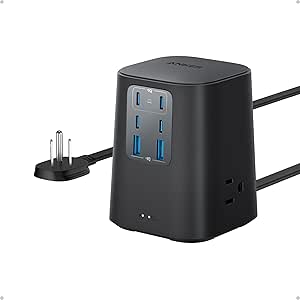 | Best for a Desk That Needs AC Outlets Too | AC outlets: 3 | USB-C ports: 4 | USB-A ports: 2 | VIEW LATEST PRICE | See Our Full Breakdown |
| 24-Port 100W USB-C Charging Station |  | Best for High-Count, Low-Power Devices | Ports: 24 USB-C | Total power: 100W | Total current: 20A | VIEW LATEST PRICE | See Our Full Breakdown |
| 150W 30-Port USB-C Charging Station |  | Best for the Largest Device Fleet | Total ports: 30 USB-C | Total output: 150W | Output voltage: 5V | VIEW LATEST PRICE | See Our Full Breakdown |
| 20-Port 270W USB Charging Station with 10 USB-C and 10 USB-A Ports |  | Best for Mixed USB-C and USB-A Collections | Total ports: 20: 10 USB-C and 10 USB-A | Total output: 270W | USB-C output: Up to 5V/3A per port | VIEW LATEST PRICE | See Our Full Breakdown |
| 150W 30-Port USB Charging Station |  | Best for Large Device Groups | Total output: 150W | Ports: 30 total: 15 USB-C and 15 USB-A | Maximum output per port: 15W | VIEW LATEST PRICE | See Our Full Breakdown |
| MEKIOJEO 12-Port 380W Aluminum Alloy Charging Station |  | Best for Laptop-and-Phone Mixes | Total power: 380W | Ports: 12 total: 8 USB-C and 4 USB-A | Maximum PD output: 65W on a dedicated port | VIEW LATEST PRICE | See Our Full Breakdown |
| 380W 8-Port USB-C Charging Station with Four Cables and Dual 100W Ports |  | Best for Two High-Power USB-C Devices | Total output: 380W | Ports: 8 total: 5 USB-C and 3 USB-A | USB-C outputs: 2 × 100W and 3 × 30W | VIEW LATEST PRICE | See Our Full Breakdown |
| 10-Port 245W GaN USB Charging Station with 4 USB-C Cables |  | Best for Mixed USB-C and USB-A Charging | Ports: 10 total: 6 USB-C and 4 USB-A | Listed maximum total output: 245W in description; 200W in product information | Laptop-capable USB-C output: Up to 65W on the first USB-C port only | VIEW LATEST PRICE | See Our Full Breakdown |
| Anker 112W 6-Port Desktop Charger | 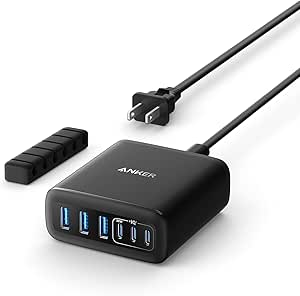 | Best Compact Desktop Pick | Total output: 112W | Ports: 6 total: 3 USB-C and 3 USB-A | Maximum USB-C output: 30W per port | VIEW LATEST PRICE | See Our Full Breakdown |
| Lcssio 300W 8-Port Charging Station |  | Best for Organized Laptop Charging | Total output: Up to 300W | Ports: 8 total, including 5 USB-C | High-power ports: 2 × 65W | VIEW LATEST PRICE | See Our Full Breakdown |
| Zobirez 420W 10-Port USB Charging Station with 5 USB-C Ports, Black |  | Best for High Device Count | Total output: 420W | Ports: 10 total | USB-C ports: 5 | VIEW LATEST PRICE | See Our Full Breakdown |
| Anker Prime 200W 6-Port GaN Desktop Charging Station |  | Best for Fast USB-C Laptop Charging | Model: A2683 | Total output: 200W | Ports: 6 USB ports | VIEW LATEST PRICE | See Our Full Breakdown |
| BREEKET 6-Port 100W GaN USB Charging Station |  | Best Compact Pick for Phones and Tablets | Ports: 3 USB-C and 3 USB-A | Total output: Up to 100W | USB-C output: Up to 20W per port | VIEW LATEST PRICE | See Our Full Breakdown |
| USB-C charging station | Ports | Total output |
|---|---|---|
| Zobirez 10-Port 750W Charging | — | — |
| Anker 9-in-1 Desktop Charger a | — | — |
| 24-Port 100W USB-C Charging St | 24 USB-C | — |
| 150W 30-Port USB-C Charging St | — | 150W |
| 20-Port 270W USB Charging Stat | — | 270W |
| 150W 30-Port USB Charging Stat | 30 total: 15 USB-C and 15 USB-A | 150W |
| MEKIOJEO 12-Port 380W Aluminum | 12 total: 8 USB-C and 4 USB-A | — |
| 380W 8-Port USB-C Charging Sta | 8 total: 5 USB-C and 3 USB-A | 380W |
| 10-Port 245W GaN USB Charging | 10 total: 6 USB-C and 4 USB-A | — |
| Anker 112W 6-Port Desktop Char | 6 total: 3 USB-C and 3 USB-A | 112W |
| Lcssio 300W 8-Port Charging St | 8 total, including 5 USB-C | Up to 300W |
| Zobirez 420W 10-Port USB Charg | 10 total | 420W |
| Anker Prime 200W 6-Port GaN De | 6 USB ports | 200W |
| BREEKET 6-Port 100W GaN USB Ch | 3 USB-C and 3 USB-A | Up to 100W |
More Details on Our Top Picks
Zobirez 10-Port 750W Charging Station with 5 USB-C and 5 USB-A Ports
The Zobirez is the strongest fit here when a shared desk needs several laptop-capable USB-C ports alongside ports for older USB-A devices. It has five USB-C ports rated up to 120W each and five USB-A ports rated up to 30W each, plus slots and ten included cables to keep a busy setup organized. Compared with the 20-Port 270W USB Charging Station, it offers much higher stated output and stronger USB-C port ratings, but fewer total connections. I would treat the 750W total and per-port figures as separate limits: the product data notes that actual output depends on compatible devices and cables, and does not establish that every maximum can be reached at once. Choose it for a mix of laptops and small electronics, not just a large fleet of phones.
Pros:- Five USB-C ports are rated up to 120W each for compatible laptop charging.
- Five USB-A ports add connections for older devices and accessories.
- Ten included cables and device slots help reduce desktop clutter.
- One-piece flame-retardant ABS construction includes multiple electrical protections.
Cons:- The 750W total and individual port ratings should not be assumed to be available simultaneously.
- Ten ports provide less capacity than the 20- and 30-port stations in this roundup.
- The high USB-C ratings depend on compatible devices and cables.
Best for: Small offices or shared home workspaces charging several USB-C laptops alongside USB-A devices.
Not ideal for: Buyers who need to charge more than ten devices at once or want confirmation that all listed port maximums are available simultaneously.
- Total USB ports:10
- USB-C ports:5, up to 120W each
- USB-A ports:5, up to 30W each
- Maximum total output:750W stated
- Input voltage:120V
- Material:Flame-retardant ABS
- Included accessories:Power cord and 10 charging cables
- Protection:Overcurrent, overvoltage, overload, overheating, overcharging, and short circuit
Our verdict“Choose the Zobirez if a small group needs a mix of laptop-capable USB-C charging and USB-A connections in one organized station.”
Anker 9-in-1 Desktop Charger and Power Strip with 100W USB-C Charging
The Anker is the most versatile desk pick for someone who needs to power more than USB devices. Its three AC outlets sit alongside four USB-C ports and two USB-A ports, so a laptop, phone, and conventional plug-in accessory can share one desktop unit. The first two USB-C ports support up to 100W when used individually, giving it a clearer fit for a laptop than the 20-Port 270W USB Charging Station, whose USB-C output is limited to 5V/3A per port. The tradeoff is capacity: this is a nine-connection charger, not a multi-device rack, and the 100W ratings apply to individual ports rather than necessarily to both at once. I’d pick it for a compact workstation, not a classroom or family charging hub.
Pros:- Combines three AC outlets with four USB-C and two USB-A ports.
- Each of the first two USB-C ports supports up to 100W when used individually.
- Includes 300-joule surge protection and an eight-point safety system.
- Five-foot cord offers flexibility in desktop placement.
Cons:- The two 100W USB-C ratings apply when each port is used individually.
- Nine total connections are insufficient for large device collections.
- The product information gives different weights: 19.75 oz and 1.2 lb.
Best for: Laptop users who want USB-C charging, USB-A ports, and standard AC outlets in one desktop unit.
Not ideal for: Households or teams that need to charge many phones and tablets simultaneously, or buyers who require two guaranteed 100W outputs at once.
- AC outlets:3
- USB-C ports:4
- USB-A ports:2
- USB-C1 and USB-C2:Up to 100W each when used individually
- Cord length:5 ft
- Voltage:125V
- Surge protection:300 joules
- Safety:Eight-point safety system
Our verdict“Pick this Anker when you need a laptop-friendly USB-C charger that also replaces a small desk power strip.”
24-Port 100W USB-C Charging Station
With 24 USB-C ports, this station suits a cart or shared space where many phones, earbuds, and similar devices need a place to charge. Its advantage over the 150W 30-Port USB Charging Station is a USB-C-only layout, which can simplify cable selection if the devices already use USB-C. The tradeoff is the modest 100W total power shared across all connected devices; this is not a fast-charging solution for a full load, and its listed output is 5V/2A. A detachable five-foot cord and broad 100–240V input support flexible placement, while multiple circuit protections add reassurance for a busy station. I would choose it for quantity and basic charging, not for laptops or users who expect each port to deliver high power.
Pros:- Provides 24 USB-C connections for a large number of compatible devices.
- Detachable five-foot power cord makes placement and storage easier.
- 100–240V input supports a broad range of mains voltages.
- Includes over-voltage, over-current, short-circuit, overcharge, and overload protection.
Cons:- The 100W total must be shared among connected devices.
- Listed 5V/2A output is suited to modest charging needs, not laptop charging.
- USB-C-only ports offer less flexibility for devices that still need USB-A.
Best for: Schools, families, or device cabinets charging many phones, headphones, and other modest-power USB-C devices.
Not ideal for: Laptop owners or anyone expecting 24 devices to charge quickly, since the 100W total is shared and listed output is 5V/2A.
- Ports:24 USB-C
- Total power:100W
- Total current:20A
- Listed output:5V/2A
- Input voltage:100–240V
- Power cord:Detachable, 5 ft
- Power plug:Type A, 2-pin
- Safety features:Over-voltage, over-current, short circuit, overcharge, and overload protection
Our verdict“Choose this station for many USB-C phones and accessories when connection count matters more than charging speed.”
150W 30-Port USB-C Charging Station
This station prioritizes maximum port count: its 30 USB-C connections can accommodate more devices than the 24-Port 100W USB-C Charging Station. That makes it a practical fit for a device shelf or group charging area where phones and other USB-powered gear need basic power at the same time. Its 150W total output is higher than the 24-port model’s 100W, but the individual ports are still limited to 5V/2.4A. That ceiling favors routine charging over fast charging, and it rules this out for USB-C laptop power. The simple layout and included power cable keep setup straightforward, while overcurrent, overcharging, and short-circuit protection cover key risks. I’d choose it for quantity, not speed or high-power flexibility.
Pros:- Thirty USB-C ports accommodate more devices than the other high-count USB-C station here.
- 150W total output exceeds the 24-port model’s stated 100W.
- Works with many phones, tablets, and other USB-powered devices.
- Includes a power cable and overcurrent, overcharging, and short-circuit protection.
Cons:- Each port is limited to 5V/2.4A, restricting fast-charging capability.
- The shared 150W total means output per device can fall when many are connected.
- USB-C-only connections may not suit devices or cables that need USB-A.
Best for: Organizations, households, or shared spaces that need many USB-C ports for phones, tablets, and low-power USB devices.
Not ideal for: Laptop users or anyone prioritizing fast charging, since each port is limited to 5V/2.4A.
- Total ports:30 USB-C
- Total output:150W
- Output voltage:5V
- Maximum output per port:5V/2.4A
- Total current:30A
- Input voltage:240V
- Power source:Corded electric
- Protection:Overcurrent, overcharging, and short circuit
Our verdict“Choose this model when fitting the most USB-C devices matters more than fast charging or laptop support.”
20-Port 270W USB Charging Station with 10 USB-C and 10 USB-A Ports
The clearest reason to choose this station is its balanced mix of 10 USB-C and 10 USB-A ports. That makes it more adaptable than the USB-C-only 24-Port 100W station when a household or team still has older cables and accessories, while its 20 ports provide more room than the Anker 9-in-1 Desktop Charger. Adjustable dividers help separate devices, and ten included mixed cables reduce the need to gather accessories before setup. The main limitation is power delivery: each USB-C port is listed at up to 5V/3A and each USB-A port at up to 5V/2.4A, so the 270W total does not make this a laptop-charging station. Choose it for organized phone and tablet charging, and skip it if high-wattage USB-C is the priority.
Pros:- Twenty ports split evenly between USB-C and USB-A.
- Eleven removable, adjustable dividers help organize different device sizes.
- Includes ten mixed USB cables and a power cable.
- Lists over-temperature, overvoltage, overload, short-circuit, and overcurrent protection.
Cons:- USB-C output is limited to 5V/3A per port, so it is not suited to laptop charging.
- Included cables may not match every device or cable-length preference.
- The 270W total does not remove the per-port voltage limits.
Best for: Families, classrooms, or small teams charging a mix of newer USB-C devices and older USB-A gear.
Not ideal for: Laptop users or anyone who needs USB-C power above 5V, since the listed USB-C output is limited to 5V/3A per port.
- Total ports:20: 10 USB-C and 10 USB-A
- Total output:270W
- USB-C output:Up to 5V/3A per port
- USB-A output:Up to 5V/2.4A per port
- Dividers:11 removable, adjustable
- Included cables:10 mixed USB cables
- Input voltage:110V
- Warranty:2-year replacement coverage
Our verdict“Pick this station if you need organized, shared charging for many phones and tablets across both USB-C and USB-A.”
150W 30-Port USB Charging Station
I’d choose this station when port count matters more than charging speed. Its 15 USB-C and 15 USB-A ports let a classroom, shared workspace, or family charge many devices from one spot, while the cooling fan and listed electrical protections address the heat and overload concerns that come with a crowded setup. The tradeoff is that each port tops out at 15W, so it is better matched to phones, earbuds, and other modest-power devices than laptop charging. Compared with the MEKIOJEO 12-Port 380W Aluminum Alloy Charging Station, this one supports far more connections but gives up dedicated higher-output charging. I’d skip it if a few devices need fast, laptop-level charging; its strength is keeping a large number of smaller devices powered together.
Pros:- Thirty ports accommodate a large group of devices at once.
- Includes both 15 USB-C and 15 USB-A ports for mixed cable needs.
- Built-in fan and listed over-voltage, over-current, overload, short-circuit, and overheating protections.
- Anti-slip pads help keep the station in place on a desk.
Cons:- The 15W per-port limit is unsuitable for laptop charging and limits fast charging for some devices.
- Requires 120V input, which restricts use in locations with different mains voltage.
Best for: Teachers, families, and shared offices that need one station for many phones, earbuds, and other low-power USB devices.
Not ideal for: Laptop owners or anyone prioritizing fast charging, since output is capped at 15W per port.
- Total output:150W
- Ports:30 total: 15 USB-C and 15 USB-A
- Maximum output per port:15W
- Output voltage:5V
- Input voltage:120V
- Dimensions:6.3 × 3.03 × 3.43 in
- Weight:1.1 lb
- Included:1.2 m power cable and user manual
Our verdict“Choose this for charging a crowd of small USB devices, not for powering laptops or demanding fast-charge setups.”
MEKIOJEO 12-Port 380W Aluminum Alloy Charging Station
The MEKIOJEO is the more capable fit when a USB-C charging station needs to serve both laptops and everyday devices. Its dedicated 65W PD port gives a compatible laptop a clearer charging path than the 15W-per-port 150W 30-Port USB Charging Station, while eight USB-C ports and four USB-A ports cover a mixed-device desk. The aluminum alloy body and GaN technology are appealing for a compact, corded setup, and the included five-foot cable offers more placement flexibility than a short lead. The key limitation is that the 65W output belongs to one dedicated port; it is not a station where every connected device receives laptop-level power. I’d also treat the 380W total figure cautiously when planning simultaneous loads, since the supplied details don’t explain how power is distributed across ports.
Pros:- Dedicated 65W PD port supports compatible laptop charging.
- Eight USB-C and four USB-A ports suit a mix of newer and older devices.
- Aluminum alloy construction and GaN technology in a compact, travel-oriented design.
- Includes a five-foot power cord and lists protection against overheating, overcharging, short circuits, and overcurrent.
Cons:- The 65W output is limited to a dedicated port rather than available across the station.
- No dimensions or weight are provided, making fit and portability harder to judge.
- The supplied details do not specify how the total output is shared across connected devices.
Best for: Home-office users who need to charge one compatible laptop alongside phones, tablets, and accessories.
Not ideal for: Buyers who need several laptops charging at once or want confirmed dimensions before planning a tight desk or travel setup.
- Total power:380W
- Ports:12 total: 8 USB-C and 4 USB-A
- Maximum PD output:65W on a dedicated port
- Other listed outputs:30W and 20W
- Body material:Aluminum alloy
- Technology:GaN
- Power cord:5 ft (1.5 m)
- Input:120V, 15A
Our verdict“Pick this for a mixed desk with one laptop and several smaller devices, but not for multiple high-power computers.”
380W 8-Port USB-C Charging Station with Four Cables and Dual 100W Ports
For a desk shared by two compatible laptops, the standout is the pair of 100W USB-C ports. That makes this station a stronger high-power match than the MEKIOJEO’s single dedicated 65W port, while three additional 30W USB-C ports and three 30W USB-A ports cover phones and accessories. The included four USB-C cables also mean fewer separate cable purchases before setting up a multi-device station. Its eight-port layout is less suited to a large group than the 150W 30-Port USB Charging Station, and the listing says power is distributed when several devices are connected, so the headline port outputs should not be assumed to apply simultaneously at full capacity. I’d also want clarification on the stated input range, which is listed as both 100–240V and 110V AC in the product information.
Pros:- Two USB-C ports are listed at up to 100W each for compatible devices.
- Five USB-C and three USB-A ports support a range of current and older devices.
- Includes four USB-C cables and a five-foot power cord.
- GaN III technology is intended to support compact construction and heat dissipation.
Cons:- Available power is distributed across ports when multiple devices are connected.
- Input-voltage information conflicts between 100–240V and 110V AC.
- Eight ports provide less capacity for a group than 10- or 30-port alternatives.
Best for: People with two compatible USB-C laptops who also want ports and included cables for phones, tablets, and accessories.
Not ideal for: Large households or classrooms needing many connections, and buyers who need unambiguous input-voltage details before purchasing.
- Total output:380W
- Ports:8 total: 5 USB-C and 3 USB-A
- USB-C outputs:2 × 100W and 3 × 30W
- USB-A outputs:3 × 30W
- Technology:GaN III
- Listed input voltage:100–240V in description; 110V AC in product information
- Included USB-C cables:One 3.3 ft 100W braided cable, two 3.3 ft cables, and one 6.6 ft cable
- Power cord:5 ft
Our verdict“Choose this for a two-laptop USB-C setup with useful included cables, provided you’re comfortable with shared output and the input-spec discrepancy.”
10-Port 245W GaN USB Charging Station with 4 USB-C Cables
This 10-port station makes a practical middle ground for a shared desk: six USB-C ports and four USB-A ports leave room for newer devices and older accessories, and four included USB-C cables help get a setup started. Its main limitation is easy to miss: only the first USB-C port supports laptops, at up to 65W. The remaining USB-C ports and all four USB-A ports are listed at up to 20W, making them a better fit for phones and tablets. Compared with the 380W 8-Port USB-C Charging Station with Four Cables and Dual 100W Ports, it trades high-power laptop flexibility for two extra ports and a larger share of USB-A connections. I’d also flag the conflicting 245W and 200W total-output claims; buyers should avoid planning around either figure without confirmation.
Pros:- Ten ports, including six USB-C and four USB-A, support a broad mix of devices.
- First USB-C port is listed at up to 65W for a compatible laptop.
- Four USB-C cables and a detachable five-foot power cord are included.
- Protection is listed for overcharging, overvoltage, overcurrent, and overheating.
Cons:- Only the first USB-C port supports laptop charging.
- Total output is inconsistent in the product data: 245W in the description and 200W elsewhere.
- The other USB-C ports and USB-A ports are each listed at up to 20W.
Best for: Households or shared desks with a mix of USB-C and USB-A phones, tablets, and one compatible laptop.
Not ideal for: People charging multiple laptops or relying on a clearly specified total output, since laptop support is limited to one port and the listed totals conflict.
- Ports:10 total: 6 USB-C and 4 USB-A
- Listed maximum total output:245W in description; 200W in product information
- Laptop-capable USB-C output:Up to 65W on the first USB-C port only
- Other USB-C outputs:5 ports, up to 20W each
- USB-A outputs:4 ports, up to 20W each
- Input:110V AC, 3.25A
- Power cord:Detachable, 5 ft
- Included cables:Two 6.6 ft and two 3.3 ft USB-C-to-USB-C cables
Our verdict“Pick this for a varied mix of phones and accessories plus one laptop, not for multi-laptop charging or power planning that depends on a confirmed total.”
Anker 112W 6-Port Desktop Charger
The Anker is the most desk-friendly choice here for someone who wants a small, straightforward charging hub rather than a high-capacity station. Its six-port mix of USB-C and USB-A covers everyday phones, tablets, and accessories, while the included silicone cable organizer helps keep a compact desktop setup from becoming a tangle. Unlike the 10-Port 245W GaN USB Charging Station with 4 USB-C Cables, it has fewer connections and no included charging cables, but its listed dimensions and weight make its footprint easier to plan around. A single USB-C port reaches 30W, so this is not the choice for fast-charging a laptop; that job is better suited to options with a dedicated 65W or 100W port. I’d choose it for tidy, routine charging, not for a busy workgroup or high-power devices.
Pros:- Compact 3.0 × 3.2 × 1.3 in body suits a crowded desk.
- Three USB-C and three USB-A ports support a mix of device generations.
- Includes a silicone cable organizer to help manage the desktop setup.
- USB-C ports are listed at up to 30W per port, with USB-A up to 18W per port.
Cons:- USB-C output is capped at 30W per port, below the 65W and 100W laptop-focused alternatives.
- Charging cables are not included.
- Six ports offer less capacity than the 10- and 30-port options in this group.
Best for: Minimalist desk users who charge a few phones, tablets, and accessories and want both USB-C and USB-A connections.
Not ideal for: Laptop users seeking higher-wattage USB-C charging, or buyers who need many ports and ready-to-use charging cables in the box.
- Total output:112W
- Ports:6 total: 3 USB-C and 3 USB-A
- Maximum USB-C output:30W per port
- Maximum USB-A output:18W per port
- Dimensions:3.0 × 3.2 × 1.3 in (77 × 82 × 33 mm)
- Weight:10.65 oz (302 g)
- Included:Silicone cable organizer and welcome guide
- Warranty:18 months
Our verdict“Choose the Anker for a compact, organized desk charging setup, but look elsewhere for laptop-level power or a large number of ports.”
Lcssio 300W 8-Port Charging Station
I’d choose the Lcssio when device organization and laptop charging matter as much as port count. It has eight ports, including five USB-C connections, and two are rated at 65W for laptops—more laptop-focused capacity than the BREEKET 6-Port 100W GaN USB Charging Station, which is intended for phones, tablets, and accessories. Six included short cables also reduce the need to supply every lead separately.
The fixed dividers and anti-slip pads give this station a more orderly tabletop setup, but that structure is also its main compromise: the slots can’t be rearranged, so unusually wide devices or cases may not fit neatly. Its listed 300W total output sounds generous, yet charging speed and compatibility can vary by device. Compared with the Anker Prime 200W 6-Port GaN Desktop Charging Station, the Lcssio offers more ports and storage-style organization, while Anker specifies stronger USB-C output per port when two are in use.
Pros:- Eight ports, including five USB-C ports, support a crowded shared charging setup.
- Two 65W ports can serve compatible laptops.
- Fixed slots and anti-slip pads help keep devices organized on a tabletop.
- Includes six short charging cables and multiple built-in electrical protections.
Cons:- Fixed dividers cannot be removed or repositioned to fit different device sizes.
- Compatibility and charging speed depend on the connected device, and individual port allocation is not specified.
Best for: Households or shared desks charging several phones and tablets alongside laptops, especially buyers who want devices kept upright in fixed slots.
Not ideal for: People with oversized devices, varied case sizes, or a need to rearrange slots; the fixed dividers limit layout flexibility.
- Total output:Up to 300W
- Ports:8 total, including 5 USB-C
- High-power ports:2 × 65W
- Input voltage:110V
- Output voltage:20V
- Output current:20A
- Included accessories:Power cord and 6 short charging cables
- Safety features:Over-current, over-voltage, overcharge, overload, overheat, and short-circuit protection
Our verdict“Choose the Lcssio for a tidy multi-device station with two laptop-capable ports, but skip it if flexible slot spacing matters more than fixed organization.”
Zobirez 420W 10-Port USB Charging Station with 5 USB-C Ports, Black
The Zobirez is the lineup’s capacity-first choice: ten ports, five of them USB-C, let one station serve a busy household or shared workspace. Its eight included mixed charging cables make it easier to set up several devices at once, while two wider slots accommodate larger devices or cases. Compared with the Lcssio 300W 8-Port Charging Station, it adds two ports and a higher stated total output, making it the better fit when the number of devices is the main concern.
That scale comes with an important unknown: individual port power allocation isn’t clearly specified, so the 420W total alone doesn’t tell me what a particular laptop or tablet will receive. The short cables may also constrain placement, especially if devices sit farther from the station. Buyers seeking clearly stated laptop charging should compare it with the Anker Prime 200W 6-Port GaN Desktop Charging Station, which specifies USB-C output in a two-port configuration but has fewer connections.
Pros:- Ten ports, including five USB-C, support many devices at once.
- Eight included mixed charging cables help get multiple devices connected.
- Two wider slots offer more room for larger devices or cases.
- Flame-retardant ABS construction and listed electrical protections add practical safety features.
Cons:- Individual port power allocation is not clearly specified.
- Included short cables can limit where devices are placed.
Best for: Families, classrooms, or shared workspaces that need to connect many phones, tablets, headphones, and other USB devices at one tabletop station.
Not ideal for: Laptop owners who need a clearly documented per-port charging rate, or anyone who needs longer cables to place devices away from the station.
- Total output:420W
- Ports:10 total
- USB-C ports:5
- Included cables:8 short mixed charging cables
- Input:110V AC
- Material:Flame-retardant ABS
- Weight:1.6 lb
- Color:Black
Our verdict“Pick the Zobirez when ten-device capacity matters most, but choose a model with clearer per-port output details if charging specific laptops is a priority.”
Anker Prime 200W 6-Port GaN Desktop Charging Station
I’d put the Anker Prime ahead of the larger multi-slot stations for buyers who need strong, clearly described USB-C charging more than maximum port count. It supports up to 100W per USB-C port when two USB-C ports are used simultaneously, a useful distinction for compatible laptops that need more than phone-level power. The Lcssio 300W 8-Port Charging Station has more connections and fixed device slots, but its two laptop-capable ports are rated at 65W each; Anker’s stated two-port USB-C output is the stronger fit for higher-demand devices.
There are tradeoffs: the Anker has six USB ports rather than eight or ten, and its 1.24-pound body is not intended for travel. Temperature monitoring, a five-foot AC cord, and a 24-month warranty suit a permanent desk setup, though the product data does not specify individual output for every multi-port combination. Compared with the BREEKET 6-Port 100W GaN USB Charging Station, it is the more laptop-oriented choice, while the BREEKET is aimed at mobile devices and accessories.
Pros:- Supports up to 100W per USB-C port when two USB-C ports are used simultaneously.
- Six USB ports can serve a mix of computers and smaller devices.
- Temperature monitoring helps manage heat during charging.
- Includes a 5 ft AC cord and a 24-month warranty.
Cons:- Not intended for travel, despite its relatively compact desktop dimensions.
- Six ports offer less capacity than the Lcssio and Zobirez multi-device stations.
Best for: Desk-based laptop users who charge one or two compatible computers over USB-C and want a compact desktop unit with six total ports.
Not ideal for: Travelers, users who need ten or more ports, or buyers looking for built-in device dividers to organize a family charging station.
- Model:A2683
- Total output:200W
- Ports:6 USB ports
- USB-C output:Up to 100W per port when 2 USB-C ports are used simultaneously
- Dimensions:4.4 × 3.0 × 1.4 in
- Weight:1.24 lb
- Power cord:5 ft
- Warranty:24 months
Our verdict“Choose the Anker Prime for a desk where high USB-C laptop output matters more than a large number of charging connections.”
BREEKET 6-Port 100W GaN USB Charging Station
The BREEKET suits a simpler job than the Anker Prime: charging phones, tablets, and accessories without taking up much desk or counter space. Its six connections split evenly between USB-C and USB-A, so it can serve newer devices alongside older cables. The cube-style unit also has a detachable five-foot AC cord, giving it more placement flexibility than a station with a short, fixed lead. Compared with the Lcssio 300W 8-Port Charging Station, it gives up laptop-capable output and two ports in exchange for a compact design focused on everyday mobile devices.
Its limits are clear: the total output is 100W, each USB-C port is listed at up to 20W, and the product is not designed for laptops. That makes it a poor match for shoppers hoping one station will handle a computer and a phone at full charging speed. For laptop charging, I’d choose the Anker Prime instead; for a smaller assortment of phones, tablets, and accessories, the BREEKET’s mix of USB-C and USB-A is the more targeted option.
Pros:- Six ports split between three USB-C and three USB-A connections.
- Compact cube design takes less space than the Lcssio and Zobirez multi-slot stations.
- Detachable 5-foot AC cord allows flexible placement.
- Built-in protections cover overcharging, overheating, short circuits, and overcurrent.
Cons:- Not designed for laptop charging.
- USB-C output is limited to up to 20W per port, with 100W total output.
Best for: People with several phones, tablets, earbuds, or other mobile accessories who want a small tabletop charger with both USB-C and USB-A ports.
Not ideal for: Laptop owners or buyers who need high-output USB-C charging; the station is not designed for laptops and its USB-C ports provide up to 20W each.
- Ports:3 USB-C and 3 USB-A
- Total output:Up to 100W
- USB-C output:Up to 20W per port
- USB-A output:Up to 18W per port
- Dimensions:3.27 × 2.36 × 1.1 in
- AC cord:5 ft detachable
- Enclosure material:Plastic
- Warranty:1 year
Our verdict“Choose the BREEKET for a compact phone-and-tablet charging spot, but look to the Anker Prime or Lcssio if laptop charging is part of the job.”

How We Picked
I ranked these USB-C charging stations by how well their listed specifications serve real charging setups, rather than by maximum port count alone. My main criteria were total output, the mix of USB-C and USB-A ports, stated high-power USB-C connections, the number of devices a station can accommodate, and practical features such as built-in cables, GaN design, and a power-strip format. I also weighed whether the product’s apparent role is clear: a compact desktop charger should be judged differently from a shared charging hub.
The ranking favors options with a useful balance of power, port mix, and everyday flexibility. Models with many ports but comparatively modest total output suit simultaneous low-power charging better than a desk full of laptops, so I would not treat their port counts as a promise of fast charging for every connected device. Products with stronger stated USB-C power or more purposeful desktop features rank higher for personal workstations, while large multi-port models remain good fits for group charging. Where the supplied product details do not specify per-port output or power distribution, I avoid assuming every port can deliver the headline wattage.
Factors to Consider When Choosing USB-C Charging Stations
I would choose a charging station by starting with the devices and charging routine, then checking whether its power and port layout support both. These factors help prevent two common mismatches: buying a hub with more sockets than useful output, or paying for high wattage when most connected devices only need modest charging.
Match total output to the devices you charge together
Total wattage is a shared pool, not a separate allowance for every port. A station with many connections can be a good fit for phones, earbuds, and accessories yet struggle to charge several laptops quickly at once. List the devices you expect to charge simultaneously and note the power requirements of the ones that draw the most. Then compare those needs with the station’s total output and any stated per-port limits. If the listing does not explain how power is divided, avoid assuming a high-wattage port can maintain its full output while other devices are connected. Paying more for output makes sense when it changes how quickly your main devices charge, not just when it raises a headline number.
Count the right port types, not just ports
USB-C is the priority for newer phones, tablets, and many laptops, but a USB-A port can still be handy for older cables and small accessories. A station with ten mixed ports may suit a varied household better than one with more connections of a single type. Check what you own now and what you expect to keep using, rather than choosing by a large port count alone. Also check whether any USB-C ports have distinct power ratings, since the layout may reserve the strongest output for only one or two connections. A common mistake is to buy a mostly USB-A hub for a USB-C-heavy setup or the reverse. Leave room for at least one spare connection if devices are likely to be added.
Check charging protocols and device compatibility
Wattage by itself does not confirm that a station will charge a device at its fastest supported rate. Charging speed depends on whether the station and device support compatible charging standards, and on the cable used between them. Before buying for a laptop or a particular phone, check the manufacturer’s stated output for the relevant port and confirm that it supports the device’s charging requirements. Do not assume every USB-C port on one station behaves the same way. If a listing gives only total wattage and port count, treat the exact speed for each device as uncertain. This check matters most when replacing a dedicated laptop charger or trying to fast-charge several devices at the same time.
Decide whether built-in cables help or get in the way
Built-in cables can reduce desk clutter and make a shared charging spot easier for guests to use. They are less flexible if the cable length or connector type does not suit how your devices sit, and a damaged fixed cable may be harder to replace than a separate one. Compare included cable count and placement with your furniture and daily routine; cables that reach the devices are more useful than extra ports that are awkward to access. A station with no built-in cables gives you more freedom to choose length and type, though you will need to supply and organize them. For a common area, fixed cables may simplify use. For a work desk with a laptop and changing devices, detachable cables can offer a better fit.
Plan for space, heat, and cable management
Large multi-port stations take up more desk or counter space, and the connected cables can spread farther than the unit itself. Measure the surface where the station will sit and think about whether ports need to face the front, side, or top for easy access. High total output and many devices can also produce heat, so follow the manufacturer’s placement guidance and avoid covering the unit. Aluminum construction or GaN components can be useful design details, but they do not replace checking the product’s ventilation and stated operating instructions. If the station will be shared, a stable position and clear cable routing reduce tangles and accidental pulls. A smaller, lower-port desktop model may be the more practical choice even when a bigger station looks more capable on paper.
Choose a power-strip format only if you need its extra outlets
A desktop charger with AC outlets can consolidate charging and other desk power needs in one place, but it serves a different job from a USB-only station. If you already have a surge protector or only need USB charging, the extra format may take up space without adding much value. If you need to connect a monitor or another mains-powered device, check the product’s outlet layout and electrical ratings rather than focusing only on USB-C output. Keep the station’s USB power budget separate in your comparison: AC outlets do not increase the wattage available to USB devices. A combined unit can tidy a desk, while a dedicated USB charger may be simpler to place near a bedside or shared charging area. Choose based on which connections you will actually use.
Frequently Asked Questions
Can a 30-port USB charging station fast-charge 30 devices at once?
Not necessarily. The listed port count describes how many devices can connect, while the station’s total output is shared among active ports. For example, a 150W 30-port model is better understood as a hub for many low- to moderate-power devices than as a promise of laptop-speed charging across every port. Check for per-port ratings and the manufacturer’s power-sharing details before relying on it for a group of high-draw devices. If several laptops will charge together, a station with fewer ports but more clearly stated USB-C output may be a better fit.
How much USB-C output do I need to charge a laptop?
The answer depends on the laptop model and whether you expect to charge it while doing demanding work. Check the wattage on the laptop’s supplied adapter or its manufacturer guidance, then compare that figure with the specific USB-C port rating on the station. A station’s total output is not automatically available from one port, and connecting other devices may affect distribution. If the listing does not identify per-port output or shared-power behavior, I would not assume it can replace a laptop’s original charger at full speed. A lower-output connection may still charge some laptops, but it can be slower or may not keep up under load.
Should I choose a station with built-in cables or bring my own?
Built-in cables suit a fixed charging area where convenience and reduced clutter matter more than cable choice. They can be particularly useful for shared spaces where people want to plug in without bringing accessories. Separate cables are more adaptable: you can select lengths that reach your devices and replace a cable without replacing the station. Before choosing built-in cables, check their number, connector type, and reach against your setup. If you charge a laptop or frequently swap devices, a mix of accessible ports and your own cables may be less restrictive.
Is a USB-C charging station a good replacement for all my device chargers?
It can replace several chargers if the station supports the devices’ charging standards and has enough output for the devices you use together. It may not replace a dedicated adapter when a device needs more power than the station can provide from a single port. Check the charging requirements for laptops and other high-draw devices separately from those for phones and accessories. Keep a device’s original charger available until you confirm the station provides suitable charging. A shared station is most useful when its port layout and power capacity match the household’s routine, not just when it has a USB-C connector.
When is it worth choosing a premium six-port charger over a large multi-port station?
A premium six-port model makes more sense when a small number of devices need dependable, higher-power USB-C charging at a personal desk. It may be easier to place and manage than a 20- or 30-port unit, which is built for a larger group of lower-demand devices. The larger station wins if multiple people need access or many accessories charge together. Compare the actual per-port output and power-sharing behavior, not just total wattage, before paying for a premium model. If your devices are mostly phones and earbuds, a large capacity or premium output may go unused.
Conclusion
For a balanced desk setup, I would start with the Anker 9-in-1 Desktop Charger and Power Strip as the best overall pick, especially if AC outlets are useful alongside 100W USB-C charging. The best value for a crowded mixed-device setup is the Zobirez 10-Port 750W, whose five USB-C and five USB-A ports make it easier to accommodate older and newer devices together, though I would verify port-level output before relying on simultaneous fast charging. For a premium personal workstation, the Anker Prime 200W 6-Port GaN stands out for a focused, higher-output desktop setup. Beginners who want a simpler, established desktop-charger format can look at the Anker 112W 6-Port, while buyers who need many connections should compare the 20- and 30-port stations by total power and device mix rather than choosing the largest count. If built-in cables are the priority, the 380W 8-Port model with four cables is the more tailored option; if your setup needs only a few ports, a compact six-port charger is likely the tidier choice.