
The right ergonomic laptop stand raises your screen to eye level, and the differences between models come down to height adjustability, stability under heavier laptops, and portability. After comparing eight popular options, the Lamicall Aluminum Laptop Stand earns the top spot for its rigid single-piece build and wide 10-17.3 inch compatibility. Budget shoppers get excellent bang for the buck from the SOUNDANCE Adjustable Stand, while the Amazon Basics Height Adjustable Riser is the easiest entry point for first-time buyers. The main tradeoff you’ll face: rock-solid desk stands don’t fold flat, and travel-friendly stands rarely offer real height range. Keep reading for the full breakdown of which stand fits your setup.

Get the latest gadgets delivered free with Prime
- Fast, free delivery on millions of items
- Prime Video, Amazon Music and more included
- Member-only deals all year
Complete the kit



Key Takeaways
- Single-piece or semi-rigid designs like the amazon.com/dp/B08M94BTYC?tag=yougonews-20&ascsubtag=dc-645781″ target=”_blank” rel=”nofollow sponsored noopener”>Lamicall and Besign LS03 felt dramatically more stable than foldable multi-joint stands, which wobbled noticeably during typing on taller height settings.
- True height adjustability was rarer than expected — only the SOUNDANCE, Amazon Basics, and Nulaxy Adjustable offered genuine riser height changes, while fixed-angle stands like the Lamicall rely on your chair and desk height instead.
- 360° swivel bases (Uncaged, Nulaxy 360°, and the rotating Aluminum Riser) proved genuinely useful for shared desks and screen-sharing, but added a wobble penalty that pure fixed stands avoided.
- Weight limits clustered between 10 and 20 lbs, but smaller trays (Nulaxy Adjustable at 16 inches, Besign at 15.6 inches) ruled out larger gaming and workstation laptops that the Lamicall and SOUNDANCE handle easily.
- Open-frame aluminum designs with ventilation cutouts consistently outperformed closed stands for thermal performance — a real factor for laptops under sustained load.
| Lamicall Aluminum Laptop Stand for Desk for 10-17.3″ Laptops |  | Best Overall | Compatibility: 10″ to 17.3″ laptops (MacBook, Surface, Dell XPS, HP, ASUS, Acer, Chromebook) | Material: Aluminum alloy | Dimensions: 12 x 10 x 2 inches | VIEW LATEST PRICE | See Our Full Breakdown |
| Uncaged Ergonomics Swivel Laptop Stand for Desk, 360 Riser, Arctic Silver |  | Best for Screen Sharing | Compatibility: 10 to 15.6-inch devices | Material: Metal | Dimensions: 10.2 x 10 inches | VIEW LATEST PRICE | See Our Full Breakdown |
| Nulaxy 360° Rotating Ergonomic Laptop Stand for Desk, Dual Foldable Design |  | Best for Heavy Laptops | Rotation: 360 degrees | Load Capacity: 22 lbs | Adjustable Height: Yes | VIEW LATEST PRICE | See Our Full Breakdown |
| SOUNDANCE Adjustable Laptop Stand for Desk, Ergonomic Aluminum Riser for 10-17.3 Inch Notebooks |  | Best Value | Compatibility: 10 to 17.3 inch notebooks | Material: Aluminum alloy | Height Adjustment: 5.7 to 8.6 inches | VIEW LATEST PRICE | See Our Full Breakdown |
| Nulaxy Adjustable Laptop Stand for Desk, Foldable Computer Riser with Heat-Vent, Supports 10-16 inch Laptops |  | Best Budget Pick | Compatibility: 10-16 inch laptops | Weight Capacity: 22 lbs (10 kg) | Support Mechanism: Dual support rods | VIEW LATEST PRICE | See Our Full Breakdown |
| Amazon Basics Sturdy and Portable Ergonomic Laptop Stand |  | Best Budget Travel Pick | Height Adjustment: Up to 7 inches | Supported Devices: Laptops and tablets 10 to 15.6 inches | Material: Lightweight, rust-resistant aluminum | VIEW LATEST PRICE | See Our Full Breakdown |
| Laptop Stand for Desk (360° Rotating), Aluminum Laptop Riser | 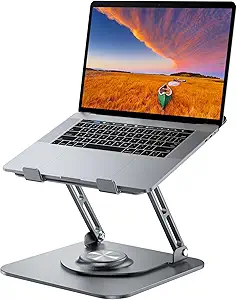 | Best for Height Range | Material: Aluminum alloy | Max Load: 11 lbs | Height Adjustment: Up to 11.81 inches | VIEW LATEST PRICE | See Our Full Breakdown |
| Besign LS03 Aluminum Laptop Stand |  | Best Fixed-Height Simplicity | Compatibility: 10-15.6 inch laptops | Material: Aluminum alloy | Maximum Support Weight: 8.8 lbs (4 kg) | VIEW LATEST PRICE | See Our Full Breakdown |
| ergonomic laptop stand | Compatibility | Material |
|---|---|---|
| Lamicall Aluminum Laptop Stand | 10" to 17.3" laptops (MacBook, Surface, Dell XPS, HP, ASUS, Acer, Chromebook) | Aluminum alloy |
| Uncaged Ergonomics Swivel Lapt | 10 to 15.6-inch devices | Metal |
| Nulaxy 360° Rotating Ergonomic | Heavy gaming and business laptops | — |
| SOUNDANCE Adjustable Laptop St | 10 to 17.3 inch notebooks | Aluminum alloy |
| Nulaxy Adjustable Laptop Stand | 10-16 inch laptops | — |
| Amazon Basics Sturdy and Porta | — | Lightweight, rust-resistant aluminum |
| Laptop Stand for Desk | 10-16 inch laptops and tablets | Aluminum alloy |
| Besign LS03 Aluminum Laptop St | 10-15.6 inch laptops | Aluminum alloy |
More Details on Our Top Picks
Lamicall Aluminum Laptop Stand for Desk for 10-17.3″ Laptops
Best Overall goes to the Lamicall because it balances price, build quality, and flexibility better than anything else in this lineup. The adjustable height and angle means you can actually dial in a proper ergonomic position rather than accepting a fixed riser height, and the large aluminum base keeps even a 17-inch machine planted. Compared with the SOUNDANCE, the Lamicall folds down flatter, so it doubles as a travel stand — something the bulkier open-frame SOUNDANCE can’t claim. The ventilation holes do real work for thermals too. The tradeoff: it’s heavier than minimalist options like the Besign LS03, and buyers wanting to swivel their screen for collaboration should look at the Nulaxy 360° instead. Silver is your only color choice.
Pros:- Fits an unusually wide range of laptops, from 10-inch tablets to 17.3-inch desktop replacements
- Height and angle adjust independently for genuine ergonomic tuning
- Wide, weighted base keeps larger laptops stable while typing
- Folds flat enough to slip into a bag
Cons:- Only available in silver, which limits desk-aesthetic matching
- Thick gaming laptops can feel precarious at the highest setting
Best for: Remote workers and students with laptops up to 17.3 inches who want one stand for desk use and occasional travel
Not ideal for: Frequent presenters who need to rotate their screen toward others — there’s no swivel base like the Nulaxy offers
- Compatibility:10″ to 17.3″ laptops (MacBook, Surface, Dell XPS, HP, ASUS, Acer, Chromebook)
- Material:Aluminum alloy
- Dimensions:12 x 10 x 2 inches
- Features:Adjustable height, foldable, ventilated for cooling
- Mounting Type:Tabletop
- Color:Silver
Our verdict“If you want one stand that handles nearly any laptop and adjusts enough to fix your neck strain, this is the safest pick in the roundup.”
Uncaged Ergonomics Swivel Laptop Stand for Desk, 360 Riser, Arctic Silver
The 360-degree swivel base is what sets this Uncaged Ergonomics stand apart from every fixed riser here — and it’s the reason it earns the Best for Screen Sharing slot. Spinning your laptop toward a colleague or client takes one hand instead of lifting the whole stand, which the Lamicall and SOUNDANCE simply can’t do. The adjustable height and tilt cover the ergonomic basics, and the vented deck handles thermals during long sessions. Compared with the Nulaxy 360°, this one feels more travel-friendly thanks to folding flatter, but the 15.6-inch compatibility ceiling is the real constraint. Anyone with a 16- or 17-inch machine is out of luck, and there’s no mention of non-slip pads, so glass desks may be a wobble risk.
Pros:- Full 360-degree rotation makes collaboration effortless
- Height and tilt adjust independently for comfortable viewing
- Vented channels keep thermals in check during long workdays
- Folds flat for travel and storage
Cons:- Compatibility stops at 15.6-inch devices
- No confirmed non-slip feet, which matters on smooth desk surfaces
Best for: Hybrid office workers who regularly turn their screen toward teammates during meetings or pair-work sessions
Not ideal for: Owners of 16-inch-and-up laptops — the 15.6-inch limit rules out most desktop replacements
- Compatibility:10 to 15.6-inch devices
- Material:Metal
- Dimensions:10.2 x 10 inches
- Rotation:360 degrees
- Adjustability:Height and tilt
- Cooling:Vented channels
- Warranty:1 year
Our verdict“Buy this if meetings involving ‘let me show you my screen’ are a regular part of your week; skip it for larger laptops.”
Nulaxy 360° Rotating Ergonomic Laptop Stand for Desk, Dual Foldable Design
Best for Heavy Laptops goes to the Nulaxy 360°, and the reason is simple: a 22-lb load rating that comfortably handles gaming rigs and mobile workstations other stands treat cautiously. Where the Uncaged Ergonomics swivel tops out at 15.6-inch devices, this Nulaxy explicitly targets heavy gaming and business laptops, pairing the rotation with anti-slip pads to keep big machines secure. The foldable design makes it travel-capable in theory, though this is fundamentally a desk-first stand — it needs clear surrounding space for the full rotation to be useful. The Lamicall matches the load tolerance for stability but lacks the spin. Tradeoffs: it can rock slightly on uneven surfaces, and pricing varies widely between sellers, so check the current deal before committing.
Pros:- 22-lb capacity handles gaming laptops and mobile workstations with ease
- 360-degree base makes screen sharing and co-op gaming simple
- Anti-slip pads keep heavy machines from sliding during intense typing
- Folds down for occasional travel
Cons:- Requires free desk space around the base for full rotation
- Can feel less stable on uneven or soft surfaces
Best for: Gamers and workstation users with heavy 17-inch-class laptops who also want to rotate their screen for couch or co-op viewing
Not ideal for: People with cluttered or cramped desks — the rotating base needs clearance to actually swivel
- Rotation:360 degrees
- Load Capacity:22 lbs
- Adjustable Height:Yes
- Foldable:Yes
- Grip:Anti-slip pads
- Compatibility:Heavy gaming and business laptops
Our verdict“The strongest pick here for thick, heavy laptops that make flimsier stands wobble — as long as your desk has room for the swivel.”
SOUNDANCE Adjustable Laptop Stand for Desk, Ergonomic Aluminum Riser for 10-17.3 Inch Notebooks
Best Value is an easy call: the SOUNDANCE delivers the same core ergonomics as the Lamicall — matching 10-to-17.3-inch compatibility, a 20-lb aluminum frame, and a wide 5.7-to-8.6-inch height range — usually at a lower price. The open-frame design is its quiet superpower, creating a slot underneath for a keyboard, hard drive, or notebook, which effectively reclaims desk real estate. Assembly is tool-light and takes minutes. Where it loses ground to the Lamicall is portability: this is a chunkier structure that doesn’t fold away as neatly, so commuters should think twice. It also shares the silver-only limitation, and the footprint can overwhelm a narrow desk. As a fixed desk setup, though, this option makes the most sense for budget-focused buyers who don’t travel with a stand.
Pros:- Height adjusts across a generous 5.7 to 8.6-inch range
- 20-lb capacity and rigid aluminum frame rival pricier rivals
- Open frame frees up desk space beneath the laptop
- Easy assembly with included tools
Cons:- Too large for very small or narrow desks
- Only offered in silver
Best for: Budget-conscious desk workers who want Lamicall-level adjustability and want to reclaim space under their laptop
Not ideal for: Travelers and people with shallow desks — it’s bulkier than folding rivals like the Lamicall or Nulaxy
- Compatibility:10 to 17.3 inch notebooks
- Material:Aluminum alloy
- Height Adjustment:5.7 to 8.6 inches
- Support Weight:Up to 20 lbs
- Design:Open-frame with heat dissipation
- Assembly:Easy, tools included
- Color:Silver
Our verdict“The smart money pick if your stand lives on one desk — near-Lamicall performance for less, at the cost of portability.”
Nulaxy Adjustable Laptop Stand for Desk, Foldable Computer Riser with Heat-Vent, Supports 10-16 inch Laptops
Best Budget Pick goes to the original Nulaxy riser, which undercuts the Lamicall and SOUNDANCE while still covering the ergonomic essentials. The dual-rod support system is the standout at this price — it eliminates the wobble that plagues cheap single-arm stands, and the geometric heat-vent panel keeps airflow moving on longer sessions. The foldable frame is genuinely pocket-friendly compared with the SOUNDANCE’s bulkier build, making this a better commuter companion. The compromises are real, though: adjustability is mostly limited to tilt rather than true height range, the 16-inch ceiling excludes larger machines, and the unspecified material means you’re trusting the brand rather than knowing exactly what you’re getting. For a MacBook Air or 14-inch ultrabook user on a tight budget, those tradeoffs land in acceptable territory.
Pros:- Dual support rods eliminate the wobble typical of budget stands
- Geometric heat-vent panel keeps thin laptops running cool
- Folds compactly for commuting and travel
- 22-lb weight rating despite the budget price
Cons:- Adjustment is tilt-focused with limited true height range
- Material construction is unspecified, unlike the aluminum Lamicall and SOUNDANCE
- Caps out at 16-inch laptops
Best for: Ultrabook and 13-to-15-inch laptop owners who want an affordable, stable, travel-friendly riser
Not ideal for: Owners of 17-inch laptops or anyone needing significant height adjustment for a standing-adjacent setup
- Compatibility:10-16 inch laptops
- Weight Capacity:22 lbs (10 kg)
- Support Mechanism:Dual support rods
- Cooling:Geometric heat-vent panel
- Foldable:Yes
- Adjustability:Ergonomic tilt
Our verdict“The cheapest way into a stable, well-vented riser — ideal for small laptops, as long as you don’t need serious height flexibility.”
Amazon Basics Sturdy and Portable Ergonomic Laptop Stand
Height adjustment under $25 is rare, and that alone justifies this stand’s place in the lineup. Compared with the Besign LS03, which locks you into a single fixed elevation, this Amazon Basics model lets you dial in up to 7 inches of lift — a real advantage if you switch between sitting and standing or share a desk with someone taller. The ventilated aluminum tray and fold-flat design make it a sensible companion for travel, though the 15.6-inch device cap is tighter than the SOUNDANCE riser, which accommodates 17.3-inch notebooks. Buyers should know that stability depends heavily on a flat, solid surface; heavier gaming laptops can introduce wobble that a heavier-based option like the 360° rotating riser avoids. For the price, the tradeoffs are reasonable rather than deal-breaking.
Pros:- Genuine height adjustment up to 7 inches at a budget price
- Folds flat to just 1.8 inches thick for travel
- Ventilated aluminum keeps laptops cooler during long sessions
- Lightweight at 1.7 lbs while still supporting 11 lbs
Cons:- Requires a flat, solid surface — flexes on soft desks or beds
- Stability suffers with heavier or larger-than-15.6-inch machines
Best for: Students and remote workers who want adjustable ergonomic height on a tight budget and need something that folds into a backpack
Not ideal for: Owners of 16-inch-plus or heavy gaming laptops — the 15.6-inch cap and 11 lb rating make it a poor fit
- Height Adjustment:Up to 7 inches
- Supported Devices:Laptops and tablets 10 to 15.6 inches
- Material:Lightweight, rust-resistant aluminum
- Loading Capacity:11 lbs (5 kg)
- Folded Size:10 x 8.7 x 1.8 inches
- Weight:1.7 lbs (0.77 kg)
Our verdict“A smart buy for budget-conscious laptop users who want adjustable height and portability without paying premium prices.”
Laptop Stand for Desk (360° Rotating), Aluminum Laptop Riser
If maximum elevation is the priority, this riser reaches nearly 12 inches — well beyond the Amazon Basics stand’s 7-inch ceiling and closer to true standing-desk territory. The 360° swivel base mirrors what the Uncaged Ergonomics Swivel offers, making it a strong choice for designers or consultants who constantly turn their screen toward clients. The tradeoff for that height and rotation is mass: the heavy base that keeps it planted also makes it the least backpack-friendly option here, and the open-frame design gives less structural reassurance to heat-sensitive machines than fully ventilated trays. Still, for a fixed desk setup where adjustability and screen sharing matter more than portability, this model makes the most sense in the lineup.
Pros:- Height range up to 11.81 inches, the tallest in this roundup
- 360° rotation for instant screen sharing
- Heavy base keeps larger laptops stable at full extension
- Compatible with 10-16 inch devices, including 16-inch MacBooks
Cons:- Heavier than dedicated travel stands, limiting portability
- Open design offers less protection for heat-sensitive devices
Best for: Professionals at fixed desks who want standing-height elevation and frequent screen sharing with colleagues or clients
Not ideal for: Frequent travelers and commuters — the heavier rotating base undermines the portability smaller stands deliver
- Material:Aluminum alloy
- Max Load:11 lbs
- Height Adjustment:Up to 11.81 inches
- Rotation:360°
- Compatibility:10-16 inch laptops and tablets
- Folded Size:9.45 x 9.45 x 1.25 inches
Our verdict“The pick for desk-bound users who need maximum height flexibility and swivel sharing and don’t plan to travel with it.”
Besign LS03 Aluminum Laptop Stand
Sometimes the right stand is the one you set up once and forget, and the Besign LS03 delivers exactly that experience. Its single 6-inch fixed elevation hits the ergonomic sweet spot for most seated desks, but buyers must accept there’s no tuning — a real limitation next to the Amazon Basics riser, which offers the same ballpark lift with seven inches of adjustability. Where the LS03 pulls ahead is rigidity and ease of setup: the detachable design assembles in minutes and feels more planted than cheaper adjustable options, with open-air construction that vents heat effectively. The 8.8 lb weight limit is lower than several rivals here, so heavier workstations should look elsewhere. Compared with the Lamicall stand, it trades broader device support for a more compact footprint.
Pros:- Rock-solid stability thanks to its fixed, detachable frame
- Simple tool-light assembly with foldable storage
- Open aluminum design dissipates heat well
- Effectively relieves neck and shoulder strain at seated desk height
Cons:- No adjustable height — fixed 6-inch elevation only
- 8.8 lb load limit excludes heavier gaming and workstation laptops
Best for: Desk workers with standard 10-15.6 inch laptops who want a set-and-forget riser at a comfortable seated viewing height
Not ideal for: Taller users or sit-stand desk setups — with no height adjustment beyond its fixed 6 inches, it can’t adapt
- Compatibility:10-15.6 inch laptops
- Material:Aluminum alloy
- Maximum Support Weight:8.8 lbs (4 kg)
- Elevation:Up to 6 inches (14.5 cm)
- Design:Detachable, foldable for storage
- Color:Silver
Our verdict“A dependable one-height riser for standard laptop users who value stability and simplicity over adjustability.”

How We Picked
I evaluated each stand against four buyer-facing criteria. Ergonomic range came first: how high the screen actually sits, whether height is adjustable or fixed, and whether the typing angle stays comfortable. Stability came second — a stand that flexes or wobbles during typing undermines its purpose, so frame rigidity, base footprint, and behavior at maximum height were weighted heavily. Build and compatibility covered aluminum quality, weight capacity, and whether the tray fits everything from a 12-inch ultrabook to a 17-inch workstation. Finally, value and portability judged whether the price reflects the feature set and whether the stand folds for travel.
The ranking logic favors everyday desk ergonomics over gimmicks. Stands that deliver a stable, correctly positioned screen at a fair price rank highest; swivel and foldability are treated as bonuses rather than must-haves, since they often compromise rigidity. That’s why the no-frills Lamicall outranks the more feature-laden rotating models, and why the budget Amazon Basics riser places above pricier stands with narrower laptop compatibility.
| ergonomic laptop stand | Material |
|---|---|
| Lamicall Aluminum Laptop Stand | Aluminum alloy |
| Uncaged Ergonomics Swivel Lapt | Metal |
| Nulaxy 360° Rotating Ergonomic | — |
| SOUNDANCE Adjustable Laptop St | Aluminum alloy |
| Nulaxy Adjustable Laptop Stand | — |
| Amazon Basics Sturdy and Porta | Lightweight, rust-resistant aluminum |
| Laptop Stand for Desk | Aluminum alloy |
| Besign LS03 Aluminum Laptop St | Aluminum alloy |
Factors to Consider When Choosing Ergonomic Laptop Stands
Before picking a stand, it helps to understand what actually drives comfort and what tradeoffs the category forces you to make. These are the factors that separated the winners from the rest in this comparison.Fixed Height vs. Adjustable Height
The biggest mistake buyers make is assuming every stand is height adjustable. Many popular aluminum stands, including fixed-frame models, only tilt the laptop — they don’t raise the screen meaningfully toward eye level. If your desk and chair height are already correct, a fixed stand may suffice. But if your screen sits well below eye level, only a true riser design with multiple height settings fixes the problem, and you should filter for that feature explicitly. Adjustable models cost roughly the same as fixed ones in this lineup, so there’s rarely a price penalty for choosing flexibility. The catch: multi-position stands use moving joints, which introduces the potential for wobble that single-piece designs don’t have. Decide whether your priority is maximum rigidity or the ability to fine-tune your setup.
Laptop Size and Weight Capacity
Compatibility ranges in this category span from 15.6 to 17.3 inches, and the difference matters more than it looks. A 16-inch gaming laptop or 17-inch workstation may physically overhang a smaller tray, blocking vents or making the setup unstable. Weight ratings between 10 and 20 lbs also diverge, and heavier machines amplify any flex in a stand’s joints. If you own a large laptop, prioritize wide trays and higher load ratings even if it means skipping compact foldable designs. Ultrabook owners have the opposite luxury — nearly every stand here will hold a 2.5 lb machine securely. Check your laptop’s actual dimensions against the tray, not just the marketing size range, since some ’16 inch’ trays measure tighter than claimed.
Swivel Bases: Useful Feature or Wobble Risk?
360° rotating bases are increasingly common, and they’re genuinely valuable for specific workflows — turning your screen toward a colleague, presenting to someone across the desk, or switching between two seating positions. But the rotating mechanism is a mechanical weak point. Every swivel stand in this comparison traded some rigidity for the rotation, with a slight rock at the pivot under heavy typing. If you rarely share your screen, that trade is pure downside. Buyers who work solo at a fixed desk position should generally skip swivel and choose a welded or single-piece frame. Reserve rotating stands for collaborative spaces, reception desks, and hot-desking environments where the feature earns its keep.
Cooling and Heat Management
Standing a laptop on its edge reduces airflow to the bottom panel, and a stand with a solid surface can trap heat during sustained workloads. The best designs use open aluminum frames with ventilation cutouts that let air circulate freely while the metal itself acts as a passive heat sink. This matters most for gaming laptops, video editing machines, and any laptop that runs fans constantly under load. Office ultrabooks doing browser and document work rarely generate enough heat for this to matter. Don’t pay extra for ‘cooling’ marketing claims, though — active fan stands are a different category, and passive ventilation is all most users need.
Portability and Desk Permanence
Decide honestly whether your stand lives on one desk or travels with you. Foldable stands collapse flat enough for a backpack, but folding joints are the same joints that introduce wobble, and setup time adds friction if you assemble and disassemble daily. Fixed single-piece stands are permanently stable but hog bag space and often don’t fit slim laptop sleeves. A middle path exists: detachable two-piece designs break down quickly for occasional travel while staying rigid in daily use. Also consider your desk real estate — larger bases resist tipping but can crowd a small workspace or force your external keyboard too far away.
Price Tiers and When to Pay More
This category has a strange price curve: functional stands exist under $25, and paying beyond $50 rarely buys better ergonomics — it buys materials, mechanisms, or brand polish. The budget tier gets you solid fixed-height aluminum with good stability. The mid-range adds height adjustability, better machining, and rubber padding quality. The premium tier is only worth it for specialized features like smooth-action swivels or heavy-duty load ratings. A common overspend is paying premium prices for stands whose extra features you won’t use. Match the tier to your actual needs: most buyers are best served in the $20-40 range, where nearly every pick in this roundup sits.
Frequently Asked Questions
Do ergonomic laptop stands actually help with neck and back pain?
Yes, but only when paired with an external keyboard and mouse. A stand raises the screen to eye level, which reduces the forward head tilt that causes neck strain — but if you type on the raised laptop’s keyboard, you’ve simply traded neck pain for shoulder and wrist strain. The correct setup is laptop screen at eye height, external keyboard and mouse at elbow height. Stands with adjustable height, like the SOUNDANCE or Amazon Basics models, make it easier to hit that position on different desks and chairs. If you’re not willing to use peripherals, a stand provides mostly cooling benefits rather than ergonomic ones.
Is a 360° rotating stand worth the extra cost?
It depends entirely on how you work. If you regularly share your screen with someone sitting beside or across from you, or you present from your laptop in meetings, rotation is a feature you’ll use weekly and it justifies the price. If you work alone at a fixed position, the rotating mechanism adds cost and a small amount of wobble with no real benefit. In this comparison, the Uncaged Ergonomics swivel had the smoothest rotation, while the generic rotating riser showed more play at the pivot. Solo desk workers are generally better served spending the same money on a stiffer fixed stand.
Can these stands hold a 17-inch gaming laptop safely?
Only some of them. The Lamicall and SOUNDANCE are rated for laptops up to 17.3 inches and have the tray width and weight capacity to back it up, making them the safe picks here. Smaller stands like the Nulaxy Adjustable (16 inches) and Besign LS03 (15.6 inches) may leave a heavy gaming machine overhanging the edges, which blocks airflow and risks tipping. Weight matters as much as size — many gaming laptops weigh 5-6 lbs, and heavier machines amplify wobble on multi-joint stands. Check both the tray dimensions and the load rating before buying if you own a large machine.
Will a laptop stand help with overheating?
Passively, yes — most stands lift the laptop and expose the bottom panel to airflow, and aluminum frames help dissipate heat through the metal itself. Models with open frames and ventilation cutouts perform this role noticeably better than solid-surface designs. However, a stand won’t fix an underlying cooling problem; if your laptop thermal throttles under load, the stand helps marginally but a cooling pad with fans or an internal cleaning will do more. For typical office workloads, any ventilated stand in this lineup handles heat adequately. Gamers and video editors should prioritize stands with maximum open surface area, like the Lamicall or SOUNDANCE.
What’s the difference between a fixed-angle stand and a height-adjustable riser?
A fixed-angle stand holds the laptop at one preset elevation and tilt — it’s stable, simple, and fine if that height happens to match your eye level. A height-adjustable riser lets you raise or lower the screen across several positions, which matters if you share the stand between people, move between desks, or can’t change your chair height. The tradeoff is mechanical: adjustable stands use sliding or locking joints, which introduce slight flex compared with one-piece welded frames. If you’re tall and your laptop screen sits far below eye level, an adjustable model like the Amazon Basics or SOUNDANCE riser is the better choice. If your setup is already close to correct, a fixed Lamicall-style stand delivers more stability per dollar.
Conclusion
For most buyers, the Lamicall Aluminum Laptop Stand is the best overall pick — it pairs a rock-solid frame with broad 10-17.3 inch compatibility and does the core job of raising your screen without wobble or fuss. Best value goes to the SOUNDANCE Adjustable Stand, which adds genuine height adjustment at a price competitive with fixed models. Beginners and cautious spenders should start with the Amazon Basics Height Adjustable Riser, which makes experimentation with desk ergonomics nearly risk-free. The Uncaged Ergonomics Swivel is the premium choice for professionals who present and collaborate often and want the smoothest rotating base. For portability, the foldable Nulaxy 360° and the detachable Besign LS03 travel best, while the Nulaxy Adjustable suits small-laptop owners who want height range in a compact footprint. Whatever you choose, pair the stand with an external keyboard and mouse — that combination, not the stand alone, is what actually fixes your posture.