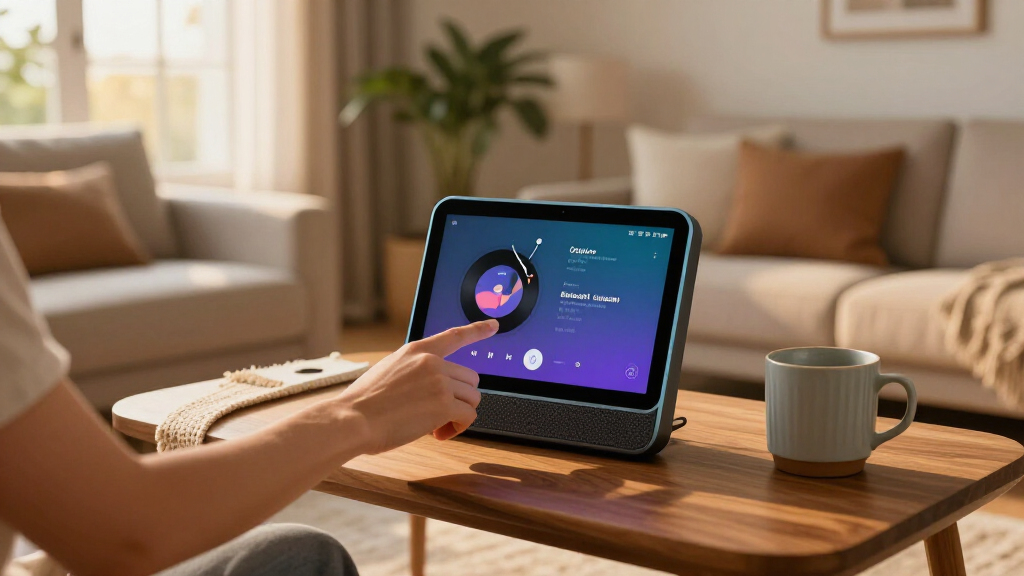

This guide helps you identify the latest Amazon Echo devices available in your country, compare their features, and choose the right one for your home. It is for first-time Echo buyers and people replacing an older model. No technical experience is required; allow 20-40 minutes to compare models and check setup requirements. Amazon changes its product lineup and availability over time, so verify the model name, generation, and specifications on Amazon’s local website before you buy.

Get the latest gadgets delivered free — and shop member deals
- Fast, free delivery on millions of items
- Access to Prime Big Deal Days deals on October 6–7
- Prime Video, Amazon Music and more included

Echo Show 11 (newest model) – Vibrant Full-HD 11" display with spatial audio, Graphite
- ✔ Display: 11-inch Full HD
- ✔ Processor: AZ3 Pro chip
- ✔ Audio: Spatial audio with up to 2x bass

Echo Dot (5th Gen) – Deep Sea Blue
- ✔ Dimensions: 3.9 × 3.9 × 3.5 inches
- ✔ Weight: 10.7 oz
- ✔ Audio bandwidth: 62 Hz–19 kHz

Echo Dot (5th Gen) – Charcoal
- ✔ Dimensions: 3.9 × 3.9 × 3.5 inches
- ✔ Weight: 10.7 oz
- ✔ Audio bandwidth: 62 Hz–19 kHz
Difficulty: Beginner | Time: 20-40 minutes
What You’ll Need
Tools & Materials:
- A phone, tablet, or computer with internet access
- Access to Amazon’s website for your country
- The Alexa app, if you plan to set up the device after purchase
Knowledge:
- Basic familiarity with your room, Wi-Fi network, and intended use for the speaker
“Latest” can mean a recently released model, the newest generation of a familiar product, or the newest model currently in stock in your country. Product names, colors, features, and release dates can vary by region. Treat the product listing and Amazon’s support pages as the final reference, rather than relying on an old article or an unverified seller listing.
Echo Show 11 (newest model) – Vibrant Full-HD 11" display with spatial audio, Graphite
The Echo Show 11 ranks first because it does more than provide hands-free Alexa: it gives us a substantial screen for visual information, video calls, and smart-home control. Its 11-inch Full-HD display offers considerably more viewing area than a compact speaker can, while the built-in hub can simplify control of compatible devices without a separate controller. Compared with either Echo Dot, this is the better fit when we want a shared household device people can glance at and interact with.Its camera and auto-framing video calls make the Show 11 more useful for conversations than a voice-only Dot, and spatial audio gives it a broader media role. The AZ3 Pro chip and Omnisense features add to its focus on responsive, context-aware assistance. Those strengths come with a placement constraint: it needs constant power, so it is best on a counter, desk, or bedside surface near an outlet. Buyers seeking a small speaker they can tuck anywhere should choose a Dot instead. The supplied details also do not make it a portable option, and its larger screen may be unnecessary if we mainly ask for timers or weather.Privacy controls include a physical mic and camera mute button plus software safeguards. That is useful for a device with a camera and screen, though buyers who prefer a screen-free room may be more comfortable with the Dots’ simpler form. We choose the Show 11 for capability, not minimalism.
Pros:
- Large 11-inch Full-HD touchscreen for visual tasks and shared use.
- Built-in smart-home hub reduces the need for a separate controller.
- Auto-framing camera and spatial audio broaden its video-call and media roles.
- Physical camera and microphone mute control.
Cons:
- Requires constant power, limiting placement to locations near an outlet.
- Larger and more screen-focused than needed for basic Alexa requests.
- The supplied details do not specify battery operation or portable use.
Best for: Households that want a fixed-position Alexa display for smart-home controls, video calls, and visual information.
Not ideal for: Buyers who need a portable or especially compact device, want a screen-free speaker, or mainly use Alexa for simple voice commands.
Bottom line: Choose the Echo Show 11 when a display, video calls, and built-in smart-home control matter more than compact placement.
“Choose the Echo Show 11 when a display, video calls, and built-in smart-home control matter more than compact placement.”
Echo Dot (5th Gen) – Deep Sea Blue
The Echo Dot (5th Gen) in Deep Sea Blue is our compact pick for a room where a screen would take up space without adding much value. It handles common Alexa tasks—music, timers, weather, and compatible smart-home controls—in a small body measuring 3.9 inches across. Its built-in eero extension capability is an extra benefit for households already using compatible eero equipment, although it should not be mistaken for a standalone mesh system.Compared with the Echo Show 11, the Dot is easier to fit on a bedside table or desk and keeps the experience voice-first. The tradeoff is a single 1.6-inch full-range driver with mono playback, so it is not the choice for a wide, immersive listening setup or on-device visual controls. Bluetooth support is listed, but the product information also notes limitations and no hands-free calling; buyers who prioritize calls or a richer media interface should look to the Show 11.Deep Sea Blue gives this version a more visible accent than the Charcoal alternative. That is a styling distinction, not a performance upgrade: the two Dots have the same listed dimensions, weight, audio configuration, and eero coverage. We rank this color first among them as a strong everyday compact option, while recommending Charcoal for buyers who want the speaker to blend into its surroundings. The mic-off button adds a direct privacy control, a practical reassurance for a device that listens for voice commands.
Pros:
- Compact body fits easily on small surfaces.
- Alexa supports everyday voice requests and compatible smart-home control.
- Built-in eero extension capability can add coverage in a compatible setup.
- Mic-off button provides a straightforward privacy control.
Cons:
- Mono playback from one full-range driver limits stereo separation.
- Eero extension functionality depends on compatible eero equipment.
- Does not provide the screen, camera, or built-in hub experience of the Show 11.
Best for: Buyers who want a small, voice-first Alexa speaker for a bedroom, kitchen, or desk and prefer a blue accent finish.
Not ideal for: Listeners seeking stereo or fuller room-filling sound, shoppers who need a display or hands-free calling, or households without compatible eero equipment that expect the extension feature to work independently.
Bottom line: Pick the Deep Sea Blue Dot for compact voice control and a distinctive finish, not for stereo sound or screen-based features.
“Pick the Deep Sea Blue Dot for compact voice control and a distinctive finish, not for stereo sound or screen-based features.”
Echo Dot (5th Gen) – Charcoal
The Charcoal Echo Dot (5th Gen) offers the same core Alexa and speaker setup as the Deep Sea Blue model, but its darker finish makes it a natural match for understated rooms and electronics. If we want voice access to music, timers, weather, and compatible smart-home devices without dedicating space to a display, it fills that role neatly. Its compact footprint is the same as the blue Dot, so neither color has an advantage in placement or portability.That similarity is important: the Charcoal version is not a higher-performing alternative. Both listed Dots use a 1.6-inch mono driver and share the same stated dimensions and eero extension reach. Compared with the Show 11, this Dot sacrifices a touchscreen, camera, spatial audio, and integrated hub in exchange for a simpler, smaller voice-first device. That makes it a better fit for a nightstand or secondary room, but a weaker choice as a central media and smart-home station.The eero feature can extend coverage in a compatible setup, but the listing notes that full functionality requires a compatible eero router and account. Bluetooth can connect with other speakers, though the listed connection support does not change the Dot’s own mono output, and the product details flag limitations around hands-free calling. The mic-off button is useful if we want a direct way to stop listening. Choose Charcoal over Deep Sea Blue for its more discreet appearance; choose the Show 11 instead if a screen and more capable call experience are priorities.
Pros:
- Small footprint works well in compact rooms and on bedside surfaces.
- Voice control covers everyday Alexa and compatible smart-home tasks.
- eero extension capability adds value for households with compatible equipment.
- Mic-off button offers an accessible privacy control.
Cons:
- Mono output lacks the separation and depth of a stereo setup.
- Full eero functionality requires a compatible router and account.
- No display or camera, and it does not match the Show 11’s broader role.
Best for: Buyers who want a compact Alexa speaker for a bedroom, office, or secondary room and prefer a finish that blends into darker decor.
Not ideal for: Anyone looking for a meaningful performance difference from the Deep Sea Blue Dot, stereo listening, a touchscreen, or an all-in-one visual smart-home hub.
Bottom line: Choose the Charcoal Dot when you want the compact Echo Dot experience in a finish that recedes into the room.
“Choose the Charcoal Dot when you want the compact Echo Dot experience in a finish that recedes into the room.”
As an Amazon Associate we earn from qualifying purchases.
Before You Start
Decide what you want the Echo to do before comparing models. Common uses include voice-controlled music, timers, smart-home control, video calls, and viewing recipes or camera feeds on a screen. Also check where the device will sit and whether that location has a power outlet and reliable Wi-Fi. Do not assume that a feature advertised for one Echo model is available on every model; check the listing for the exact generation and regional version.
Amazon product pages may show a newer model alongside older generations, refurbished units, or third-party listings. Compare the model name and generation carefully. A low price alone does not establish that a device is the newest version.
Step-by-Step Instructions
Step 1: Set your priorities
Write down your main use, where you will place the device, and the features you need. For example, note whether you want a compact speaker for a bedroom, stronger sound for a living room, a screen for video or smart-home controls, or a device intended to manage compatible smart-home equipment. Set a spending limit before browsing.
Separate must-have features from nice-to-have features. If you mainly want timers and basic voice control, you may not need a screen or premium audio. If you want to make video calls or view compatible camera feeds, check screen and camera specifications rather than choosing by appearance alone.
Tip: Check who will use the device. A shared room, a child’s room, and a private office can call for different placement, privacy, and account settings.
Check: You have a short list of required features, a likely placement, and a price range.
Step 2: Check Amazon’s current Echo lineup
Open Amazon’s website for your country and search for “Amazon Echo” or visit its Alexa and Echo device section. Check the product names and generations shown as current models. Open the product page for each candidate and confirm its release or generation details in the title, specifications, and product description.
Use Amazon’s official product pages or help pages to verify features and availability. If you compare a retailer’s listing, check that it names the same generation and that the seller is reputable. Do not treat a search result’s “new” label as proof that the device is the newest generation; it may mean new condition rather than new model.
Tip: Listings can vary by country, and a newer model may not be available everywhere. Record the model name exactly as written on the official listing.
Check: You have a current list of Echo models available in your market, with each model’s generation identified.
Step 3: Compare device types and features
Compare each candidate against your priorities. Look at whether it is a speaker or a display, its stated audio features, screen size if applicable, camera availability, smart-home capabilities, physical controls, and supported connections. Check the complete specifications for the exact model; do not infer a feature from a product photo or from another device in the same family.
Compare practical differences as well as headline features. A display takes more space and needs a suitable viewing position. A small speaker may fit a bedside table but may not suit a large room if you expect room-filling sound. For smart-home use, confirm that the device supports the connection types and devices you already own. Feature support can vary by model, software, and region.
Tip: Look for the included power adapter and any stated requirements. Echo devices generally need a power source; do not assume a model can run on batteries unless its listing explicitly says so.
Check: You can explain why your leading model meets your must-have needs better than the other candidates.
Step 4: Check compatibility and setup requirements
Confirm that your home has a working Wi-Fi connection and that you can access the Amazon account you plan to use. Check the device’s listing or support page for network requirements and any regional limitations. If you plan to connect smart-home products, check their compatibility with Alexa and whether they require a separate hub, app, or account.
Install or update the Alexa app on a compatible phone or tablet if you expect to configure the Echo yourself. Make sure you can sign in to the app. If you will use the device with another household member, decide which Amazon account and household settings should apply before setup.
Tip: If your Wi-Fi name or password is likely to change, have the current details ready. A mistyped password is a common reason setup does not finish.
Check: You have working Wi-Fi, the right account access, and a compatible phone or tablet available for setup.
Step 5: Choose the model and verify the listing
Select the device that covers your must-have features without paying for extras you do not plan to use. Before ordering, read the listing title and specifications again. Confirm the generation, color, included accessories, seller, delivery region, return terms, and whether the unit is new, refurbished, or used.
Check that the product is compatible with your country’s power and service availability. Save the product page or note the exact model name and generation. This makes it easier to confirm that the delivered box matches what you ordered.
Tip: When two listings look nearly identical, compare their model or generation details rather than relying on the product image.
Check: Your order or purchase plan names the intended Echo model and generation and matches your required features.
Step 6: Prepare to set up the Echo when it arrives
Unbox the Echo and check that the device, power adapter, and included documentation match the order. Place it near a power outlet and within reliable Wi-Fi coverage. For a display, position the screen where you can see it without blocking the camera or placing it near water, heat, or a spot where it can fall.
Connect the power adapter and follow the device’s on-screen prompts or the Alexa app’s instructions to connect it to Wi-Fi and register it to your Amazon account. Review the privacy and voice-history controls in the app. Add smart-home devices only after the Echo is online, and follow the setup steps for each device.
Tip: Setup screens and app menus can change with software updates. Follow the prompts shown for your model instead of relying on instructions written for a different generation.
Check: The Echo connects to Wi-Fi, appears in the Alexa app under the intended account, and responds to a basic voice request.
Common Mistakes to Avoid
- Confusing a new-condition listing with the latest Echo generation. — Verify the model name and generation on an official product page; the word “new” may describe the item’s condition.
- Buying based on a feature shown for another Echo model. — Check the exact model’s specifications for features such as a screen, camera, audio functions, and smart-home connections.
- Choosing a device without checking the intended location. — Confirm that the spot has power and reliable Wi-Fi, and that a display can be viewed comfortably.
- Ordering a model that does not suit local availability or setup needs. — Use the Amazon site for your country and review regional compatibility, delivery, and return details before purchase.
Troubleshooting
Problem: Search results show several similar Echo models and it is unclear which is newest.
Solution: Open each official product page and compare the generation or model details in the title and specifications. Check Amazon’s current Echo device pages for your country; do not rely on search ranking or seller wording alone.
Problem: The Echo will not connect to Wi-Fi during setup.
Solution: Check that the phone running the Alexa app is connected to the intended network, re-enter the password carefully, and move the Echo closer to the router. Restart the router and Echo if needed, then repeat the app’s setup prompts.
Problem: A smart-home device does not appear in Alexa.
Solution: Confirm that the device is compatible with Alexa and set up in its own app first. Check whether it needs a skill, linked account, or separate hub, then use the Alexa app to discover devices again.
Problem: The delivered device does not match the model ordered.
Solution: Compare the packaging and device model information with the order details. If the generation, condition, or included accessories differ, contact the seller or Amazon support before setting it up.
What Success Looks Like
You have identified the current Echo models offered in your region, verified the generation and features of the model you selected, and confirmed that it fits your budget, intended location, Wi-Fi, and smart-home needs. If you have purchased and set it up, the device should appear in the Alexa app under the correct account, remain connected to Wi-Fi, and respond to a basic voice request. Its features should match the product listing for that exact model.
Next Steps
After setup, test the functions you bought the Echo for, such as music playback, timers, a compatible smart light, or a video call. Review microphone controls, camera controls if present, voice-history settings, and household access in the Alexa app. Keep the model name and order details for future support. If Amazon releases another generation later, compare its specific improvements with your needs before replacing a working device.
Frequently Asked Questions
How can I tell whether an Amazon Echo is the latest generation?
Check the model name and generation on Amazon’s official product page for your country, then compare it with the current Echo lineup page. Verify the exact listing rather than relying on the product image or a “new” condition label.
Are the newest Echo models available in every country?
No. Release timing, model selection, colors, and features can vary by country. Check the local Amazon store and regional support information before ordering from another market.
Do all Echo devices have a screen or camera?
No. Echo models differ. Read the specifications for the exact device to confirm whether it has a display, camera, or the audio and smart-home features you want.
Can I use an Echo with smart-home devices I already own?
Often, but compatibility depends on the Echo model and the smart-home product. Check the product’s Alexa compatibility details and whether it needs a hub, linked account, or setup in a separate app.
What do I need to set up an Echo?
You generally need power, a Wi-Fi network, access to an Amazon account, and a compatible phone or tablet with the Alexa app. Follow the prompts for your particular Echo model because setup screens and features may differ.
Halloween Picks
halloween
As an affiliate, we earn on qualifying purchases.



![A Walkable ASCII Cyberpunk City In One HTML File [Video]](https://yougonews.com/wp-content/uploads/2026/09/a-walkable-ascii-cyberpunk-city-in-one-html-file-video-featured-560x300.jpg)