

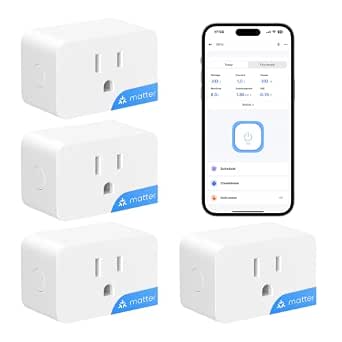
For most buyers, I’d start with the Kasa Matter Smart Plug with Energy Monitoring 4-Pack: it pairs energy tracking with Matter support and a useful multi-plug bundle. The Tapo P110M 15 A is a strong alternative for shoppers comparing Matter-ready options, while Emporia’s four-pack suits households that want plugs from an energy-focused brand. The main tradeoffs are platform compatibility, how much energy detail the app provides, and whether a larger pack fits your needs. Check each model’s requirements before buying, especially if your home uses a hub or a particular smart-home ecosystem. Read on for how all 11 options compare and which one fits your setup.

Get the latest gadgets delivered free with Prime
- Fast, free delivery on millions of items
- Prime Video, Amazon Music and more included
- Member-only deals all year
Complete the kit



Key Takeaways
- Matter support is a key separator: the Kasa Matter and Tapo P110M options add broad smart-home compatibility, but buyers should still check platform and controller requirements.
- Pack size changes the value calculation: several models appear in both two- and four-plug bundles, so the right choice depends on how many outlets you actually plan to monitor.
- Energy monitoring is not equally useful to every household: app presentation and energy-focused tools may matter more than basic on/off control for buyers tracking appliance consumption.
- Rated load and device type deserve attention: 15 A models offer a stated capacity, but a smart plug is not a substitute for checking an appliance’s operating requirements.
- Connectivity varies: some picks specify Matter, while Govee lists Wi-Fi and Bluetooth and other models rely on Wi-Fi; confirm network and setup compatibility before choosing.




| smart plugs with energy monitoring | Pack size | Connectivity | Operating voltage | Model |
|---|---|---|---|---|
| Kasa Matter Smart Plug with En | 4 | Matter, Wi-Fi, SmartThings | 120 V | KP125MP4 |
| TP-Link Tapo P110M Matter Smar | 4 | Matter, 2.4 GHz Wi-Fi | — | — |
| AiSeek Smart Plug with Energy | 4 | 2.4 GHz Wi-Fi, Bluetooth | 120 V | KT-US-EM-15AP |
| SONOFF S61s Matter Smart Plug | 4 | Matter over 2.4 GHz Wi-Fi | 120 V | S61STPB |
| Govee Smart Plug with Energy M | 4 | Wi-Fi and Bluetooth | 120 V AC | H5086 |
| Tapo P110M Matter Smart Plugs | 2 plugs | 2.4 GHz Wi-Fi | — | P110M |
| THIRDREALITY Smart Plug Gen3 | 4 plugs | Zigbee 3.0 | 110 V | — |
| Tapo P115 Smart Wi-Fi Plug wit | 2 plugs | 2.4 GHz Wi-Fi | 125 V | P115 |
| Emporia Energy Monitoring Smar | 4 plugs | 2.4 GHz Wi-Fi; 5 GHz not supported | 120 V | — |
| Tapo P115 Smart Wi-Fi Plug wit | 4 plugs | 2.4 GHz Wi-Fi | 110 V AC | P115 |
| Kasa Matter Smart Plug with En | 2 plugs | Matter, Wi-Fi, SmartThings; 2.4 GHz Wi-Fi | 120 V | KP125MP2 |
More Details on Our Top Picks
Kasa Matter Smart Plug with Energy Monitoring, 4-Pack
I’d put the Kasa Matter four-pack first for buyers who want energy monitoring without tying every plug to one smart-home brand. Matter support spans Apple Home, Alexa, Google Home, and SmartThings, while local-network control can keep commands working when internet service drops. That gives it an advantage over the AiSeek Smart Plug, which depends on the SmartLife app and offers a narrower set of stated voice-platform integrations. Its compact, UL-certified flame-retardant design is also a reassuring fit for everyday indoor devices. The tradeoff is a 15 A, 1800 W ceiling, shared by several alternatives here, and setup requires 2.4 GHz Wi-Fi. Choose Kasa for broad platform flexibility; skip it if your network only uses 5 GHz or your appliance exceeds its rating.
Pros:- Matter support works with four major smart-home platforms.
- Tracks connected-device energy use.
- Local-network control can work without internet service.
- Compact, UL-certified flame-retardant construction.
Cons:- Requires a 2.4 GHz Wi-Fi network.
- The 15 A and 1800 W limit rules out higher-load appliances.
Best for: Households using Apple Home, Alexa, Google Home, or SmartThings that want four energy-monitoring plugs and local control options.
Not ideal for: Buyers with 5 GHz-only Wi-Fi or appliances that draw more than 15 A or 1800 W.
- Model:KP125MP4
- Pack size:4
- Maximum load:15 A, 1800 W
- Operating voltage:120 V
- Connectivity:Matter, Wi-Fi, SmartThings
- Wi-Fi band:2.4 GHz
- Compatible platforms:Apple Home, Amazon Alexa, Google Home, Samsung SmartThings
- Warranty:2-year limited warranty
Our verdict“Choose Kasa for a four-plug set that pairs energy tracking with broad Matter compatibility and local control.”
TP-Link Tapo P110M Matter Smart Plugs with Energy Monitoring, 4-Pack, 15 A
The Tapo P110M four-pack is the strongest fit here for buyers who want energy data to trigger practical limits, not just appear in an app. Its customizable power thresholds can help manage consumption or flag a device that is drawing more power than expected, alongside monitoring, schedules, and voice control. Like the Kasa Matter Smart Plug, it supports Matter across Apple Home, Alexa, Google Home, and SmartThings, so platform choice need not dictate the purchase. The Kasa listing, however, specifically describes local control when internet service is unavailable; that detail is not stated for Tapo. The main compromise is familiar: 2.4 GHz Wi-Fi is required, and the 1800 W rating limits use with higher-load equipment. Pick Tapo when thresholds matter more than offline-control assurances.
Pros:- Matter compatibility covers Apple Home, Alexa, Google Home, and SmartThings.
- Energy monitoring provides consumption statistics.
- Power thresholds add a way to manage or flag excess draw.
- Supports app, voice, and scheduled control.
Cons:- Requires 2.4 GHz Wi-Fi.
- Its 1800 W rating does not suit higher-load appliances.
- Offline local control is not specified in the supplied product details.
Best for: Smart-home users who want a four-plug Matter set with energy statistics, scheduled operation, and configurable power thresholds.
Not ideal for: Buyers who need stated local control during an internet outage or have a 5 GHz-only Wi-Fi network.
- Pack size:4
- Maximum wattage:1800 W
- Connectivity:Matter, 2.4 GHz Wi-Fi
- Control:App, voice, scheduling
- Compatible platforms:Alexa, Apple Home, Google Home, SmartThings
- Operation mode:Automatic
- Certification:UL Certified
- Color:White
Our verdict“Choose Tapo if configurable energy thresholds are more useful to you than the Kasa plug’s stated offline local control.”
AiSeek Smart Plug with Energy Monitoring, 15A, 2.4 GHz Wi-Fi, 4-Pack
The AiSeek four-pack suits buyers who already organize devices in SmartLife and want energy tracking plus timers and group control in the same app. Its overload and short-circuit protection add a stated layer of protection, while compact dimensions help when outlets are close together. Compared with the Matter-based Kasa KP125MP4 and Tapo P110M, AiSeek does not offer the same broad platform flexibility: Alexa and Google Assistant control requires linking through SmartLife, and direct Alexa connection is not supported. That app dependency is the central tradeoff, not a small setup detail. Its 15 A, 1800 W rating is in line with those alternatives, and it also needs 2.4 GHz Wi-Fi. I’d choose it for SmartLife-centered routines, but not for a Matter-first home.
Pros:- Tracks connected-device power and energy use in real time.
- Schedules, timers, and group control support flexible automation.
- Works with Alexa and Google Assistant through SmartLife.
- Compact body includes overload and short-circuit protection.
Cons:- Requires the SmartLife app for setup and related integrations.
- Alexa control requires SmartLife linking; direct Alexa connection is not supported.
- Requires 2.4 GHz Wi-Fi.
Best for: Buyers already using SmartLife who want four compact plugs with energy monitoring, group control, and timers.
Not ideal for: Matter-focused households or Alexa users who want to connect plugs directly without routing setup through SmartLife.
- Model:KT-US-EM-15AP
- Pack size:4
- Maximum load:15 A, 1800 W
- Operating voltage:120 V
- Connectivity:2.4 GHz Wi-Fi, Bluetooth
- App:SmartLife
- Voice assistants:Amazon Alexa, Google Assistant
- Dimensions:1.4 x 2.8 x 2 inches
- Certifications:FCC, ETL
Our verdict“Pick AiSeek if SmartLife is already your automation hub, but choose Kasa or Tapo for broader Matter integration.”
SONOFF S61s Matter Smart Plug with Energy Monitoring, 15A, 4-Pack
The SONOFF S61s stands apart by pairing energy monitoring with stated electricity-cost tracking, giving buyers a more direct way to relate a device’s consumption to household bills. It supports Matter over Wi-Fi and works with Apple Home, Alexa, Google Home, and SmartThings without a hub, much like the Kasa KP125MP4. SONOFF lists a higher maximum power figure—1875 W versus Kasa’s 1800 W—though both are rated at 15 A, so I would still check appliance requirements rather than treating that difference as permission for any high-load use. The drawback is its IP20 rating, which offers limited protection from dust and moisture; this is an indoor plug, not an outdoor choice. It also requires 2.4 GHz Wi-Fi.
Pros:- Tracks real-time power use and electricity costs.
- Matter support spans Apple Home, Alexa, Google Home, and SmartThings.
- No hub is required.
- Supports remote control, schedules, and automation.
Cons:- IP20 rating provides limited dust and moisture protection.
- Requires 2.4 GHz Wi-Fi.
- Although rated at 15 A, appliance compatibility still depends on its load requirements.
Best for: Matter users who want to monitor both energy consumption and estimated electricity costs across several indoor appliances.
Not ideal for: Anyone needing outdoor or damp-area use, or a plug with protection beyond the stated IP20 rating.
- Model:S61STPB
- Pack size:4
- Maximum current:15 A
- Maximum power:1875 W
- Operating voltage:120 V
- Connectivity:Matter over 2.4 GHz Wi-Fi
- Compatible platforms:Apple Home, Alexa, Google Home, SmartThings
- Dimensions:2.36 x 1.5 x 2.13 inches
- Warranty:2 years
Our verdict“Choose SONOFF for Matter-based energy and cost tracking indoors, but skip it for exposed or damp locations.”
Govee Smart Plug with Energy Monitoring, Wi-Fi and Bluetooth, 4-Pack
For buyers who want to study patterns rather than check a momentary reading, the Govee four-pack has a distinct advantage: the Govee Home app stores historical energy data for up to one year, alongside power, current, and voltage readings. That makes it more useful for comparing how an appliance behaves over time than the AiSeek Smart Plug, whose supplied details focus on real-time monitoring, schedules, and timers. Govee also offers remote, voice, scheduled, and group control without a hub. The tradeoff is platform breadth: Alexa and Google Assistant are supported, but Matter and Apple Home compatibility are not listed, unlike Kasa and Tapo. Setup and monitoring rely on the Govee Home app, and the plug requires 2.4 GHz Wi-Fi rather than 5 GHz.
Pros:- Tracks power, current, and voltage.
- Stores historical data for up to one year.
- Supports remote, voice, scheduled, and group control.
- Works with Alexa and Google Assistant without a hub.
Cons:- Does not support 5 GHz Wi-Fi.
- Requires the Govee Home app for setup and monitoring.
- Matter and Apple Home compatibility are not listed.
Best for: Alexa or Google Assistant users who want year-long energy history to compare appliance consumption over time.
Not ideal for: Matter or Apple Home households, and buyers who want setup and monitoring outside the Govee Home app.
- Model:H5086
- Pack size:4
- Operating voltage:120 V AC
- Maximum wattage:1800 W
- Connectivity:Wi-Fi and Bluetooth
- Wi-Fi compatibility:2.4 GHz; does not support 5 GHz
- Voice assistants:Amazon Alexa, Google Assistant
- Dimensions:2.68 x 2.4 x 1.5 inches
- Certifications:ETL, FCC
Our verdict“Choose Govee if long-term energy history matters more than Matter or Apple Home support.”
Tapo P110M Matter Smart Plugs with Energy Monitoring, 2-Pack, 15A
The Tapo P110M suits buyers who want energy tracking without committing to one smart-home ecosystem. Its Matter certification connects it with Alexa, Apple HomeKit, Google Home, and SmartThings, giving it broader platform choice than the Tapo P115, which lists Alexa and Google Assistant compatibility. Energy monitoring, schedules, and customizable power thresholds also help track consumption and automate devices. The compact two-plug set is a sensible way to try monitoring in a couple of rooms without buying a larger bundle. The tradeoff is that Matter flexibility does not remove its network limit: it uses 2.4 GHz Wi-Fi only. Choose this over the P115 when platform compatibility matters most; skip it if you need 5 GHz support or more plugs in one purchase.
Pros:- Matter certification supports several major smart-home platforms
- Energy tracking, schedules, and customizable power thresholds
- Compact design is intended to keep the neighboring outlet accessible
Cons:- Works on 2.4 GHz Wi-Fi only
- Two-plug pack covers fewer outlets than the four-plug options
Best for: Smart-home owners who use or plan to use Matter-compatible platforms and want to monitor a small number of appliances.
Not ideal for: Households that need 5 GHz Wi-Fi support or want four monitored outlets from a single pack.
- Model:P110M
- Pack size:2 plugs
- Maximum power:1800 W
- Connectivity:2.4 GHz Wi-Fi
- Matter certified:Yes
- Energy monitoring:Yes
- Compatible platforms:Amazon Alexa, Apple HomeKit, Google Home, Samsung SmartThings
Our verdict“Choose the P110M if cross-platform Matter support matters more than getting a larger number of plugs at once.”
THIRDREALITY Smart Plug Gen3, 4-Pack
For a home already built around Zigbee, the THIRDREALITY Smart Plug Gen3 pairs device-level energy monitoring with a role in extending the mesh. The four-pack can add monitored outlets while helping relay Zigbee signals, unlike the Wi-Fi-based Tapo P115, which does not serve as a Zigbee repeater. THIRDREALITY claims ±1% power-monitoring accuracy, a useful distinction for buyers who care about close readings rather than broad consumption trends. It supports Home Assistant, SmartThings, Hubitat, and compatible Echo devices, but a compatible Zigbee hub is required; this is not a plug-and-play Wi-Fi alternative. Power-on status restoration also varies by platform. I would pick it for an established Zigbee setup, but skip it if adding a hub just for four plugs would complicate the system.
Pros:- Four plugs provide monitoring across multiple appliances
- Claimed ±1% power-monitoring accuracy
- Functions as a Zigbee mesh repeater
- Supports remote and voice control through compatible setups
Cons:- Requires a compatible Zigbee hub
- Power-on status restoration is available only on select platforms
- Zigbee compatibility depends on the hub and smart-home setup
Best for: Home Assistant, SmartThings, or Hubitat users who already have a compatible Zigbee hub and want monitored plugs that can extend mesh coverage.
Not ideal for: Buyers seeking direct Wi-Fi setup or consistent power-on status restoration across platforms.
- Pack size:4 plugs
- Connectivity:Zigbee 3.0
- Operating voltage:110 V
- Monitoring accuracy:Claimed ±1%
- Hub required:Yes
- Certification:ETL
- Warranty:1 year
Our verdict“Pick the THIRDREALITY set when you already use Zigbee and value mesh support alongside energy readings.”
Tapo P115 Smart Wi-Fi Plug with Energy Monitoring, 2-Pack, 15A
The Tapo P115 two-pack is a straightforward fit for buyers who want to check appliance use, set schedules, and control plugs remotely through one app. Its energy statistics and charts make consumption easier to review than a plug that only reports on/off status, while overload auto-shutoff adds a layer of protection. Compared with the Matter-certified Tapo P110M, the P115 lists Alexa and Google Assistant rather than a wider range of platform integrations; that narrower compatibility may be fine for households already using those assistants. Its compact body is intended to leave the adjacent outlet usable. The main limitations are 2.4 GHz-only Wi-Fi and the two-plug quantity. Choose this for familiar app-based monitoring, but consider the four-pack P115 if you want to track more devices at once.
Pros:- Energy statistics and charts help track connected devices
- Scheduling and remote control are available through the Tapo app
- Supports Alexa and Google Assistant voice control
- Overload auto-shutoff is included
Cons:- Supports 2.4 GHz Wi-Fi only
- Lists fewer smart-home platform options than the Matter-certified Tapo P110M
- Two plugs may not cover a multi-room monitoring setup
Best for: Alexa or Google Assistant households that want app-based energy charts and scheduling for two appliances.
Not ideal for: Matter-focused smart-home users or buyers who need 5 GHz Wi-Fi and a larger set of plugs.
- Model:P115
- Pack size:2 plugs
- Operating voltage:125 V
- Maximum wattage:1800 W
- Connectivity:2.4 GHz Wi-Fi
- Voice assistant compatibility:Amazon Alexa, Google Assistant
- Certifications:ETL, FCC, RoHS
Our verdict“Choose the P115 two-pack for app charts and basic automation on a couple of devices in an Alexa or Google Assistant home.”
Emporia Energy Monitoring Smart Plugs with Wi-Fi, Alexa and Google Home, 4-Pack
The Emporia four-pack offers a clear way to monitor several appliances through the Emporia app, with scheduling and Alexa or Google Assistant control. Its standout distinction in this group is the stated 10 A maximum continuous load: buyers can check the limit against each appliance before plugging it in. That rating is more restrictive than the 15 A Tapo P115 plugs, so I would not treat the two sets as interchangeable for higher-load devices. Emporia also lists a 15 A peak load for up to one hour per day, but that should not be confused with its continuous rating. It relies on 2.4 GHz Wi-Fi and does not support 5 GHz. This set makes the most sense for users monitoring compatible, lower-load appliances who value clear load limits; skip it when your devices require a higher continuous rating.
Pros:- Four plugs allow monitoring across multiple devices
- Energy tracking and on/off schedules are supported
- App, touch, voice, remote, and push-button control methods are listed
- ETL and FCC certifications are listed
Cons:- Maximum continuous load is 10 A, below the 15 A Tapo P115 rating
- Requires 2.4 GHz Wi-Fi and does not support 5 GHz
- Peak-load allowance is limited to up to one hour per day
Best for: Alexa or Google Assistant users who want to monitor several compatible appliances and can confirm each stays within the 10 A continuous limit.
Not ideal for: People monitoring appliances that require more than 10 A continuously, or households whose Wi-Fi setup uses only 5 GHz.
- Pack size:4 plugs
- Operating voltage:120 V
- Maximum continuous load:10 A
- Maximum peak load:15 A for up to 1 hour per day
- Wattage:1200 W
- Connectivity:2.4 GHz Wi-Fi; 5 GHz not supported
- Voice assistants:Amazon Alexa, Google Assistant
- Dimensions:1.97 x 3.31 x 1.5 inches
Our verdict“Choose Emporia for multi-device monitoring when its 10 A continuous limit suits your appliances and Wi-Fi supports 2.4 GHz.”
Tapo P115 Smart Wi-Fi Plug with Energy Monitoring, 4-Pack, 15A
Where the two-plug Tapo P115 suits a small setup, this four-pack makes it easier to track several appliances across a home while keeping the same app-based charts, scheduling, and remote control. It also supports Alexa, Google Assistant, and SmartThings, giving it a broader listed assistant range than the two-pack P115, which specifies Alexa and Google Assistant. The plugs are rated up to 1800 W and their compact design is intended to leave neighboring outlets accessible. That combination makes this a practical pick for spreading monitoring across rooms rather than concentrating it at one outlet. The limits are its 2.4 GHz-only Wi-Fi and the lack of stated manufacturer warranty details in the supplied product information. Choose it over the Emporia pack when the higher listed wattage matters; check appliance requirements before use.
Pros:- Four plugs support monitoring across more appliances than the two-pack P115
- Energy statistics and charts are available in the Tapo app
- Supports scheduling, app control, and voice control
- Compact design is intended to leave neighboring outlets accessible
Cons:- Works only with 2.4 GHz Wi-Fi
- Manufacturer warranty details must be requested from customer service
- Smart-home compatibility is narrower than the Matter-certified Tapo P110M
Best for: Households that want to monitor several compatible appliances in different rooms and use Tapo app charts with Alexa, Google Assistant, or SmartThings.
Not ideal for: Buyers who need 5 GHz Wi-Fi, clear warranty terms before purchase, or plugs for devices beyond the stated 1800 W maximum.
- Model:P115
- Pack size:4 plugs
- Operating voltage:110 V AC
- Maximum wattage:1800 W
- Connectivity:2.4 GHz Wi-Fi
- Compatible assistants:Amazon Alexa, Google Assistant, SmartThings
- Material:Polycarbonate
- Certifications:ETL, FCC, RoHS
Our verdict“Pick the four-pack P115 when you want the Tapo monitoring features on several outlets and can use 2.4 GHz Wi-Fi.”
Kasa Matter Smart Plug with Energy Monitoring, 15A/1800W, 2-Pack
I’d choose this two-pack when compatibility matters as much as tracking household power use. Matter support lets it work with Apple Home, Alexa, Google Home, and SmartThings, while energy monitoring helps you follow usage over time rather than simply switch appliances on and off. Unlike the Kasa Matter 4-Pack and Tapo P110M Matter 4-Pack, this set covers fewer outlets, but it suits buyers who want to start with a couple of devices without committing to a larger bundle.
Local network control can keep commands working when the internet is down, a useful distinction for connected homes. Its compact, UL-certified flame-retardant design is another practical strength. The tradeoff is that it needs 2.4 GHz Wi-Fi, and buyers equipping several rooms may prefer a four-pack. I’d pick it for platform choice and a smaller starting set, not for maximum outlet coverage.
Pros:- Matter support spans Apple Home, Amazon Alexa, Google Home, and Samsung SmartThings.
- Energy monitoring tracks usage over time.
- Local network control can preserve operation when internet access is unavailable.
- Compact, UL-certified flame-retardant design helps keep neighboring outlets accessible.
Cons:- Requires a 2.4 GHz Wi-Fi network.
- Two plugs provide less outlet coverage than the Kasa Matter and Tapo P110M four-packs.
- The listed maximum of 15 A/1800 W limits use to compatible loads within that rating.
Best for: Smart-home owners who use Apple Home, Alexa, Google Home, or SmartThings and want energy monitoring on two appliances.
Not ideal for: Buyers outfitting several rooms at once or anyone whose Wi-Fi setup lacks a 2.4 GHz network; a four-pack such as the Kasa Matter 4-Pack may fit broader coverage better.
- Model:KP125MP2
- Pack size:2 plugs
- Maximum current:15 A
- Maximum wattage:1800 W
- Operating voltage:120 V
- Connectivity:Matter, Wi-Fi, SmartThings; 2.4 GHz Wi-Fi
- Control:App and voice
- Compatible platforms:Apple Home, Amazon Alexa, Google Home, Samsung SmartThings
- Safety and warranty:UL-certified flame-retardant design; 2-year limited warranty
Our verdict“Choose this two-pack if you want energy monitoring and Matter-based control across major smart-home platforms without buying four plugs.”

How We Picked
I ranked these smart plugs with energy monitoring by how well their stated features answer the questions buyers face: what smart-home platforms they support, what load rating they specify, how many plugs come in the pack, and what connectivity they require. I gave priority to options that combine practical energy tracking with broad compatibility and clear specifications, rather than treating energy monitoring as a checkbox. I also considered whether the product makes sense for a single appliance, several rooms, or a household building a larger monitoring setup.
The order reflects tradeoffs, not a claim that every plug performs identically. The Kasa Matter four-pack leads as a balanced starting point; Tapo’s P110M models remain close alternatives, with pack size helping determine which is the better fit. Other picks serve narrower needs, such as comparing Wi-Fi and Bluetooth, choosing an energy-focused brand, or selecting among different Tapo and Kasa bundle sizes. I would verify current app features, regional compatibility, and electrical requirements before purchase, since product listings can vary by market.
Factors to Consider When Choosing Smart Plugs With Energy Monitoring
Before choosing a model, I’d work backward from the appliance and the way you plan to use its energy data. These broader checks can prevent a plug that works for basic switching but does not fit your smart-home setup or monitoring goals.
Match the plug to the appliance
Start with the appliance’s label or manual, not the plug’s marketing headline. A stated 15 A or 1800 W rating describes a limit, but it does not prove that every appliance is suitable for a smart plug. Motors, heaters, and appliances with unusual startup loads may have requirements that a simple rating comparison misses. Check the plug maker’s instructions for the specific device type and local electrical standards. Avoid chaining plugs or placing a plug where heat, moisture, or cramped access could cause problems. If the appliance needs a dedicated circuit or hardwired control, use equipment designed for that job instead.
Decide what energy data you will use
Energy monitoring is useful when it changes a decision: identifying standby draw, comparing usage across appliances, or spotting when a device runs longer than expected. Before buying, check whether the app shows live power, historical use, or estimated energy costs; those are different levels of usefulness. A cost estimate depends on entering a reasonable electricity rate, and it may not match a bill with time-of-use pricing or extra fees. If you only want to turn a lamp off remotely, paying attention to monitoring features may not improve your setup. For ongoing tracking, favor an app and data view you can readily understand rather than assuming every plug reports information in the same way.
Check smart-home compatibility beyond the label
Matter support can make a plug easier to connect across compatible ecosystems, but Matter does not mean every feature appears in every app. Energy readings, automations, and setup steps can differ by platform, controller, and software version. Confirm whether your preferred voice assistant or smart-home app supports the functions you want, not just basic power switching. Also check whether a Matter controller or hub is required for your chosen setup. If you prefer one manufacturer’s app, a non-Matter plug may still be a straightforward fit. The right choice is the one that supports your actual routines without adding hardware you did not plan to buy.
Plan for Wi-Fi, Bluetooth, and setup limits
Many smart plugs depend on 2.4 GHz Wi-Fi, so check your router settings before ordering; a combined network name can sometimes make setup less obvious. Bluetooth may help with initial connection or local functions, but it does not automatically replace Wi-Fi for remote access. Confirm the manufacturer’s instructions for network setup and whether the plug needs a cloud account. Consider where the plug will sit: a weak signal behind furniture or near a distant appliance can make control unreliable. If you have many connected devices, also review your router’s capacity and the app’s device-management tools. These checks can matter more than small differences in plug shape.
Choose a pack size around your monitoring plan
A four-pack can make sense when you already know which appliances you want to track, but buying extra plugs before defining that list can leave unused devices in a drawer. A two-pack is a lower-commitment way to compare energy use between two appliances or start with a small setup. Remember that pack size does not necessarily indicate better monitoring or broader compatibility. For a larger home, think about whether you want all readings in one app and whether the plugs can be named clearly by room and appliance. I’d list target devices first, then compare bundle size and the number of outlets each device will occupy. This reduces the chance of buying a bundle that does not match your real monitoring needs.
Treat energy readings as guidance, not billing-grade measurement
Smart-plug readings can help compare appliances and spot usage patterns, but buyers should not assume a plug replaces a utility meter or a dedicated power analyzer. Measurement precision, reporting intervals, and historical retention can vary, and listings may not explain each detail. If you need data for reimbursement, compliance, or a precise electrical diagnosis, check for documented accuracy or use equipment intended for that purpose. For household decisions, consistency may be more useful than a single reading: compare devices under similar conditions and over a meaningful period. Also check whether app history is stored locally or in the cloud and how long it remains available. Those details shape how useful the monitoring will be months after setup.
Frequently Asked Questions
Will a Matter smart plug show energy use in every smart-home app?
Not necessarily. Matter can help compatible devices connect across supported ecosystems, but the energy-monitoring details exposed by an app may vary. Some platforms may offer switching while showing fewer energy readings or controls than the plug maker’s own app. Check the plug’s current compatibility notes and the app’s supported features before buying. If detailed consumption history is your main reason for choosing a plug, confirm that your preferred app displays it.
Should I choose a two-pack or a four-pack?
Choose based on the number of appliances you plan to monitor soon, rather than assuming a larger bundle is automatically a better fit. A two-pack can help you compare a pair of devices or try an app before spreading plugs around the home. A four-pack suits buyers who have several specific outlets in mind and want to keep them in one system. Check whether the plugs will block neighboring outlets or require space around the receptacle. If you are unsure, start with fewer plugs and expand after confirming the data is useful.
Can I use an energy-monitoring smart plug with a heater or other high-load appliance?
Only if the appliance’s requirements fit the plug maker’s stated limits and instructions. A 15 A label by itself does not confirm suitability for every heater, motor, or device with a high startup load. Read both product manuals and check the appliance’s rated draw, plug type, and any restrictions on unattended operation. Do not use a smart plug to bypass an appliance’s built-in safety controls. When the instructions are unclear, choose a control device specifically approved for that appliance or ask a qualified electrician.
Do energy-monitoring plugs need a hub or a particular Wi-Fi network?
Requirements differ by model and setup. Some Matter configurations need a compatible controller, while Wi-Fi models may require a 2.4 GHz network during setup; a product that also lists Bluetooth may use it for setup or other functions. Read the manufacturer’s network and hub requirements before ordering, particularly if your router separates network bands or you use a voice-assistant hub. Also check whether remote access needs an account or internet connection. These details can determine whether setup is simple in your home.
Can I rely on a smart plug’s energy reading to calculate my exact electricity bill?
I would treat the reading as a household estimate, not an exact bill calculation. The result can depend on the plug’s measurement behavior, the app’s reporting period, and whether you entered the correct electricity rate. Time-of-use pricing, taxes, delivery charges, and other bill components may not be reflected in a simple cost estimate. These plugs are better suited to comparing usage patterns or spotting standby consumption than reconciling a utility bill. For billing-grade measurement, look for a device with documented accuracy that matches your intended use.
Conclusion
For the broadest balance in this lineup, I’d choose the Kasa Matter Smart Plug with Energy Monitoring 4-Pack as best overall. The Tapo P110M four-pack is a strong alternative for buyers weighing Matter support and a multi-plug setup, while the two-pack is a sensible starting point for a smaller household. For value, I’d compare the AiSeek and Govee four-packs against your preferred app and connectivity needs rather than choosing on bundle size alone. Beginners should favor the option whose app and smart-home setup already match their home; Matter support can help, but only when their controller and platform support the features they need. For energy-focused tracking, consider Emporia, and for a specific device or room, pick the pack size and stated load rating that suit the appliance. Check compatibility, electrical limits, and monitoring details before placing an order.
Columbus Day / Indigenous Peoples' Day Picks
long weekend sales
As an affiliate, we earn on qualifying purchases.