
Smart home bundles appeal to different buyers for different reasons: a starter kit limits the initial spend, while a premium ecosystem bundle promises broader control and a more joined-up experience. The choice is less about how many boxes arrive in the bundle and more about what you want your home to do, which devices you already own, and how much setup you are willing to handle. A starter bundle is usually the sensible choice for a few lights, plugs, or sensors in one area. A premium system may justify its higher price if you want to coordinate devices across several rooms and value one consistent way to control them. Because bundle contents and compatibility vary by brand and model, check the included devices and supported standards before buying.

Get the latest gadgets delivered free with Prime
- Fast, free delivery on millions of items
- Prime Video, Amazon Music and more included
- Member-only deals all year

Smart Home Starter Kit | Includes Echo Hub, Amazon Smart Plug and 4 Amazon Basics Smart Bulbs, Designed for Alexa+
- ✔ Included: Echo Hub, Amazon Smart Plug, four Amazon Basics smart bulbs
- ✔ Hub display: 8-inch touchscreen, 1280 × 800 resolution
- ✔ Hub protocols: Wi-Fi, Bluetooth, Zigbee, Thread, Matter controller

Ring Alarm 14-Piece Kit (newest model)
- ✔ Included: Base Station, two Keypads, eight Contact Sensors, two Motion Detectors, Range Extender
- ✔ Suggested home size: Two to four bedrooms
- ✔ Security modes: Disarmed, Away, Home
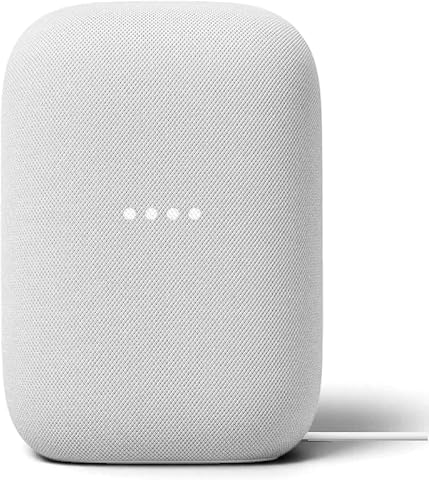
Google Nest Audio (3-Pack) Smart Speakers – Multi-Room Wireless Home Speaker Bundle with Bluetooth, Wi-Fi, Assistant, Stereo Soun…
- ✔ Included: Three Nest Audio smart speakers
- ✔ Audio drivers: 75 mm woofer and 19 mm tweeter per speaker
- ✔ Connectivity: Wi-Fi and Bluetooth
At a Glance
| Criteria | Smart Home Starter Bundle | Premium Smart Home Ecosystem Bundle | Winner |
|---|---|---|---|
| Upfront cost | Usually lower; covers basic functions | Usually higher; pays for a broader system | A |
| Included devices | A small selection of common devices | More devices or a central controller may be included | Depends |
| Compatibility | Can be limited by the kit or its hub | Often designed around one platform, but still check support | Depends |
| Setup and control | Often straightforward for a small setup | More coordinated once configured; more decisions up front | A |
| Automation | Good for simple schedules and triggers | Better suited to routines spanning multiple devices | B |
| Privacy and security | Depends on brand, account, and update policy | Depends on brand, account, and update policy | Depends |
| Room to expand | Can become fragmented as brands are added | Often easier within its supported ecosystem | B |
| Overall value | Strong for buyers with modest needs | Worth the premium when its added capabilities will be used | Depends |
Smart Home Starter Kit | Includes Echo Hub, Amazon Smart Plug and 4 Amazon Basics Smart Bulbs, Designed for Alexa+
The Echo Hub Starter Kit gives a new Alexa household the most varied set of functions in one box: a central 8-inch touchscreen, a smart plug, and four color changing bulbs. That mix makes it easier to begin with visible, everyday routines—such as changing room lighting or switching a plugged-in device—than with the Nest Audio 3-Pack, whose included hardware is entirely audio focused. The screen also gives household members a place to tap controls instead of relying on voice commands for every interaction.As a bundle, its strongest advantage is that the pieces establish a practical foundation rather than only adding another voice endpoint. The Echo Hub supports Wi-Fi and Bluetooth devices and can act as a controller for Zigbee, Thread, and Matter devices, although compatibility depends on the device and the stated support is as a controller. The four bulbs are dimmable and color changing, and the plug can add Alexa control to a compatible indoor appliance. That gives buyers a concrete first automation project, with the hub ready to coordinate a wider Alexa system later.There are meaningful limits. The included bulbs and plug are Alexa only, and the plug and bulbs use 2.4 GHz Wi-Fi, so buyers should check their network and preferred assistant before committing. The Echo Hub is designed for wall mounting or use with a separately sold stand; installation may involve drilling, and it is not a portable display. Compared with Ring, this kit provides no door or motion sensors, so it should not be mistaken for an entry security bundle. It makes the most sense for buyers who want a broad, approachable control layer and starter lighting, not for those seeking platform neutrality or alarm coverage.
Pros:
- Combines an 8-inch touchscreen hub with a plug and four smart bulbs
- Bulbs support dimming and color changes for routines and away-from-home lighting
- Echo Hub supports Wi-Fi, Bluetooth, Zigbee, Thread, and Matter devices as a controller
- Can be wall mounted or connected through compatible USB-C power accessories
Cons:
- Included Amazon plug and bulbs work with Alexa only
- Hub installation may require drilling, and a stand is sold separately
- No alarm sensors or security base station are included
Best for: Households starting an Alexa-based smart home that want a touchscreen controller plus immediately usable lighting and plug control.
Not ideal for: Buyers committed to Google Assistant, Apple HomeKit, or another non-Alexa ecosystem, or anyone whose main goal is entry security.
Bottom line: We rank this first for broad Alexa setup because it pairs a central control screen with lighting and plug accessories, though its included devices are firmly tied to Alexa.
“We rank this first for broad Alexa setup because it pairs a central control screen with lighting and plug accessories, though its included devices are firmly tied to Alexa.”
Ring Alarm 14-Piece Kit (newest model)
For buyers who want a security bundle first, the Ring Alarm 14-Piece Kit is the most purpose-built choice here. Its eight contact sensors and two motion detectors provide a broader set of entry and room coverage than either the Echo Hub kit or the Nest Audio set, which do not include alarm sensors. Ring positions this kit for two- to four-bedroom homes, and the second keypad can make arming and disarming more accessible across a larger layout than a single control point.The package is organized around the Ring Alarm Base Station, with sensors communicating over Z-Wave and a range extender intended to extend that network. A 24-hour battery backup is listed for the base station, and the kit can send mobile notifications when triggered. Buyers can add compatible Ring Alarm sensors and accessories later, so this is the clearest expansion path for someone building out a security system rather than a general collection of smart devices.That specialization is also the tradeoff. There are no bulbs, smart plugs, or multi-room speakers in the box, making Ring less flexible as an all-purpose starter bundle than Echo Hub. Several features—including arming from anywhere, cellular backup, and professional monitoring—require a compatible Ring subscription, which is sold separately. Alexa voice arming also has a subscription requirement in the supplied description. We would choose Ring when sensor coverage and alarm controls are the main need, and skip it if the goal is to experiment with lighting, audio, and different assistants in a single starter kit. Monitoring availability and possible local permit or response fees also vary by location, so buyers should review local requirements before relying on those services.
Pros:
- Includes eight contact sensors and two motion detectors for broad initial coverage
- Two keypads provide multiple physical arming locations
- Z-Wave components and a range extender support a larger sensor layout
- Base Station includes a 24-hour battery backup
Cons:
- Remote arming, cellular backup, and professional monitoring require a compatible subscription
- No lights, smart plugs, or speakers are included
- Professional monitoring and related requirements vary by location
Best for: Owners or renters in a two- to four-bedroom home who want a substantial starter set of door, window, and motion sensors built around Ring Alarm.
Not ideal for: Shoppers seeking a general smart home bundle with included lighting, speakers, or broad assistant choice, or buyers who do not want optional subscription dependencies.
Bottom line: We recommend Ring for buyers prioritizing entry detection across several rooms, provided they are comfortable with its Ring centered setup and optional service requirements.
“We recommend Ring for buyers prioritizing entry detection across several rooms, provided they are comfortable with its Ring centered setup and optional service requirements.”
Google Nest Audio (3-Pack) Smart Speakers – Multi-Room Wireless Home Speaker Bundle with Bluetooth, Wi-Fi, Assistant, Stereo Soun…
The Nest Audio 3-Pack is the strongest choice when “smart home bundle” means putting voice access and music in more than one room. Three matching speakers can play together for synchronized audio, or two can be paired for stereo while the third serves another room. Neither Ring nor Echo Hub offers that kind of included room-by-room speaker coverage. For buyers who already use Google Assistant or Chromecast-enabled apps, the set also extends voice control and smart home commands across the home without requiring a separate speaker purchase for each area.Its role is distinct from the Echo Hub kit: Nest Audio is a distributed listening setup, while Echo Hub is a visual control center with starter lighting. The Nest speakers support Wi-Fi and Bluetooth and include Google Assistant for timers, weather, music, and compatible smart home controls. The compact freestanding units can fit on shelves or counters, which gives the bundle more placement flexibility than a wall-mounted hub. A pair can create a stereo arrangement in a main room, but buyers should consider whether they would rather spread all three speakers around for convenience.The limitation is just as clear: this bundle is audio centered rather than device diverse. It includes no security sensors, bulbs, or smart plug, so it does less to establish a broader automation system than Echo Hub and less to protect entry points than Ring. It is also not waterproof, and its advertised smart home integration depends on compatible devices. Buyers outside the Google ecosystem should compare the Alexa starter kit carefully, particularly if they want physical controls and included lighting. We would select this three-pack for music, voice access, and room coverage; we would skip it if a smart home bundle should immediately deliver security or lighting hardware.
Pros:
- Three speakers support audio across three separate rooms
- Two speakers can be paired for stereo while the third is used elsewhere
- Google Assistant provides voice access to music, timers, weather, and compatible devices
- Wi-Fi and Bluetooth support streaming from compatible services and devices
Cons:
- Bundle contains speakers only, with no bulbs, plug, or security sensors
- Smart home controls depend on compatible devices and the Google ecosystem
- Speakers are not waterproof
Best for: Google Assistant households that want synchronized music and voice control in several rooms, with the option of making two speakers a stereo pair.
Not ideal for: Buyers whose priority is security sensors, starter lighting, a touchscreen control panel, or compatibility centered on Alexa.
Bottom line: We choose this set for multi-room sound and Google voice access, while buyers seeking a more varied hardware starter kit should look to Echo Hub or Ring.
“We choose this set for multi-room sound and Google voice access, while buyers seeking a more varied hardware starter kit should look to Echo Hub or Ring.”
As an Amazon Associate we earn from qualifying purchases.
Key Differences
The biggest distinction is how much home automation you are buying into at the start. The Smart Home Starter Bundle is a low-commitment entry point: it can cover a practical task such as scheduling lights or switching off a plugged-in lamp. Its smaller scope also means fewer devices to configure. That makes it easier to learn what you actually use before adding more hardware.
The Premium Smart Home Ecosystem Bundle makes a stronger case when you want multiple devices to work together. A coordinated platform can simplify control and support more elaborate routines, but it is only an advantage if the included devices match your needs and the platform supports the products you plan to keep. A bigger kit can also mean a bigger initial outlay and more setup choices. Neither label guarantees a particular hub, protocol, privacy practice, or device count, so compare the exact bundle contents and compatibility list.
In practice, the deciding question is whether you want to try a few automations or build a system you expect to expand. If your plans are limited, the starter bundle keeps the cost and commitment in check. If you already know which rooms and routines you want to connect, the premium bundle may save frustration later. Paying more makes sense when the system’s particular features solve a real problem for you—not simply because the package contains more products.
Detailed Comparison
Upfront cost (Smart Home Starter Bundle wins — moderate)
The Smart Home Starter Bundle wins on initial cost, usually asking you to pay for a smaller set of capabilities. This is a moderate advantage for someone testing smart home controls or automating one room. The Premium Smart Home Ecosystem Bundle asks for more money at once, which can be worthwhile if it replaces separate purchases you already planned. Check the price of the exact devices, not only the bundle discount.
Included devices (moderate difference)
There is no automatic winner here. Starter kits tend to focus on a few basic devices, making it less likely that you pay for extras you will not use. Premium kits may include a wider selection or a controller, but a larger box is useful only when its contents fit your home. Compare each item and its role; count useful functions, not product boxes.
Compatibility (major difference)
The result depends on the named products and standards in each bundle. A premium ecosystem can provide a clearer route for adding devices within its platform, giving it a moderate advantage for buyers committed to that system. A starter bundle can work well when its limited device range already covers the task. Before purchase, verify that the bundle works with your phone, voice assistant, network, and any devices you plan to retain.
Setup and everyday control (Smart Home Starter Bundle wins — moderate)
The Smart Home Starter Bundle usually has the easier first setup because it covers fewer devices and routines. That is a minor to moderate practical win for a first-time buyer who wants a quick result. A premium bundle can take longer to configure, especially when you set up several rooms, but a unified control app may make daily use simpler afterward. The better fit depends on whether you value a short first session or a consistent system as it grows.
The Premium Smart Home Ecosystem Bundle is better suited to routines that combine multiple devices, such as coordinating lights with a sensor or schedule. This is a major difference for someone who wants linked actions around the house. The starter kit can handle simple schedules or individual controls, and that may be all a small household needs. Its limitation is less important when a single device or room is the whole goal.
Privacy and security (major difference)
Neither bundle wins on its category name alone. Security depends on the manufacturer, account protections, software support, data practices, and how devices connect. This is a major factor if cameras, locks, or sensors will monitor sensitive areas. Read the product’s current support and privacy information, enable strong account protection, and avoid buying a device whose update policy is unclear. A lower-cost kit is not automatically less secure, and a premium system is not automatically safer.
The Premium Smart Home Ecosystem Bundle generally has the advantage when expansion within its supported platform is a priority. It may offer a more coherent path from a few devices to multiple rooms, though specific compatibility must be confirmed. The starter bundle can expand too, but adding products from different brands can create extra apps or setup steps. This is a moderate win for premium buyers who have a concrete expansion plan; it matters less if you expect to stop after one room.
Overall value (major difference)
Value depends on use. The starter kit is the better value when it covers the job at a lower total cost and avoids unused devices. The premium kit can earn its higher price when its controller, compatibility, or automation features will be used across several rooms. This is a major decision point: compare the cost of the exact bundle with the cost of buying only the devices you need, and include any required subscriptions or hubs in the calculation.
Smart Home Starter Bundle: Pros and Cons
Pros:
- Lower initial spend
- Smaller setup is easier to learn
- Good way to test whether automation suits your household
- Can be better value when only a few functions are needed
Cons:
- Fewer devices or functions may be included
- May offer less support for routines across multiple rooms
- Expansion can add setup steps if new devices use different platforms
- A low bundle price does not guarantee compatibility with existing equipment
Pros:
- Better suited to coordinated routines across devices
- May provide a clearer path to expansion within its platform
- Can make everyday control more consistent once configured
- May be good value if the included items replace planned purchases
Cons:
- Higher upfront price
- More devices can mean more setup and decisions
- Some included products may go unused
- Its ecosystem may limit choices if future devices or existing products are unsupported
Who Should Choose What
Choose Smart Home Starter Bundle if:
- You want to automate one room or a small number of devices.
- You are trying smart home controls for the first time and want to limit the initial cost.
- You have identified a specific task, such as scheduling a lamp, and do not need linked routines across rooms.
- The starter bundle’s exact contents already match your devices and phone.
Choose Premium Smart Home Ecosystem Bundle if:
- You plan to coordinate devices across several rooms.
- You value routines that combine sensors, lights, plugs, or other supported products.
- You have checked that the platform supports both your current devices and the products you may add.
- The bundle includes devices you intended to buy anyway, making its higher total price worthwhile.
Skip both if: Neither bundle lists the device or standard you need, or you only want one specific product that costs less to buy on its own.
Value for Money
Paying more for the Premium Smart Home Ecosystem Bundle is worthwhile when its additional devices, controller, or automation features will be used regularly. For someone building several connected rooms, a single platform may reduce the effort of managing separate controls, and a bundle can cost less than purchasing its useful items individually. Check that the price advantage holds after adding any required hub, subscription, or accessories.
For a first experiment or a small, clearly defined task, the Smart Home Starter Bundle is often better value. It lets you learn whether scheduled controls or basic automation improve daily life without paying for a system you may not use. If the premium kit includes devices that would sit in a drawer, its higher price is poor value even if the package discount looks large. Compare the exact contents with your shopping list, and choose the least expensive bundle that meets your real requirements.
Final Verdict
For most buyers who want to try smart home automation or handle one room, choose the Smart Home Starter Bundle. Its lower cost and smaller scope make it the more sensible first purchase when you do not yet need coordinated routines. Choose the Premium Smart Home Ecosystem Bundle if you have a clear multi-room plan, have verified compatibility, and will use the extra control or included devices. The main deciding factor is whether you need a connected system or just a few useful automations. If neither bundle matches the products and standards you already own, buy the specific compatible device you need instead.
Frequently Asked Questions
Are smart home bundles cheaper than buying devices separately?
Sometimes. A bundle offers good value when you will use its included devices and its total cost is lower than buying those same items individually. Compare the exact models and include any required hub, subscription, or accessory. A discount on products you do not need is not a saving.
Should a beginner choose a starter bundle?
Usually, if you want to try a few basic controls without a large upfront purchase. Check that the bundle supports your phone and the task you want to automate. If you already have a detailed plan for several rooms, a premium system may be a better fit from the start.
Is a premium bundle worth the higher price?
It can be, when you will use its wider control, linked routines, or included devices across your home. It is harder to justify when you need only one or two basic functions. Confirm compatibility and compare the bundle’s price with the items you would actually buy.
Can I add devices from other brands later?
That depends on the specific platform, device models, and supported standards. A bundle label does not guarantee compatibility with every brand. Check the manufacturer’s current compatibility information for each product you intend to add, including devices you already own.