This checklist is for anyone comparing smart home gear for a new setup, an upgrade, or a more connected daily routine. It covers six categories: a family hub, video doorbell, thermostat, robot vacuum, smart lock, and indoor security camera. The named products are specific picks to evaluate, not a claim that one device will suit every home.

Get the latest gadgets delivered free — and shop member deals
- Fast, free delivery on millions of items
- Access to Prime Big Deal Days deals on October 6–7
- Prime Video, Amazon Music and more included
Each section explains why the category matters, what to check before choosing, and which household may be a good match for the pick. The guidance is organized around fit, compatibility, and practical use, so you can compare options without assuming that a feature or integration will work with your existing setup.
Before buying, check the product’s current specifications and installation requirements, then compare them with your home, devices, and routines. Use the look-for checklist to identify questions that need answers, and treat each verdict as a quick starting point—not a substitute for confirming compatibility.
Smart Home Hub
A shared hub can give household members one place to organize plans and view information, making it a useful category to consider when schedules are spread across people or devices. The NORI Family Hub 15.6-Inch AI Digital Calendar is the pick in this slot; its product name identifies a 15.6-inch display and a digital calendar, but does not establish which services, apps, or smart home platforms it supports. Confirm those details before treating it as the center of a connected home.
A common buying mistake is choosing a hub based on its screen or AI label alone, then discovering that it does not work with the calendars or devices the household actually uses. Check supported calendar services, user access, network requirements, and any account or subscription requirements in the current product documentation. Consider screen placement and viewing distance, too: measure the available surface or wall area and make sure the display can be comfortably read from where family members will use it. Verify power and mounting needs, and think through whether everyone who needs access can use the interface. Choose this category for shared visibility, but confirm its specific capabilities rather than assuming broad compatibility from the name.
What to look for:
- Confirm which calendar services and accounts are supported.
- Check whether multiple household members can access or update schedules.
- Verify Wi-Fi, power, and mounting requirements for the intended location.
- Measure the display area and check visibility from typical viewing positions.
- Review current documentation for smart home integrations and any required services.
NORI Family Hub 15.6-Inch AI Digital Calendar

The NORI Family Hub is a 15.6‑inch touchscreen calendar that syncs Google, iCloud and Outlook calendars into one color‑coded view for the whole family. It includes routine scheduling, chore tracking with rewards, meal planning tools, and AI‑powered organization across the hub, mobile app and web without requiring a subscription.
Pros:
- All family calendars combined into one easy‑to‑read touchscreen view.
- Built‑in routine, chore and reward system encourages kids’ independence.
- Meal planning with nutrition details and shared shopping lists saves time.
- AI integration works across hub, app and web without a mandatory subscription.
Cons:
- May have a learning curve for families new to digital scheduling.
- Limited usefulness for single users or small households.
Best for: Households that want a dedicated display for shared scheduling
Not ideal for: Buyers who need integrations that have not been confirmed
Bottom line: Consider the NORI hub for shared calendar visibility, after verifying service support, access, and placement.
Video Doorbell
A video doorbell can help you see activity at an entryway, but the right choice depends on the home’s installation conditions and the product’s actual capabilities. The pick here is the Ring Battery Doorbell 4K Pro (2nd Gen) – Deep Silver. Its name indicates a battery model, but it does not by itself confirm runtime, recording terms, network requirements, or compatibility with an existing chime or smart home setup. Check the current specifications and setup instructions for the exact details.
One frequent mistake is assuming a battery-powered doorbell will fit every doorway without preparation. Check the mounting surface, available space, Wi-Fi signal at the entrance, and whether the existing wiring or chime matters for your preferred setup. Review how video is accessed and stored, including any account requirements, before relying on a feature for daily use. Make sure the camera’s intended view suits the entryway and that you understand the controls and privacy settings. Installation and connectivity are as important as the listed resolution: confirm that the device can be positioned securely, connected reliably, and managed by the people who will answer it. The Deep Silver finish is part of the product name, but appearance should come after verifying practical fit.
What to look for:
- Confirm the doorbell’s installation options and battery requirements.
- Check Wi-Fi coverage at the exact entryway location.
- Verify chime, wiring, and smart home compatibility in current documentation.
- Review video access, storage, account, and privacy requirements.
- Measure the mounting area and confirm the intended camera view.
Ring Battery Doorbell 4K Pro (2nd Gen) – Deep Silver

The Ring Battery Doorbell 4K Pro captures Retinal 4K video with up to 10x Enhanced Zoom and a wide 140° field of view. It features radar-powered 3D Motion Detection for precise alerts, two-way audio with Audio+, and a quick-release Ultra Battery Pack for fast charging.
Pros:
- High-resolution Retinal 4K video with significant zoom capabilities
- Precise 3D Motion Detection reduces false alerts
- Quick Release Ultra Battery Pack offers fast charging and easy removal
- Wide 140° field of view captures more of the entrance
Cons:
- Requires a paid Ring Protect subscription for advanced AI features and video storage
- Requires minimum 15 Mbps upload speed for optimal 4K performance
- Some AI features are unavailable in specific regions due to legislation
Best for: Households seeking a video doorbell with a battery-based setup
Not ideal for: Buyers who have not confirmed entryway Wi-Fi or installation fit
Bottom line: Check the Ring model’s installation, connectivity, and video terms before choosing it for your entrance.
Smart Thermostat
A smart thermostat is a worthwhile category to investigate when you want to manage home temperature through a connected control, but compatibility with the heating and cooling system comes first. The featured pick is the ecobee Smart Thermostat Premium – WiFi, Siri & Alexa Built-In, Smart S. The name identifies Wi-Fi and Siri and Alexa built-in, but the abbreviated ending does not clarify the full model configuration. Confirm the exact product listing and supported system types before deciding it is suitable for your home.
A common mistake is buying a thermostat based on voice-assistant support or appearance without checking the existing wiring and HVAC equipment. Compare your system type and wiring with the manufacturer’s compatibility guidance; if anything is unclear, consult a qualified installer. Also confirm which functions require accounts, apps, or additional equipment, and whether the voice services you use are supported in your region and configuration. System compatibility is essential: a device that cannot connect correctly to your equipment is not a useful upgrade. Check the thermostat’s dimensions and placement against the existing wall location, and consider who needs access to its controls. Treat the product name’s feature terms as prompts to verify details, not as a complete specification sheet.
What to look for:
- Check HVAC system and wiring compatibility using current manufacturer guidance.
- Confirm the exact model name and full product configuration.
- Verify the supported setup for Wi-Fi, Siri, and Alexa in your home.
- Review account, app, and any additional equipment requirements.
- Compare dimensions and placement with the existing thermostat location.
ecobee Smart Thermostat Premium – WiFi, Siri & Alexa Built-In, Smart Sensor

The ecobee Smart Thermostat Premium is an ENERGY STAR certified device that helps save energy and reduce bills by automatically adjusting temperature based on occupancy. It features a built-in air quality monitor, smart speaker with voice control, and compatibility with most HVAC systems, offering easy installation and advanced home comfort management.
Pros:
- Energy-efficient with up to 26% savings
- Built-in smart speaker with voice control
- Includes smart sensor for room-specific comfort
- Easy DIY installation with necessary accessories
Cons:
- Requires an Apple home hub for Siri functionality
- Subscription needed for some security features
- Smart Sensor value not included in the purchase
Best for: Homes whose HVAC system is confirmed as compatible
Not ideal for: Buyers who cannot verify wiring or equipment support
Bottom line: Choose the ecobee only after confirming your HVAC setup and the exact features of the listed model.
Robot Vacuum
A robot vacuum and mop combo can be appealing when you want floor-care equipment that combines two tasks, but the home’s layout and floor surfaces should guide the decision. This checklist’s pick is the iRobot Roomba Max 705X Robot Vacuum and Mop Combo with AutoWash Dock. The product name identifies vacuum-and-mop functions and an AutoWash Dock; it does not establish the precise cleaning modes, dock requirements, or surfaces the unit supports. Check the current product details against your rooms and routines.
Common mistakes include overlooking thresholds, clutter, rugs, and the space required for the dock. Measure the proposed dock location and check for nearby power and enough clearance for the setup described by the manufacturer. Review the product’s guidance for floor types, rugs, obstacles, maintenance, and any water or consumable requirements. If the home has multiple levels or tight furniture clearances, confirm how the device is intended to navigate those conditions rather than assuming it will handle every room. Room layout and upkeep affect whether a combo is convenient: consider how often you can clear floors and maintain the vacuum, mop components, and dock. A careful fit check can prevent a feature-rich device from becoming awkward to use in the rooms you want it to clean.
What to look for:
- Check supported floor types, rugs, and cleaning modes in the product documentation.
- Measure the dock location and verify power and clearance requirements.
- Review guidance for thresholds, obstacles, and room navigation.
- Confirm maintenance steps and any water or consumable requirements.
- Consider whether the intended rooms can be cleared for regular cleaning.
iRobot Roomba Max 705X Robot Vacuum and Mop Combo with AutoWash Dock
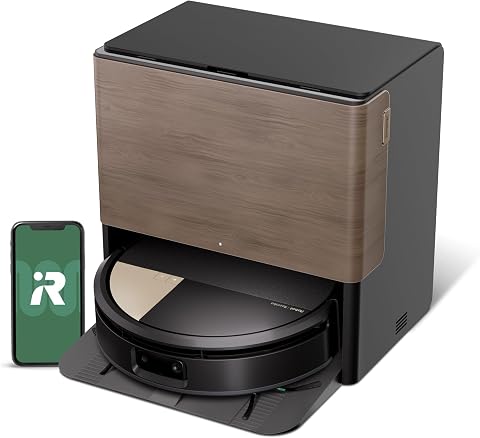
The Roomba Max 705X vacuums and mops in one run, with an extending self-cleaning roller mop, carpet protection, and suction designed to pick up dirt and pet hair. Its AutoWash Dock empties debris, washes and dries the mop, and dispenses cleaning solution, while AI obstacle avoidance and LiDAR mapping help it navigate and clean specific areas.
Pros:
- Vacuums and mops in a single run, adjusting for floor type
- Dock automates debris emptying and mop washing and drying
- AI recognizes common obstacles and can avoid pet waste
- Mapping and app controls support room-specific cleaning
Cons:
- The 175× suction comparison is specifically against the Roomba 600 series
- The supplied product description is truncated at the end
Best for: Homes looking to assess vacuum-and-mop cleaning in one device
Not ideal for: Spaces without a suitable dock location or clear navigation paths
Bottom line: Check room fit, dock space, and upkeep requirements before choosing the Roomba combo.
Smart Lock
A smart lock can change how a household manages entry, but dependable fit starts with the door itself. The named pick is the Schlage Encode Smart WiFi Deadbolt Lock with Century Trim, Matte Black. Its product name specifies a smart Wi-Fi deadbolt and Century trim in Matte Black; confirm the exact door preparation, supported access features, and setup requirements from current product documentation. Do not assume that the lock will fit every door just because the existing hardware looks similar.
A common buying mistake is skipping measurements or overlooking the door’s condition. Check the door thickness, bore and backset dimensions, deadbolt alignment, and available space around the trim against the manufacturer’s installation guide. Confirm that the door closes and latches smoothly before installation, since a poorly aligned door can undermine everyday use. Review how the Wi-Fi connection is established, what accounts or apps are needed, and which household members can manage access. Also consider backup entry and the manufacturer’s recommended operating requirements. Door measurements and alignment matter more than the finish when determining whether a deadbolt is a practical match. If the existing preparation differs from the stated requirements, get professional guidance rather than forcing an incompatible installation.
What to look for:
- Compare door thickness, bore, and backset with the installation guide.
- Check deadbolt alignment and ensure the door closes and latches smoothly.
- Verify Wi-Fi setup, account needs, and supported access management.
- Confirm the Century trim configuration fits the intended door and hardware layout.
- Review installation steps and backup-entry guidance before removing existing hardware.
Schlage Encode Smart WiFi Deadbolt Lock with Century Trim, Matte Black
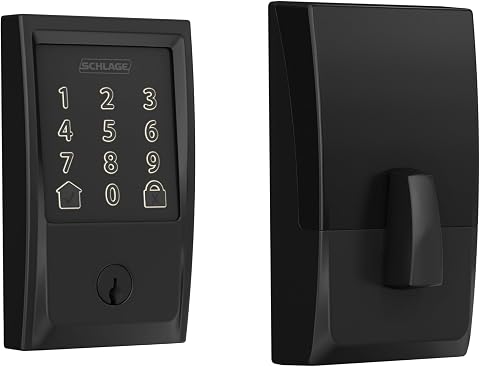
The Schlage Encode Smart WiFi Deadbolt offers keyless entry and remote control via the Schlage Home app, compatible with Alexa and Google Home for voice commands. It features advanced security, easy installation, and customizable access management, making it a secure and convenient smart lock for your home.
Pros:
- Remote access and management via mobile app from anywhere
- Compatible with Alexa and Google Home for voice control
- Easy installation without hardwiring, fits standard doors
- Secure encryption and built-in alarm for enhanced security
Cons:
- Requires WiFi connection for remote features
- Battery life may require frequent replacement with heavy use
- Limited to standard door sizes and backset options
Best for: Homes with a door confirmed to fit the listed deadbolt
Not ideal for: Doors with uncertain dimensions or alignment issues
Bottom line: Verify door preparation and Wi-Fi setup before choosing the Schlage Encode deadbolt.
Indoor Security Camera
Indoor security equipment can help organize monitoring around a home, but the right system depends on how many cameras are needed, where they will be placed, and how recordings are managed. The pick listed here is the Reolink 16-Channel 4K Security Dome Camera System with 4TB HDD RLK16-8. Its name identifies a 16-channel system, 4K security dome cameras, and a 4TB HDD, but does not specify the complete camera count, network setup, storage policy, or compatibility details. Confirm the package contents and system requirements before buying.
A common mistake is treating a channel count as the number of cameras included, or assuming that every camera and recorder can be installed without planning. Check the exact contents, cabling and power requirements, recorder placement, network needs, and whether the planned camera locations are suitable indoors. Review how footage is accessed, retained, and protected, and check whether the system supports the devices and viewing method you intend to use. Consider privacy carefully when choosing rooms and camera angles, and make sure household members understand where monitoring is active. Coverage planning and storage should be checked together: map the areas you want to monitor, then verify that the system’s included equipment and recording setup meet those needs. Confirm details in the current product documentation rather than inferring them from the model name.
What to look for:
- Verify included camera quantity and all package contents.
- Check recorder, cabling, power, and network installation requirements.
- Plan camera placement and confirm intended indoor coverage.
- Review recording access, retention, and storage setup for the 4TB HDD.
- Check compatibility with the viewing devices and network you plan to use.
Reolink 16-Channel 4K Security Dome Camera System with 4TB HDD RLK16-800D8

This security system features 8MP 4K Ultra HD cameras with smart person and vehicle detection, providing clear, detailed footage. It offers plug-and-play PoE installation, 24/7 recording with expandable storage, and remote access via the Reolink app for monitoring your home or business.
Pros:
- High-resolution 4K video quality for detailed footage
- Smart detection features reduce false alerts
- Easy plug-and-play PoE setup for quick installation
- Remote access via mobile app for convenience
Cons:
- Requires a 4K display for optimal viewing
- Expandable storage up to 16TB may require additional setup
- Night vision range may be limited in very large areas
Best for: Buyers planning a multi-camera indoor security setup
Not ideal for: Homes that need a simple setup without recorder or cabling checks
Bottom line: Confirm package contents, installation needs, and recording workflow before choosing the Reolink system.
For a budget-first buying order, start with the device that addresses the most immediate household need, then verify compatibility and installation before comparing extras. Prioritize required fit checks—HVAC support, door measurements, network coverage, room layout, or camera placement—before adding optional connected devices. This approach helps avoid buying equipment that cannot be installed or used as intended.
Build your setup in manageable steps and check each product’s current specifications before placing an order. A thoughtful match for your home is more useful than a long feature list: confirm the essentials, ask questions where compatibility is unclear, and choose the devices that fit your daily routines and space.
Fall Picks
fall essentials
As an affiliate, we earn on qualifying purchases.